
Light Mode

Prebuilt day-trading scans firing live, from the premarket gap to the closing bell.
Momentum, gaps, volume, breakouts and halts, streaming on every US stock all session.
Free account, just an email. No card. Live access for a limited time.

Named to the Inc. 5000 list of America’s fastest-growing private companies six years in a row (2017–2022).

Investopedia: Best Short Term Stock Screener, 2024
Day trading is about the stocks moving right now. Trade Ideas streams the moves as they happen:
Streaming Alerts (Scanner) run in TI Pro, our desktop app for Windows (on a Mac, through Parallels). Top Lists (Screeners) also run in the Web Dashboard, right in your browser.
Stocks moving now, with volume, at prices you can trade. Most day traders watch a few setups: premarket gappers, opening range breaks, momentum runs, and new highs of day.
This page is about Trade Ideas itself. For a comparison of tools, see best stock scanners for day trading.
| Alert or filter | What it does |
|---|---|
| Running Up (RU) | Running up: moving much faster than normal for that stock. |
| Running Up Now (RUN) | Running up now, the short-term version. |
| High Relative Volume (HRV) | Volume well above normal for this time of day. |
| 5 Minute Opening Range Breakout (ORU5) | Breaks the high of the first 5 minute bar. |
| New High (NHP) | New high of day. |
| 5 Minute Consolidation Breakout (CBO5) | Breaks out of a 5 minute consolidation. |
| Gap Up Reversal (GUR) | Gap up fills back through yesterday's close. |
| False Gap Up Retracement (FGUR) | Gap up fills partway, then pushes back above the open. |
| Halt (HALT) | Trading halted, with the reason. |
| Relative Volume (RV) | Relative volume. |
| Float (Float) | Shares available to trade. |
| Gap (%) (GUP) | Gap in percent. |
A common starting point: Price $2 to $50, Relative Volume (RV) at 2 or more, a Dollar Volume minimum, and a max Spread. Add Float (Float) under 20 million if you trade small caps.
Crossed Above Close (CAC) fires when a stock crosses above yesterday's close, a red to green move. Crossed Below Close (CBC) is green to red.
Unusual Number Of Prints (UNOP) fires when trades print much faster than normal. Many day traders read it as buyers or sellers getting aggressive.
Before the open. Gap (%) and Relative Volume on a Top List to build the watchlist.
The open. Opening range breaks and running alerts on the watchlist names.
Mid-morning. New highs of day and consolidation breakouts.
Midday. Unusual volume wake-ups, often the only movers.
Afternoon. Breakouts of the day's range into the close.
Running Up (RU) and Running Up Now (RUN) measure speed against each stock's own volatility, so a slow stock moving fast for it shows up next to a fast stock. That is closer to "unusual" than raw percent change.
Gap Up Reversal (GUR) fires when a gap up fills back through yesterday's close. False Gap Up Retracement (FGUR) fires when a gap fills partway then pushes back over the open, an intraday cup pattern on a gap. See the gap scanner.
High Relative Volume (HRV) is the alert behind most day-trading watchlists. See the unusual volume scanner.
Add Float (Float) at a max of 20 million for low float runners, and keep Halt (HALT) in the same window. See the low float scanner.
Price range, Dollar Volume (DV) for dollar volume, and Spread (Spread) for spread. Without these, the list fills with thin names you cannot get in and out of.
TI Pro works with paper trading. Run your setup on paper for a few weeks before real money.
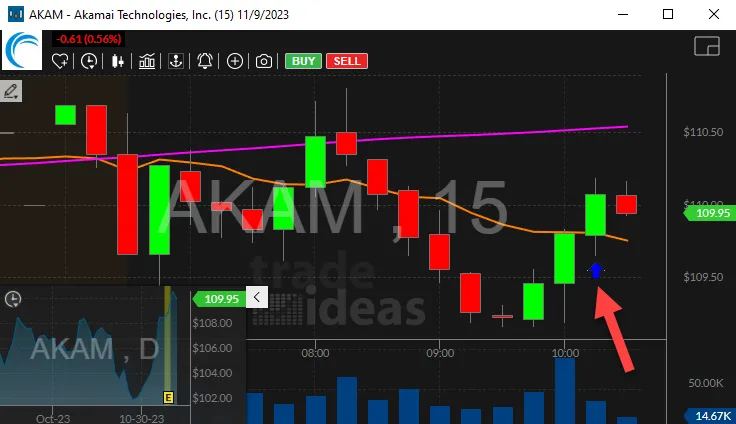
This is a real capture from the Running Up Now (RUN) help page. At 10:20:53 a.m. ET on November 9, 2023, the alert fired on Akamai (AKAM) with the description "Running up: +0.16 in less than one minute." The stock was at $109.88, down 0.6% on the day, with Relative Volume at 1.42 and 737,123 shares traded.
Look at the chart. AKAM had sold off from the open and spent the first hour under its moving averages. The alert fired as a green bar pushed back toward them. That is the kind of turn a day trader wants to see the moment it starts, not after the 15 minute bar closes.
The same window also listed IVZ, IAU and SHY moving two cents. Those are slow names where two cents is a normal wiggle. The quality column, $0.02 against $0.16, is how you tell them apart at a glance. A minimum on that column, or a Price and Relative Volume filter, keeps the slow names out.
Most day traders run more than one scan. Three windows cover the session: one for the open, one for momentum during the day, and one for reversals. Here is a starting setup for each, using the exact alert and filter names.
Window 1: the open (9:30 to 10:30 a.m. ET)
| Alert or filter | Setting |
|---|---|
| 5 Minute Opening Range Breakout (ORU5) | On. Fires when price clears the first 5 minute range. |
| Bullish Opening Power Bar (OVO5U) | On. A strong first 5 minute bar on volume. |
| Gap (%) (GUP) | Min 3, so the stock gapped at least 3%. |
| Relative Volume (RV) | Min 1.5. |
| Price (Price) | $2 to $100, or what you trade. |
Window 2: momentum all day
| Alert or filter | Setting |
|---|---|
| Running Up Now (RUN) | On. Moves much faster than normal for the stock, with no confirmation delay. |
| New High (filtered) (NHPF) | On. New highs for the day, filtered for noise. |
| Dollar Volume (DV) | Min $5 million a day. |
| Spread (Spread) | Max 10 cents. |
Window 3: reversals
| Alert or filter | Setting |
|---|---|
| 5 Minute Green Bar Reversal (GBR5) | On. A green bar after a run of red bars. |
| Fibonacci 62% Buy Signal (FU62) | On. A pullback to the 62% level holding. |
| 25% Pullback From Lows (PFL25) | On. A 25% bounce off the low of the day. |
| Change From The Close (%) (FCP) | Max -3, so the stock is down at least 3% today. |
The open is when most day trading alerts fire. Spreads are wider, prices jump, and the first range sets the levels for the rest of the day. Alerts like ORU5 and OVO5U only make sense here.
Midday is slower. Volume drops, and many breakouts stall. Some traders shut the momentum window off between 11:30 a.m. and 2 p.m. ET and leave only the reversal window running. The Time Of Day (Time) filter can do this for you. It counts minutes after the open, so a max of 120 stops alerts at 11:30 a.m. ET.
The last hour brings volume back. Funds rebalancing and traders closing positions can push stocks through the day’s high or low. NHPF and NLPF tend to pick up again after 3 p.m. ET.
Every bullish alert on this page has a bearish twin. 5 Minute Opening Range Breakdown (ORD5) is the opening range breakdown, Running Down (RD) is Running Down, New Low (filtered) (NLPF) is the filtered new low, and 5 Minute Red Bar Reversal (RBR5) is the red bar reversal. A trader who only buys can still keep a short window open to see when the whole market turns.
Watch S&P Change Today (SpyD) in the same window. When most of your alerts are breakdowns and the S&P is red, longs are fighting the tape.
Example numbers, not a real trade
This is the setup many small-cap day traders run from 9:00 to 10:00 a.m. ET. The Top List does the ranking before the bell, and the alert window takes over once trading opens.
Top List, sorted by Gap (%)
| Alert or filter | Setting |
|---|---|
| Gap (%) (GUP) | Min 4. Only stocks opening at least 4% above yesterday’s close. |
| Relative Volume (RV) | Min 3. The stock is trading three times its normal volume for this time of day. |
| Float (Float) | Max 20 million shares, for the low float version. Leave it off for large caps. |
| Price (Price) | $1 to $20. |
Alert window, same filters
| Alert or filter | Setting |
|---|---|
| 1 Minute Opening Range Breakout (ORU1) | On. The 1 minute opening range break. |
| 5 Minute Opening Range Breakout (ORU5) | On. The 5 minute version, for fewer and later signals. |
| Halt (HALT) | On. Low float gappers get halted; you want to know right away. |
| New High (filtered) (NHPF) | On. New highs after the first range. |
| Alert | When it matters |
|---|---|
| Pre-market Highs (HPRE) | 4:00 to 9:30 a.m. ET. New premarket highs show which gappers still have buyers. |
| 5 Minute Opening Range Breakout (ORU5) | 9:35 a.m. The first 5 minute range is set; breaks start firing. |
| Bullish Opening Power Bar (OVO5U) | Right after the first bar. A strong opening bar on volume. |
| Running Up Now (RUN) | All session. Sudden fast moves, strongest in the first two hours. |
| 15 Minute Consolidation Breakout (CBO15) | Late morning. Stocks breaking out of a 15 minute consolidation after the open settles. |
| Crossed Above VWAP (CAVC) | Midday. VWAP reclaims are a common afternoon entry. |
| New High (filtered) (NHPF) | Last hour. New highs into the close as volume returns. |
| Post-market Highs (HPOST) | 4:00 to 8:00 p.m. ET. New post-market highs, often on earnings. |
| Filter | Small cap / low float | Large cap |
|---|---|---|
| Price (Price) | $1 to $20 | $20 and up |
| Float (Float) | Max 20 million | Leave off |
| Relative Volume (RV) | Min 3 | Min 1.5 |
| Dollar Volume (DV) | Min $2 million | Min $50 million |
| Spread (Spread) | Max 5 to 10 cents | Max 3 cents |
| Gap (%) (GUP) | Min 10 | Min 2 |
Small caps move further and faster, so the volume bar is higher and the gap bar is higher. Large caps move less, so a 2% gap on twice normal volume is already worth a look.
If you are still choosing a tool, our best stock scanners for day trading page compares Trade Ideas with nine others on speed, halt alerts, small-cap filters and price, with each price checked on the company’s own page.
Float Turnover (FloatTurn) is today’s volume divided by the float. A reading of 1 means every share of the float has changed hands once today. Low float runners with turnover above 1 are where the biggest intraday swings tend to happen, both ways.
Most day traders watch five to ten stocks at a time. The filters on this page are there to get you to that short list fast. If a window fires more than you can read, tighten it before the open, not during a trade.
Fast stocks reverse fast. Size small.
Chasing alerts after a long run is a common mistake.
Test your rules in a simulated account first.
Free account, just an email. No card. Live access for a limited time.
Plain answers to what traders search for.
Start with Relative Volume, a Price range and a Spread limit, then add momentum and breakout alerts.
You can try it with a free account, just an email, no card. Live access is for a limited time, then it is part of a paid plan.
Yes. Gap and premarket high alerts run before the open. See the premarket scanner.
Streaming Alerts run in TI Pro, our desktop app for Windows. On a Mac, traders run it through Parallels. Top Lists (Screeners) also run in the Web Dashboard, in a browser.
Add a Float maximum. See the small cap stock scanner.
No. The scanner shows what is moving. Holly AI Signals, part of TI Premium, are a separate feature.
The first hour and the last hour are the busiest. Midday is quieter.
Results are not typical. Trading involves risk; most day traders lose money. Past and simulated results don't guarantee future results.
Past results, including backtests, don't guarantee future results.
Free account, just an email. No card. Live access for a limited time. Ready to buy? See plans & pricing

