
Light Mode

Keep Your Charts, Add Gap Alerts
TradingView is a fine place to chart a gapper. Some traders add Trade Ideas for the part after the list: alerts when a gap holds, fills or turns.
Free account, just an email. No card. Live access for a limited time.

Named to the Inc. 5000 list of America’s fastest-growing private companies six years in a row (2017–2022).

Investopedia: Best Short Term Stock Screener, 2024
| TradingView | Trade Ideas | |
|---|---|---|
| Finding gappers | Stock screener with gap and premarket columns | Gap (%), Gap ($), Gap (Bars) in Top Lists (Screeners) every 15 seconds |
| After the open | Price and indicator alerts you set per symbol | Gap Up Reversal and False Gap Up Retracement fire on any stock that matches |
| Price | Free Basic; Essential $12.95, Plus $29.95, Premium $59.95 a month billed yearly | See pricing; free account with an email |
TradingView prices from tradingview.com/pricing, checked October 12, 2026.
Example numbers, not a real trade
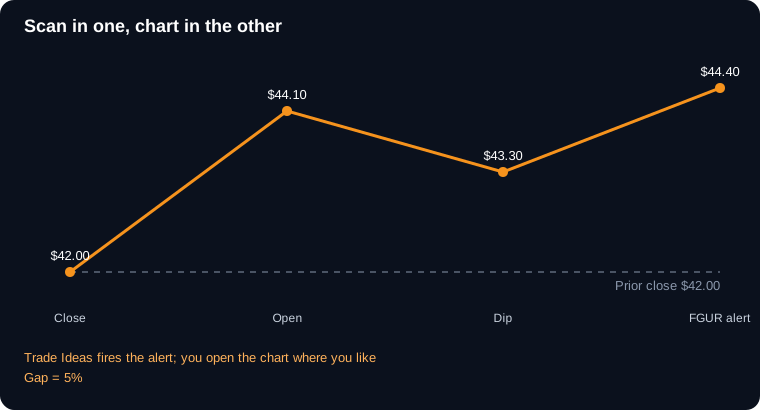
We hear from a lot of traders who love their TradingView charts and have no plans to leave. Fair enough. The question they ask is whether Trade Ideas can sit next to it and do the scanning part. It can, and here is how folks set it up.
The difference shows up most on busy mornings. In a screener, you see a list and you go looking. With streaming alerts, the list comes to you when something actually happens, like a gap that dips, holds and turns higher.
Example, made-up numbers. You have 12 gappers on the list at 9:30. At 9:38, one of them, a $22 stock that gapped 7%, dips to $23.10, holds above its $22 close, and turns back up. The alert pops at $23.60. You flip to your TradingView chart, see it is right at a level you drew last week, and decide from there. You didn’t have to babysit twelve charts to find it.
On cost, TradingView’s prices are on its site and Trade Ideas has a free account with just an email. A lot of traders run the free Trade Ideas account alongside their TradingView plan for a while before deciding if they need more. No credit card for the free one, so there is not much to lose by looking.
A small tip from traders who run both: put Trade Ideas on the left monitor and TradingView on the right. Keep the alert window small and tall so new alerts stack at the top. When something fires, your eyes move one screen over and the chart is already waiting. It sounds minor, but on a fast morning that layout saves a lot of fumbling between tabs.
Free account, just an email. No card. Live access for a limited time.
Honest answers.
Yes. Its stock screener can filter and sort by gap and premarket change.
No. Many traders keep TradingView for charts and use Trade Ideas only for scanning and alerts.
TradingView has a free plan and paid plans from $12.95 a month billed yearly. Compare that with what you need from alerts.
You copy the symbol over yourself. Most traders keep both windows side by side, so it takes a second.
Past results, including backtests, don't guarantee future results.
Free account, just an email. No card. Live access for a limited time. Ready to buy? See plans & pricing

