
Light Mode

A stock trading three times its normal volume is telling you something. Trade Ideas compares each stock to its own normal for this time of day and flags it the moment volume jumps.
Free account, just an email. No card. Live access for a limited time.

Named to the Inc. 5000 list of America’s fastest-growing private companies six years in a row (2017–2022).

Investopedia: Best Short Term Stock Screener, 2024
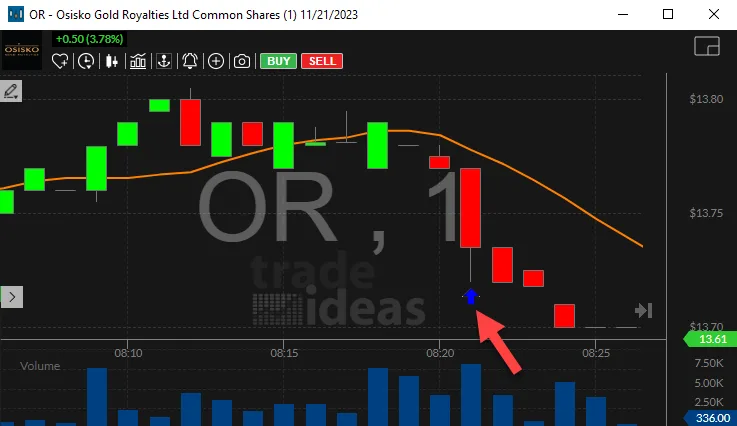
Unusual means unusual for that stock, at this time of day. A volume number on its own doesn’t tell you much. These are the pieces traders use:
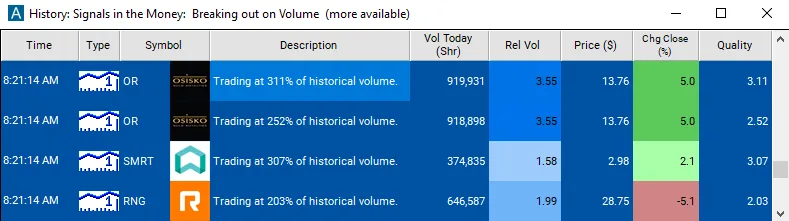
Streaming Alerts run in TI Pro, our desktop app for Windows (on a Mac, through Parallels). Top Lists also run in the Web Dashboard, right in your browser. Volume often moves before the news does, so see the breaking news stock scanner too, or the low float scanner for small-float names.
It finds stocks trading far more shares than they normally do at this point in the day. A stock at 3x its usual pace at 10:15 a.m. shows up, even if its total share count still looks small.
That is the point. Raw volume lists are full of the same big names every day. Relative volume puts a sleepy mid-cap that suddenly wakes up next to them.
Traders look for it because volume usually shows up before or alongside a real move. Price can drift on light trading. A move on heavy volume has more people behind it.
Relative volume is the core of this page. Relative Volume compares volume so far today with what the stock normally trades by this time of day. A reading of 1 is normal. A reading of 3 means three times the usual volume for this point in the session.
To use it as a relative volume scanner, sort a Top List (Screener) in the Web Dashboard by Relative Volume and set a minimum of 2. Add Average Daily Volume (5 day) so the stock has real average volume behind it, and a Price range you trade. In TI Pro, High Relative Volume fires the moment a stock crosses into heavy relative volume, so you do not have to keep checking the list.
Early in the session, relative volume jumps around because the numbers are small. Many traders give it the first 15 minutes before trusting a reading.
Morning list. Sort by Relative Volume before and just after the open, then check the news and chart on the top names.
Midday wake-ups. The alerts matter most after 10:30, when the opening noise is done and a new spike stands out.
Confirmation. Some traders only take a breakout when Relative Volume is above 1.5 on that stock. It is a filter on their own setup, not a signal by itself.
Heavy volume can be selling just as easily as buying. Look at which way price is going before you read anything into it.
Early premarket readings jump on a handful of trades. Wait for real share counts, or use Dollar Volume to screen out the noise.
Index rebalances and options expiration days push volume up across many stocks at once. On those days, a high ratio says less.
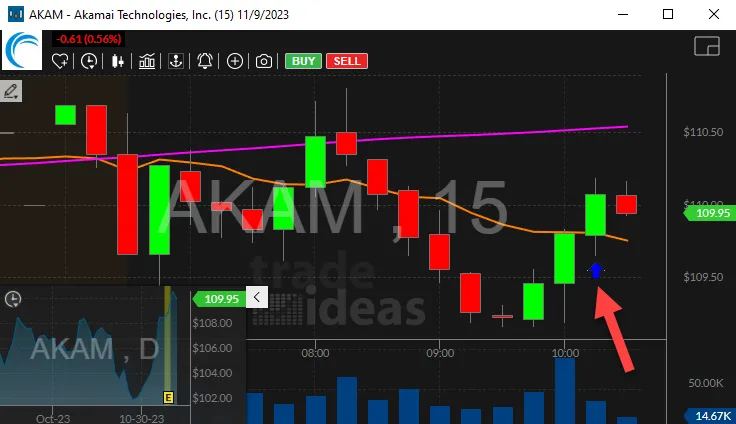
Look at the volume bars under the chart. The tallest bar of the morning comes first, and the alert arrow sits right after it as price turns up. That is the order traders look for: volume, then price.
Free account, just an email. No card. Live access for a limited time.
It is a set of Trade Ideas alerts and filters that compare a stock’s volume right now to its own normal for this time of day. When a stock trades well above that normal, it shows up, usually before the price move is obvious.
Stocks trading far more shares than they usually do by this time of day. In Trade Ideas, set Relative Volume to a minimum of 2 to see stocks at twice their normal pace, and sort a Top List (Screener) by it.
Because it compares each stock to its own normal for this time of day, a quiet morning doesn’t hide anything. A stock at 2x at 10:00 a.m. is really busy for that stock, even if the share count looks small next to the big names. Top Lists update every 15 seconds.
Yes. Relative Volume works before the open too. Pair it with Gap (%) to see which premarket gappers have real volume behind them. More on the premarket scanner page.
Before the open, volume is thin, so a few trades can make the ratio jump. Add Average Daily Volume (5 day) or Dollar Volume so the list sticks to stocks that normally trade enough to matter.
A screener ranks a list, like a Top List sorted by Relative Volume. A scanner fires the moment something happens, like the High Relative Volume alert. Trade Ideas does both, and most traders use them together.
A Top List is a good place to start in the morning. The alerts help most once the day is moving and you can’t keep refreshing a list. Both use the same filters, so a setup you like in one works in the other.
Yes. Relative Volume runs premarket. Pair it with Gap (%) and a Dollar Volume minimum so a few early trades do not top the list.
TradingView ranks by volume on its screener. Trade Ideas compares each stock to its own normal for this time of day, and the alerts fire as it happens. Top Lists update every 15 seconds.
Many traders start at 2, twice the normal pace. Some use 1.5 for large caps and 3 or higher for small caps. Pick one and stick with it so you learn what it looks like.
Past results, including backtests, don't guarantee future results.
Free account, just an email. No card. Live access for a limited time. Ready to buy? See plans & pricing

