



Chart context
Reads your chart
Trader tip
The AI Assistant inside the chart tells you what is happening on the stock you are trading, such as key levels and buying or selling pressure. Then you can act without leaving Trade Ideas.
AI Assistant — built into Trade Ideas Configure triggers. Read the chart. Find the stock.
Free account, just an email. No card. Live access for a limited time.

Named to the Inc. 5000 list of America’s fastest-growing private companies six years in a row (2017–2022).

Investopedia: Best Short Term Stock Screener, 2024
AI Assistant is Trade Ideas’ AI for active investors and day traders. Describe a scan in plain English and Holly builds the Alert or Top List window for you. Holly also tells you what is happening on the chart, and OddsMaker TI Premium lets you test the setup before you trade it.
AI Assistant works inside Trade Ideas. It builds live Alert and Top List (Screener) windows from plain English and reads the chart you have open. AI Assistant is included in TI Pro on every Trade Ideas plan. Everything runs on live market events.
Chart context
The AI Assistant inside the chart tells you what is happening on the stock you are trading, such as key levels and buying or selling pressure. Then you can act without leaving Trade Ideas.
Scanning
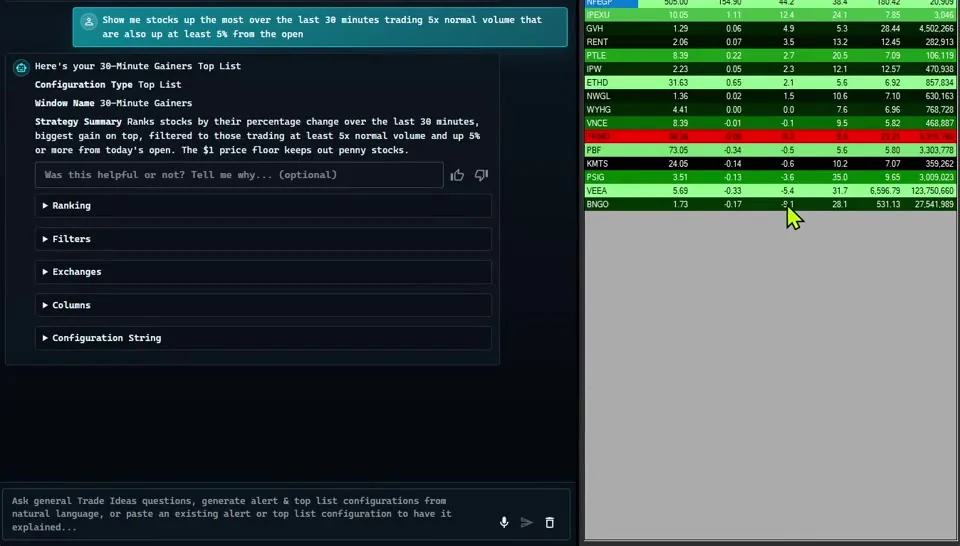
Describe the list you want. Holly builds a live Top List, sorted the way you ask, such as top gainers, relative volume or % from the open.
Triggers
Describe a setup in plain English and Holly turns it into an Alert window. Gaps, volume surges and breakouts fire as they happen.
Grunt work
Skip the menu hunting. Ask in plain English and it walks you to the right settings.
Trade Ideas includes an AI Assistant inside the chart that tells you what is happening on the chart. It works in the same Trade Ideas windows you already trade from.
Chart-context AI explains the chart you are looking at. Then Holly can turn what you learned into a live Alert or Top List (Screener) window.
AI Assistant is built for the jobs active traders actually run.
Desk language
Describe conditions the way you already talk, like gaps, relative volume or breakouts. Holly turns them into Alert and Top List (Screener) windows.
Built for actives
AI Assistant is built for active investors and day traders, and it works on Trade Ideas live market data.
Massive tape
Holly works with the live stream of alerts and filters. OddsMaker then shows what happened next in Trade Ideas history.
Holly’s modes match the real jobs on a Trade Ideas desk.
The AI Assistant inside the chart explains what is happening. You get a second set of eyes without leaving your chart.
Rank stocks live. Holly builds Top Lists that update every 15 seconds, not static lists sent by email.
Turn your trading triggers into live alerts. Start with a simple prompt, refine the filters, then test the window in OddsMaker.
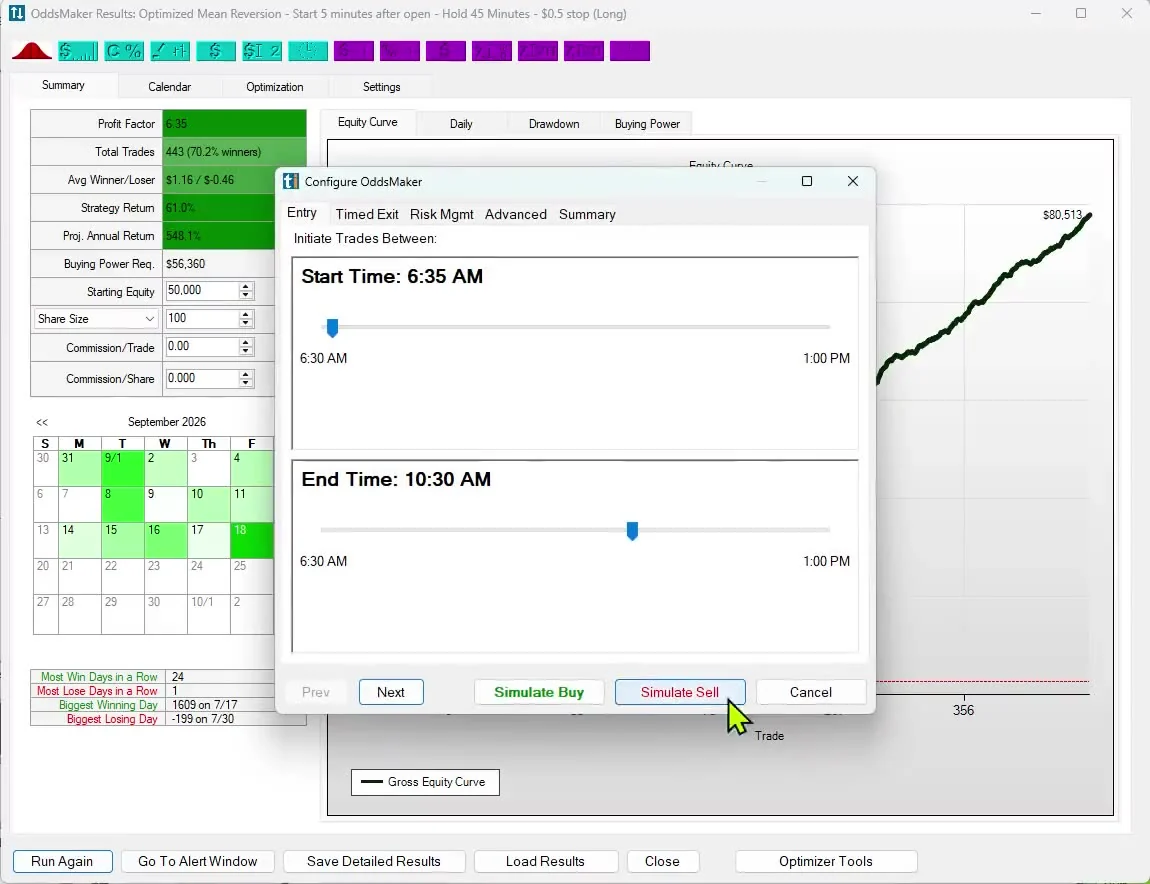
OddsMaker tests the same events and filters, then helps you improve them. Like a Vegas Card Counter but for the Stock Market. Past results, including backtests, don't guarantee future results.
Entry and Exit Signals with a Statistical Edge. Holly does the machine learning for you on live market data. See the AI Strategy Lab for more.
Learn the workflow. Sit with people who Really Know Trade Ideas.
Holly works with the data that moves trades: live market events, live windows and chart context.
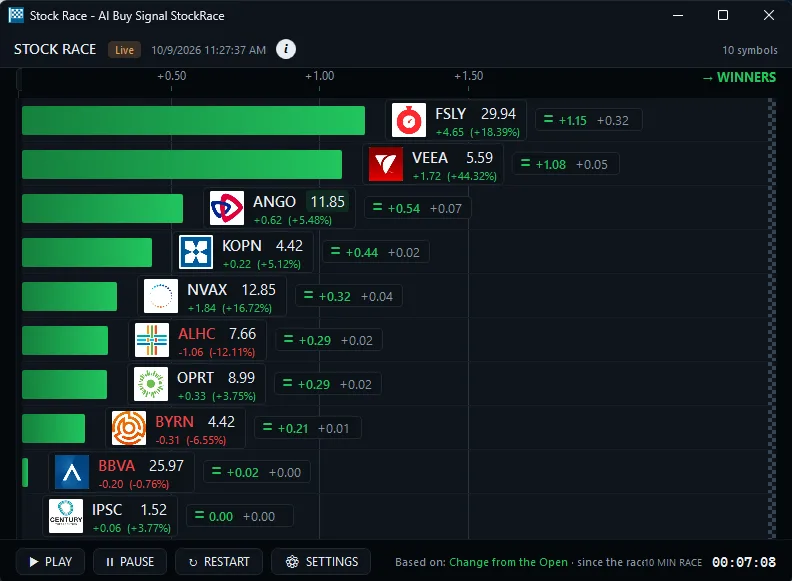
Breakouts, buying pressure, gaps and volume spikes: the live alerts you already watch.
Price, RVOL, % from open, 30-minute gain rank — Top List (Screener) language in real time.
AI Assistant inside the chart reads the open picture and tells you what is happening.
When this alert fired under these filters, what happened next? Event-based test results.
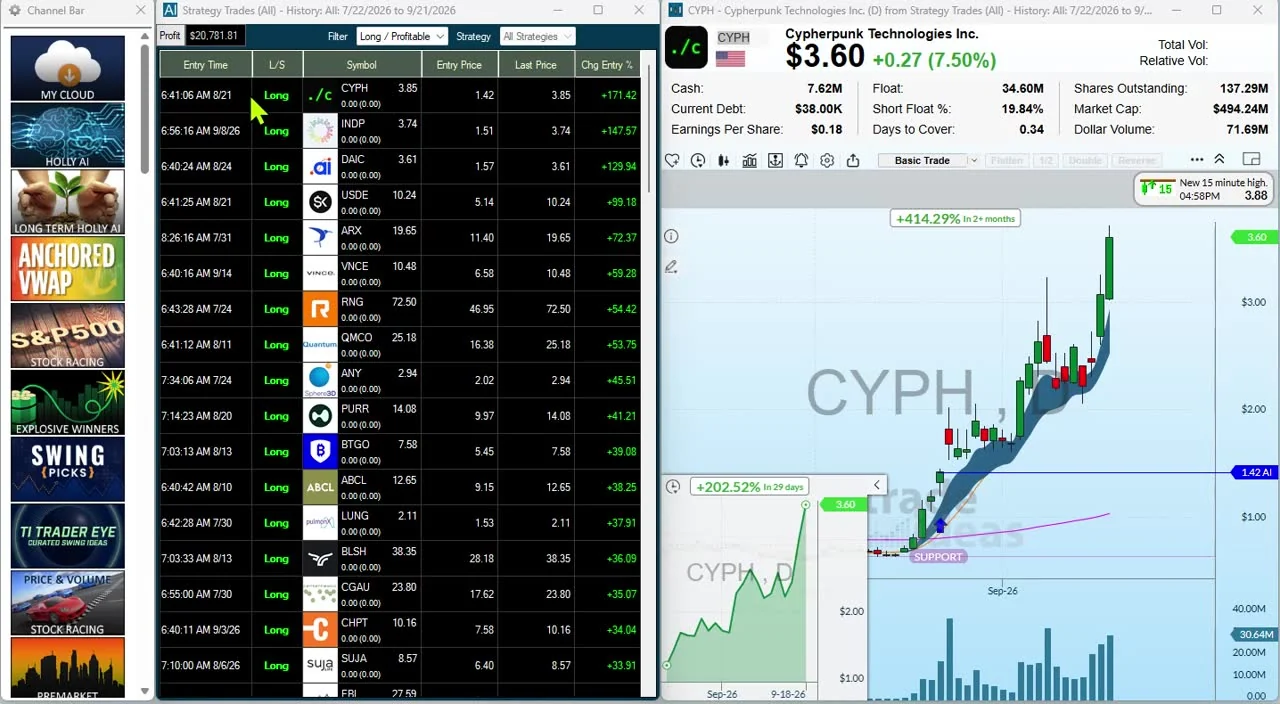
40+ ready-made channels. Each theme comes with its own alerts, Top List, MultiStrategy window and charts.
Real-time chart pattern recognition that scans the whole market for you.
Research any ticker, from price and ranges to momentum, financials and peers.
Time-of-day windows show when during the session a setup works best.
Trade Ideas live market data is built on premium exchange data.
Trade Ideas live market data: A live stream of market events built on premium exchange data, so you see moves as they happen. Data Difference → · Nasdaq Basic vs Trade Ideas live market data →
Every TI Pro plan includes AI Assistant. Describe the scan you want in plain English, and it builds the Alert window or Top List (Screener) for you. That's the value: you describe a scan instead of configuring it by hand.
Natural-language Alert and Top List configuration. Chart-context AI inside the chart. Desk helper on live market data. Handoff to OddsMaker for statistical edge.
Holly AI Signals are a separate product, and they come with TI Premium. Pricing →
AI Assistant runs on Trade Ideas’ own data: live market data → Holly → OddsMaker. It configures triggers, reads chart context and helps you test setups in OddsMaker.
Plain-English windows, chart AI and OddsMaker, all on Trade Ideas live market data. Holly does the machine learning for you. AI Strategy Lab →
AI Assistant turns plain-English requests into live Streaming Alert (scanner) and Top List (screener) windows. It reads the chart you have open and tells you what is happening, and it helps with everyday setup, like explaining which settings do what.
AI Assistant is included in TI Pro on every Trade Ideas plan. It works on live market events. More: Nasdaq Basic vs Trade Ideas live market data · Compare Trade Ideas → · AI Signals / Holly
New to trading? The AI Assistant builds the scan from your own words, so there is no need to configure anything. Start with Trade Ideas for beginners.
Learn how to use AI Assistant to set up Alerts and Top Lists (Screeners) in plain English.
Open Users Guide →Trade alongside people who Really Know Trade Ideas. The live room runs Monday to Friday during market hours (ET).
AI Assistant is Trade Ideas’ AI trading assistant and AI market analyst for active investors and day traders. It configures Alert windows and Top Lists (Screeners) in plain English, and reads chart context so you know what is happening on the chart. You can then test the same setup in OddsMaker to check its statistical edge. AI Assistant is included in TI Pro on every Trade Ideas plan, with no per-message charge.
Yes. Trade Ideas includes an AI Assistant inside the chart that tells you what is happening on the chart you are looking at. Holly can then help you build a live Alert or Top List from what you see.
AI Assistant does the setup work. It builds live Alert and Top List windows from plain English, reads the chart you have open, and creates trading triggers on live market events. OddsMaker, which tests setups on Trade Ideas history, then shows how the same setup played out in the past.
No. AI Assistant is included in TI Pro on every Trade Ideas plan. Plain-English Alert and Top List setup, chart-context AI and setup help are all included. There is no separate chat subscription. Pricing.
All of them. AI Assistant is included in TI Pro on every Trade Ideas plan. Describe a scan in plain English and it builds the Alert window or Top List for you.
Describe trading triggers in plain English, like gaps, volume surges, breakouts or top gainers. Holly drafts the Alert windows and Top Lists for you. You can also ask what is happening on the chart. Then test the same setup in OddsMaker.
Yes. Holly runs machine learning on live market events so you get Entry and Exit Signals with a Statistical Edge. The AI Strategy Lab page covers how Holly uses machine learning.
Holly works on Trade Ideas live market data, a live stream of market events built on premium exchange data. Holly builds live Alert and Top List windows on this data. Chart-context AI reads the chart on the same data. See Data Difference.
No. AI Assistant sets up Alerts and Top Lists from plain English and helps you read charts. Describe the trigger and Holly helps build the windows. Refine with filters, then OddsMaker tests it on Trade Ideas history. Strategy Development & Testing.
Users Guide shows how to set up Alerts and Top Lists with AI Assistant. Trade Ideas Trading Room sits with people who Really Know Trade Ideas during market hours.
No. AI Assistant is built for active investors and day traders alike. The same live alerts, Top Lists, chart help and OddsMaker testing work for anyone who trades live markets. Beginners use it too, because it builds a scan from a plain-English sentence.
Free account, just an email. No card. Live access for a limited time. Ready to buy? See plans & pricing