
Light Mode

News feeds tell you what happened. Volume often tells you first. Unusual volume and unusual options volume can show up in Trade Ideas before the headline hits the wire.
Free account, just an email. No card. Live access for a limited time.

Named to the Inc. 5000 list of America’s fastest-growing private companies six years in a row (2017–2022).

Investopedia: Best Short Term Stock Screener, 2024
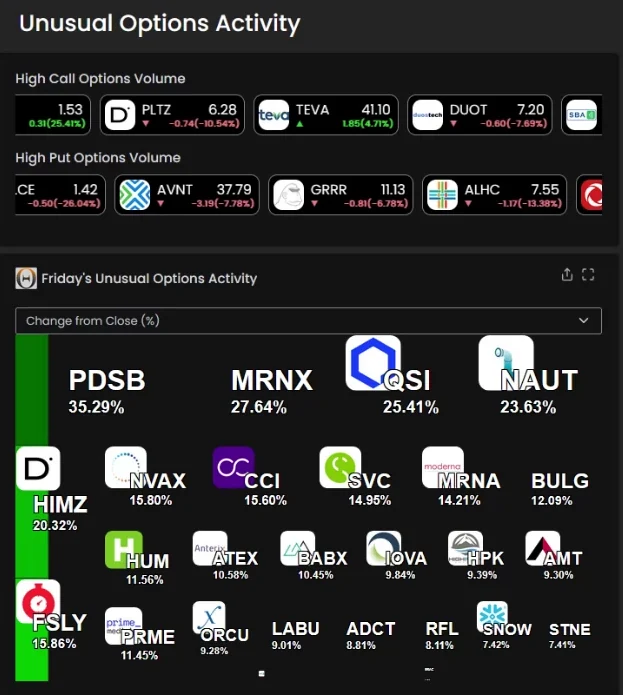
Someone usually knows first. Their buying and selling shows up as volume before the story is written. These are the tools for it:
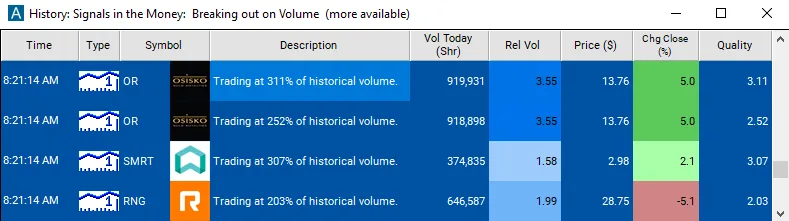
Not every volume spike is news, and not every headline comes with early volume. It happens enough to be worth watching. Streaming Alerts run in TI Pro, our desktop app for Windows (on a Mac, through Parallels). Top Lists (Screeners) also run in the Web Dashboard, right in your browser. Start with the unusual volume scanner and the unusual options volume scanner.
It doesn’t read headlines. It watches for the trading that shows up around news: volume far above normal, options volume piling up, prints coming fast, and news halts.
Sometimes that comes before the story. Sometimes it’s at the same time. Either way, it tells you where to look.
Then read the headlines in the integrated news feed. The scan points you to the stock; the news tells you why.
News doesn’t reach everyone at once. People close to a story, or quick to read a filing, trade first. That shows up as volume, prints and options activity.
A news feed waits for the story to be written. Watching the trading itself can point you to the stock a little sooner.
Find the story. A spike tells you to look. Traders check the news feed and filings next.
Halts. A news-pending halt often means a big announcement is coming.
Penny stocks with news. Add a Price max of 5 and keep a Spread filter on.
Not every volume spike is news. Index trades, block trades and rebalances cause them too.
News moves can reverse hard once the headline is read. Don’t trade the spike alone.
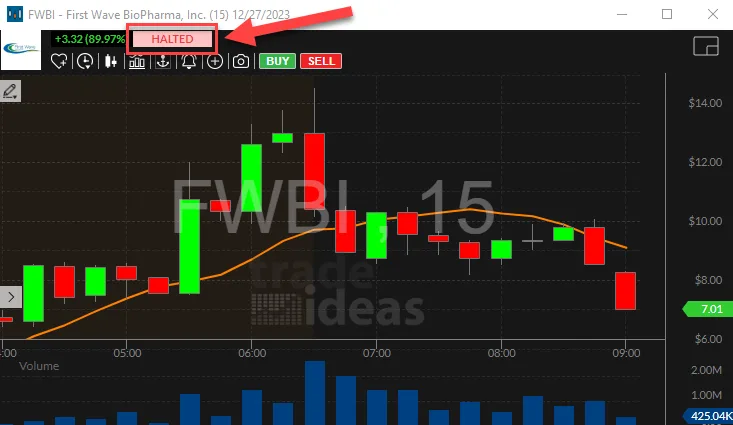
The Halt alert lands on the chart where trading stopped. When the reason is news pending, it is often the first sign of a story about to hit.
A volume spike tells you something is happening, not what. Before acting, look up the headline or filing. Earnings, FDA news, an offering and a buyout each move a stock in a different way. An offering can push a stock down even on heavy volume.
Free account, just an email. No card. Live access for a limited time.
It is a set of Trade Ideas volume and options filters that can flag a stock before the headline comes out. It doesn’t read the news. It watches the trading that tends to come first.
Watch Relative Volume and Options Volume Today (%) together. When both jump, there may be news on the way or just out.
Relative Volume compares the stock’s volume to its normal for this time of day. Options Volume Today (%) compares today’s option contracts to a normal full day. A jump in both at once is worth a look. Top Lists (Screeners) update every 15 seconds, so you can watch the list change through the day.
The High Relative Volume alert fires on unusual volume as it happens, and Halt shows news-pending halts with the reason.
Unusual Number Of Prints is another tell. It fires when trades print on the tape at least 5 times faster than normal. It counts trades, not size. Streaming Alerts run in TI Pro, for Windows, or on a Mac through Parallels.
Add Price with a maximum of 5. Keep Spread on, since news on cheap stocks tends to bring wide spreads.
Not every move like that turns into a headline, and some news hits with no warning at all. Use it as a reason to look, not a reason to buy. Check the chart and the news yourself before you trade.
You can try Trade Ideas with a free account, just an email, no card. Live access is for a limited time.
Yes. Trade Ideas has an integrated news feed, so you can read the headlines that may be behind a move. And because it tracks volume in real time, it often spots the move before the news comes out.
Sort a Top List by Relative Volume. The names at the top tend to have news out or on the way.
The Halt alert shows news-pending halts with the reason. High Relative Volume and Unusual Number Of Prints fire on the trading that comes with news. They run in TI Pro.
Past results, including backtests, don't guarantee future results.
Free account, just an email. No card. Live access for a limited time. Ready to buy? See plans & pricing

