
Light Mode

There isn’t one best gap up scanner for everybody. It depends where you chart, where you trade and how much you want alerts to do for you.
Free account, just an email. No card. Live access for a limited time.

Named to the Inc. 5000 list of America’s fastest-growing private companies six years in a row (2017–2022).

Investopedia: Best Short Term Stock Screener, 2024
| Tool | Gap features | Good fit for |
|---|---|---|
| Trade Ideas | Gap (%), Gap ($) and Gap (Bars) filters; gap reversal and false gap retracement alerts; Top Lists (Screeners) every 15 seconds. | Streaming alerts on gap behavior after the open. |
| TradingView | Stock screener with gap and premarket columns; paid plans from $12.95/mo billed yearly (checked October 12, 2026). | Traders who live in TradingView charts. |
| thinkorswim | Stock Hacker scans with your own criteria and alerts when results change; no software fee with a Schwab account (checked October 12, 2026). | Schwab clients who want scans inside their broker. |
What we weighed: how fast the list updates, whether it alerts on what the gap does next, and cost. Prices checked October 12, 2026; check each site before you buy.
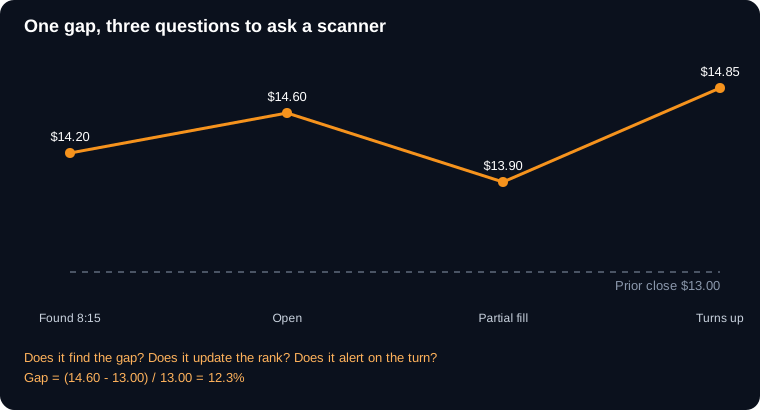
Example numbers, not a real trade
Already settled on a tool? Read the TradingView or thinkorswim comparison.
We make one of these tools, so take our view with that in mind. Here is how we would choose if we were in your chair.
Start with where you chart and trade. If your whole day lives in TradingView charts, its screener is right there, and that convenience counts for a lot. If you have a Schwab account, thinkorswim comes along with it and Stock Hacker can scan for gaps. Neither costs you a new login.
Then ask how often the list updates. Premarket, a gap list that refreshes every few minutes is a different tool than one that refreshes every 15 seconds. When an 8:30 report drops, a few minutes is a long time.
Then ask what happens after the list. Finding the gap is half the work. The other half is knowing when a gap holds, fills or turns. Trade Ideas fires alerts on those events across every stock that matches, without you setting a price alert on each symbol. That is the main thing we built it for.
Last, cost. TradingView has a free plan with limits and paid plans priced on its site. thinkorswim has no software fee with a Schwab account. Trade Ideas has a free account with just an email and paid plans on our pricing page. Prices change, so check each site the day you buy.
An example of how traders mix them: scan gaps in Trade Ideas, get the false gap up retracement alert at 9:41, and open the chart in TradingView because the drawings are already there. Place the order at Schwab. Nobody says you have to pick just one.
If you are brand new, start free wherever you already are, learn what a good gap looks like, and only pay for more speed and alerts when you know you need them.
A quick checklist to bring when you test any of the three: does it rank gaps before the open, does it refresh fast enough for your style, does it tell you when a gap holds or fills, and does the price fit your account. Try each one on the same morning with the same rules and you’ll know pretty quick which one feels right for how you trade.
Free account, just an email. No card. Live access for a limited time.
Picking a gap scanner.
thinkorswim has no software fee for Schwab clients, and TradingView has a free Basic plan with limits. Trade Ideas has a free account with an email.
For most day traders, how fast the list updates premarket and whether it tells you when a gap holds or fills.
Sure. Many traders scan in one tool and chart or trade in another.
Usually the one inside the tool you already use. Learn what a clean gap looks like there first, then add speed and alerts when you need them.
Past results, including backtests, don't guarantee future results.
Free account, just an email. No card. Live access for a limited time. Ready to buy? See plans & pricing

