
Light Mode

Automate the Analysis on Your Charts
You know what you look for on a chart: a MACD cross, a move through resistance, a stock back over its 50 day. Trade Ideas checks every US stock for it at once and tells you the moment it happens.
Free account, just an email. No card. Live access for a limited time.

Named to the Inc. 5000 list of America’s fastest-growing private companies six years in a row (2017–2022).

Investopedia: Best Short Term Stock Screener, 2024
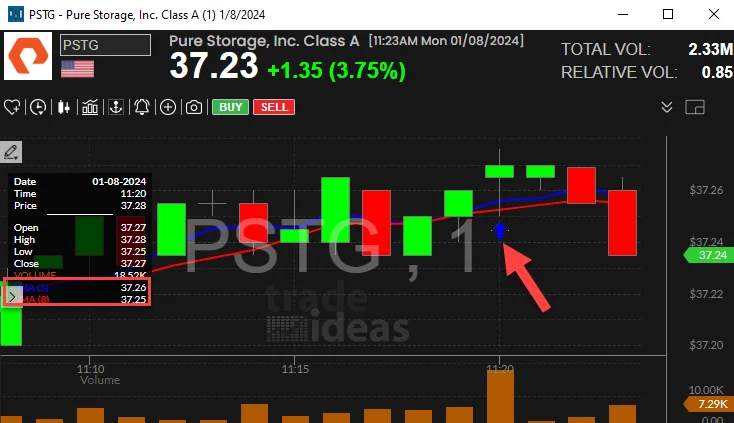
Each technical signal is its own alert with written rules. Turn on the ones you use, add a few filters, and the alerts stream in as stocks trigger them.
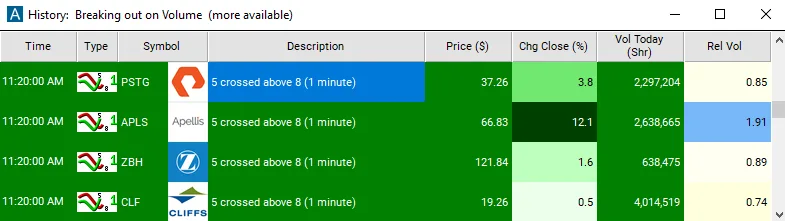
Streaming Alerts run in TI Pro, our desktop app for Windows (on a Mac, through Parallels).
It finds stocks where a technical signal just happened: an indicator cross, a break of a level, a pattern completing.
Doing that by hand means flipping through one chart after another. The Trade Ideas engine does the analysis on every US stock at the same time and streams each hit as it happens.
Many scanners refresh on a timer or check one chart at a time. Here the alert comes the moment the signal forms. See how streaming pattern alerts compare with TrendSpider.
| Signal | What it means | Trade Ideas alert |
|---|---|---|
| MACD | MACD crosses its signal line, or crosses zero | 5 Minute MACD Crossed Above Signal (MDAS5) 5 Minute MACD Crossed Below Signal (MDBS5) 5 Minute MACD Crossed Above Zero (MDAZ5) 5 Minute MACD Crossed Below Zero (MDBZ5) |
| Stochastic | Stochastic leaves oversold (above 20) or overbought (below 80) | 5 Minute Stochastic Crossed Above 20 (SC20_5) 5 Minute Stochastic Crossed Below 80 (SC80_5) |
| Daily moving averages | Price crosses the 20, 50 or 200 day average | Crossed Above 20 Day Moving Average (CA20) Crossed Above 50 Day Moving Average (CA50) Crossed Above 200 Day Moving Average (CA200) Crossed Below 200 Day Moving Average (CB200) |
| Intraday averages | A fast SMA crosses a slower one | 8 SMA Crossed Above 20 SMA (5 Min) (ECAY5) 8 SMA Crossed Below 20 SMA (5 Min) (ECBY5) |
| Support / resistance | Price moves through a level it has turned at before | Crossed Above Resistance (CAR) Crossed Below Support (CBS) Crossed Daily Highs Resistance (CDHR) Crossed Daily Lows Support (CDLS) |
| Consolidation breakout | Price leaves a tight range | 5 Minute Consolidation Breakout (CBO5) 5 Minute Consolidation Breakdown (CBD5) |
| Broadening top / bottom | Swings getting wider | Broadening Top (GBTOP) Broadening Bottom (GBBOT) |
| Triangles, double tops, head and shoulders | Geometric patterns | Triangle Bottom (GTBOT) Double Top (GDTOP) Head and Shoulders (GHAS) |
| Candle patterns | Hammer, engulfing, doji and more | 5 Minute Hammer (HMR5) 5 Minute Bullish Engulfing (NGU5) 5 Minute Doji (DOJ5) |
Most intraday indicator alerts come in several bar lengths, like 5, 15 and 60 minutes. The 5 minute version is linked; the help page lists the rest.
Confirmation. A MACD cross on a stock that just crossed resistance gets a closer look.
Trend checks. The 50 and 200 day crosses show when a stock changes its longer trend.
Timing. Short bar alerts, like 5 minute Stochastic, help with entries on a stock already on your list.
Patterns. For triangles, double tops and candles in detail, see the chart pattern recognition scanner.
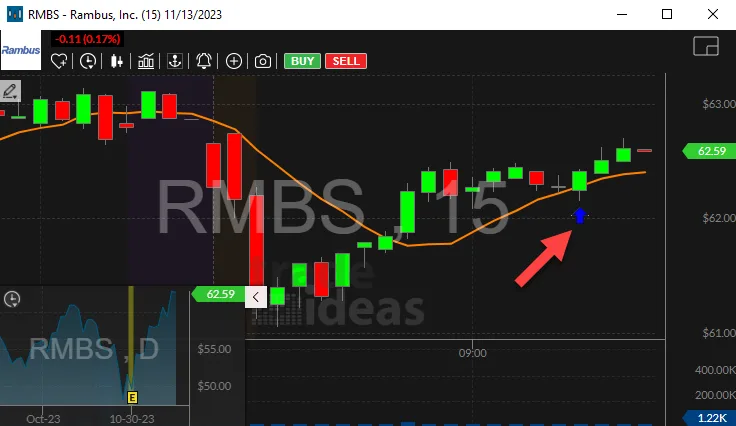
The arrow marks the bar where price moved back above the day’s open, and Crossed Above Open fired right there. Price level alerts like this one and Crossed Above Resistance work the same way: the level is set, and the alert fires on the trade that crosses it.
Indicators lag price. A MACD cross often comes after a good part of the move.
Short bar lengths fire often and give a lot of false starts. Start with longer bars, or add Relative Volume.
No signal works every time. Test your rules in a simulated account first.
Free account, just an email. No card. Live access for a limited time.
Plain answers to what traders ask about automated technical analysis in Trade Ideas.
Software that checks price and volume data across many stocks for the signals you would look for on a chart, like a MACD cross or a break of resistance, and shows you which stocks have them.
Letting software run your chart checks for you. In Trade Ideas, each signal is a Streaming Alert with written rules, so you see exactly why a stock showed up.
MACD, Stochastic, daily and intraday moving averages, support and resistance, consolidation, and geometric and candle patterns. Filters like RSI (5 min) and Change From 200 Day SMA (%) narrow the list.
Both, in a way. Trade Ideas does the analysis on the live data and brings you the result. You still read the chart and make the call.
Yes. It watches US stocks at once and streams the alert when the signal happens. Streaming Alerts run in TI Pro.
TI Pro runs on Windows. On a Mac, traders run it through Parallels. Top Lists (Screeners) also run in the Web Dashboard in a browser.
You can try it with a free account, just an email, no card. Live access is for a limited time, then it is part of a paid plan.
No. The alerts on this page are rule based. Holly AI Signals are a separate feature and part of TI Premium.
Past results, including backtests, don't guarantee future results.
Free account, just an email. No card. Live access for a limited time. Ready to buy? See plans & pricing

