

Guide · Trade scanner Updated

The Trade Scanner That Moves When the Stock Moves

Trade Ideas checks every trade in the market and tells you the second a stock does what you want.

Free account, just an email. No card. Live access for a limited time.

Named to the Inc. 5000 list of America’s fastest-growing private companies six years in a row (2017–2022).

Investopedia Best Short Term Stock Screener 2024 award badge

Investopedia: Best Short Term Stock Screener, 2024

Real recording: alerts streaming into a Multi-Strategy window, 19 seconds.
In one minute

What a trade scanner is

A trade scanner watches every stock at once and speaks up when one does what you are looking for. You stop flipping charts. The market comes to you.

  • You set the rule: a new high, a gap, a volume spike.
  • You set the filter: price, float, relative volume.
  • The scanner does the watching and lists each match as it happens.
Key point

Price: Trade Ideas plans start at $127 per month for TI Standard and $254 per month for TI Premium, billed monthly; annual plans cost less, at $1,068 a year ($89 a month) for TI Standard and $2,136 a year ($178 a month) for TI Premium.

TI Pro runs on Windows (Mac via Parallels). The Web Dashboard runs in any browser.
Speed

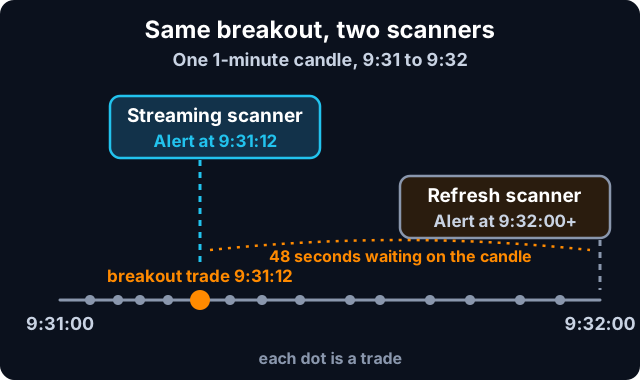
Streaming vs refresh-based: every trade, not every candle

Diagram: a streaming trade scanner alerts on the breakout trade at 9:31:12; a refresh-based scanner waits for the candle to close at 9:32
Same breakout. The streaming scanner speaks up on the trade. The refresh scanner waits for the candle.

Most scanners wait. They check on a timer, or when a 1-minute or 5-minute candle closes. By then the move is old news.

Trade Ideas streams. It checks each trade as it prints, so the alert shows up on the trade that made the move, not at the end of the bar.
How to

Set up a real-time trade scanner in 4 steps

  1. Step 1: Open the live alert window. See it live in the Web Dashboard. Alerts start streaming right away.
  2. Step 2: Pick your alerts. Start with three, like New High, Running Up Now and High Relative Volume.
  3. Step 3: Add filters. Price, Float and Relative Volume keep the list to stocks you would actually trade.
  4. Step 4: Watch it fire, then test it. Let it run for a session and paper trade what it finds before you put money on it.
Proof

What is under the hood

  • Alerts can fire multiple times per second, one for each qualifying trade.
  • 308 stock alerts and 249 filters, each with its own help page.
  • Multi-Strategy windows: run many scans in one window, like the clip up top.
  • Holly AI Signals (TI Premium): dozens of strategies, run each day, with an entry and an exit.
  • Since 2002, and on the Inc. 5000 list six years in a row.
AI

AI trade scanner: Holly scans the live market, not chart images

The AI Assistant building a window from plain English.
  • Holly AI Signals (TI Premium) run dozens of strategies on the live market each day and send trade ideas with an entry and an exit.
  • The AI Assistant, in every TI Pro plan, builds alert windows from plain English. Type "small caps making new highs on volume" and it sets up the window.
Tips

Tips from the desk

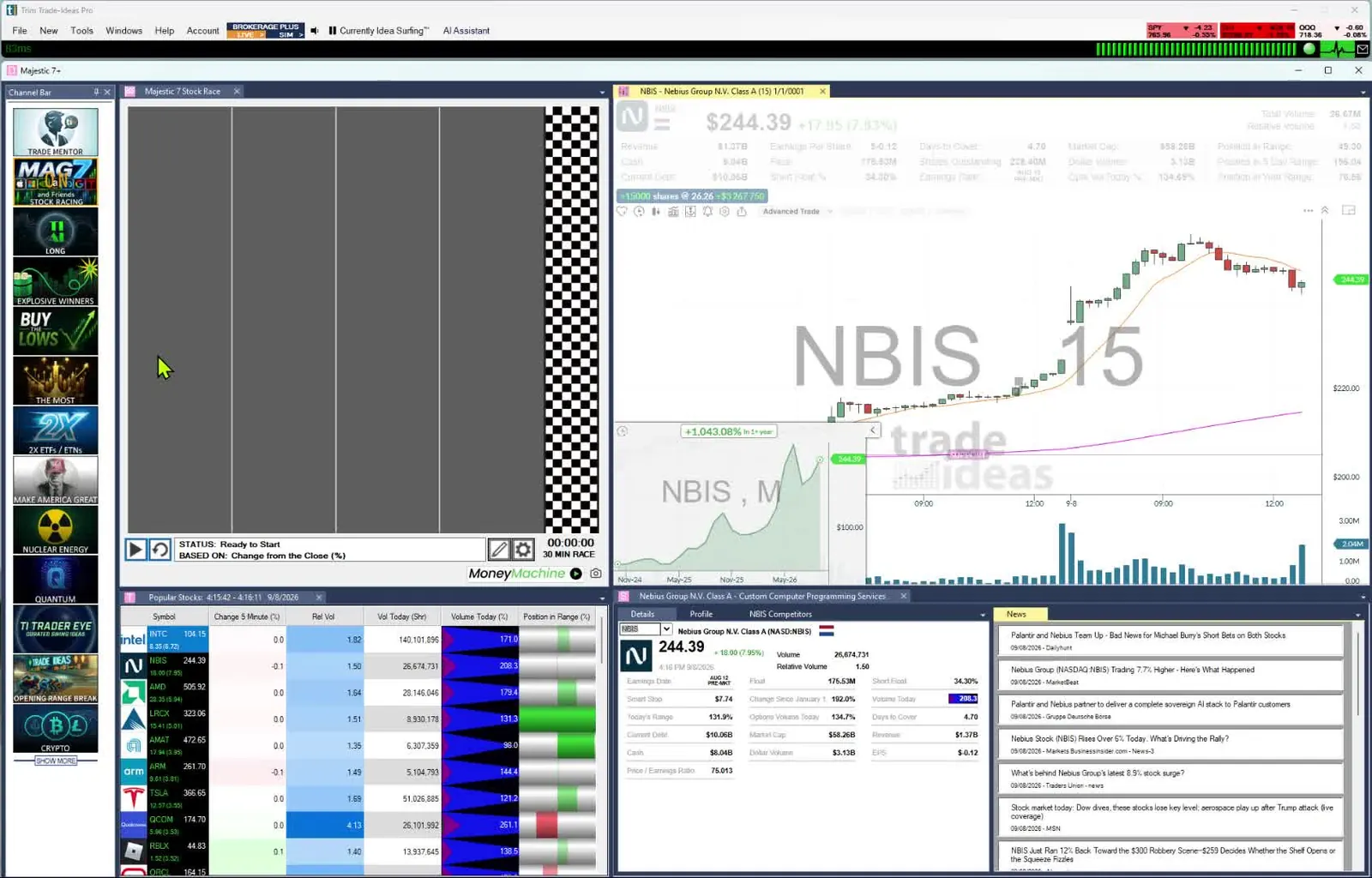
TI Pro layout with Channel Bar, Stock Race, Top List, chart and news
One TI Pro layout: alerts, a Top List (Screener), a race and a chart.
  • Fewer alerts, better alerts. Three good ones beat thirty noisy ones.
  • Filter on volume, every time. A move on no volume rarely holds.
  • Mind the spread. Use the Spread filter to skip names you can't get in and out of.
  • Scan premarket too. Gaps start before the bell.
  • Most traders pick the exit before they get in. They set a stop going in, knowing a gap can make a loss bigger than the stop.

Past results don't guarantee future results.

FAQ

Trade scanner FAQ

What is a trade scanner?

A trade scanner watches the whole stock market and tells you when a stock does what you are looking for, like a new high, a gap or a volume spike. In Trade Ideas it fires on every trade, as it prints.

Trade scanner vs stock screener: what is the difference?

A scanner tells you the moment something happens. A screener ranks stocks that fit your filters. In Trade Ideas, Streaming Alerts (Scanner) fire on each qualifying trade. Top Lists are the screener and refresh every 15 seconds.

Does it scan premarket?

Yes. Alerts like Pre-market Highs and Pre-market Lows fire before the open, and the Premarket channel in the Channel Bar sets up a premarket layout in one click.

Is a streaming trade scanner faster than a refresh-based one?

Yes. A refresh-based scanner checks on a timer or when a candle closes, so a move can be a minute old when you see it. A streaming scanner like Trade Ideas checks each trade, so the alert shows up on the trade that made the move. Alerts can fire multiple times per second.

Is there an AI trade scanner?

Yes. Holly AI Signals (TI Premium) run dozens of strategies each day on the live market and send trade ideas with an entry and an exit. The AI Assistant, in every TI Pro plan, builds alert windows from plain English.

How much does Trade Ideas cost?

Trade Ideas plans start at $127 per month for TI Standard and $254 per month for TI Premium, billed monthly; annual plans cost less, at $1,068 a year ($89 a month) for TI Standard and $2,136 a year ($178 a month) for TI Premium. You can start with a free account, just an email, no card. Live access is for a limited time.

Keep reading

Related guides and tools

Alerts and filters to look at

Past results, including backtests, don't guarantee future results.

Ready when the next move starts.

Free account, just an email. No card. Live access for a limited time. Ready to buy? See plans & pricing

