
Light Mode

A calendar tells you who reports. It doesn’t tell you which reports the market cares about. Trade Ideas lists the reporters, then ranks the ones actually trading heavy.
Free account, just an email. No card. Live access for a limited time.

Named to the Inc. 5000 list of America’s fastest-growing private companies six years in a row (2017–2022).

Investopedia: Best Short Term Stock Screener, 2024
Start with the date, then add the move:
Put Earnings Date and Relative Volume in one Top List (Screener) and you get a short list of reporters that are moving, ranked as volume builds. Top Lists also run in the Web Dashboard, right in your browser. Streaming Alerts (Scanner) run in TI Pro, our desktop app for Windows (on a Mac, through Parallels). See the after hours scanner and the gap scanner for the next morning.
It finds stocks reporting earnings today, tomorrow or this week, and puts the ones trading heavy at the top.
A calendar lists hundreds of reports. Most get a shrug from the market. The scan shows the handful the market is reacting to.
Earnings moves can reverse in minutes. The first reaction after hours is on light volume and is often undone by the open.
Report dates can move. Check the company’s own announcement for the time before you plan around it.
Free account, just an email. No card. Live access for a limited time.
It is a Top List (Screener) that pulls stocks reporting earnings today or this week, then sorts them by how hard they are trading. You see the calendar and the reaction in one place.
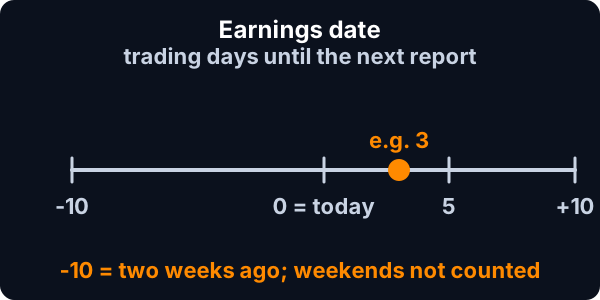
Set Earnings Date to a minimum of 0 and a maximum of 5. It counts trading days, so weekends are skipped. Min 0, max 1 is today.
Negative numbers look back, so -10 means two weeks ago. That is handy for stocks still moving days after a report. Add Relative Volume and the list shows which reporters are still trading heavy. A stock reporting before the open shows up the same day.
Use Earnings Date for today, then add Change Post Market (%) so the list ranks the after-hours move. The after hours scanner page shows the full setup.
For reports after the close, the regular-session numbers stop at 4:00 p.m. ET. Post Market Volume counts the shares traded since then, so you can skip after-hours moves on light volume.
Yes. The Top List runs in the Web Dashboard, right in your browser. The live alerts that fire as a stock moves are in TI Pro.
The Web Dashboard has all the alerts and filters, and a Top List updates every 15 seconds. You can start there and add TI Pro later if you want more windows open at once.
Set Earnings Date to a minimum of 1 and a maximum of 2. It counts trading days, so on a Friday that lands on Monday.
The filter counts days, not the hour. Stocks that report before the open show up the same day. For after-close reports, add the post-market filters.
Not as a single alert. Traders use EPS and Quarterly Earnings Growth for the numbers, then Relative Volume and Gap to see how the market took it.
Past results, including backtests, don't guarantee future results.
Free account, just an email. No card. Live access for a limited time. Ready to buy? See plans & pricing

