
Light Mode

When a stock halts, you want to know right away, and you want to know why. The Trade Ideas Halt alert reports the halt and the reason. Resume tells you when it trades again.
Free account, just an email. No card. Live access for a limited time.

Named to the Inc. 5000 list of America’s fastest-growing private companies six years in a row (2017–2022).

Investopedia: Best Short Term Stock Screener, 2024
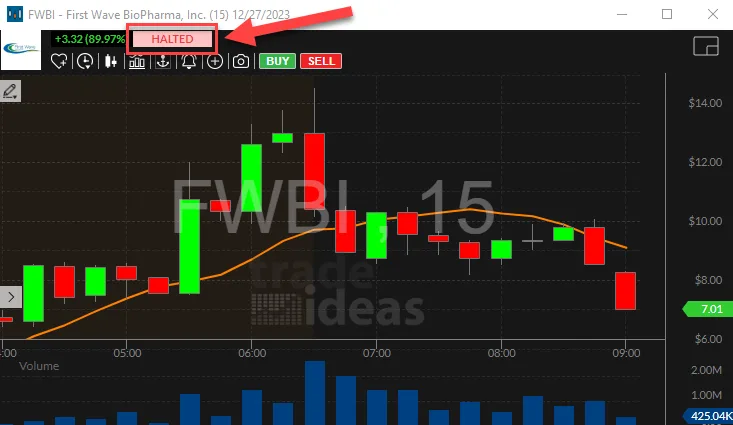
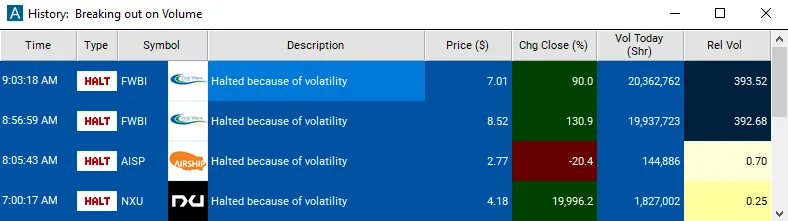
Halt and Resume are Streaming Alerts. Streaming Alerts run in TI Pro, our desktop app for Windows (on a Mac, through Parallels). Halts often come with news; see the breaking news stock scanner and the low float scanner.
It shows which stocks just stopped trading, the reason, and when they start again. Halt and Resume run in one window.
Halts happen most in small, fast names. Knowing about one right away matters if you hold it or are about to trade it.
Protect a position. If you hold the stock, you know right away and can plan for the reopen.
Watch the resume. Some traders wait for the Resume alert and the first few bars before deciding anything.
Spot news. A news-pending halt is often the first sign of an announcement.
You can’t trade out of a halted stock. If you hold one, you wait.
The reopen price can be far from the halt price. Spreads are often wide for the first minutes.
The Halt alert shows the reason with each halt. A volatility pause means the stock ran outside its allowed price band, and it usually reopens within minutes. A news-pending halt means the company has something to announce. Those last longer, and the reopen price can be far from the halt price. Knowing which one you are looking at tells you how long you may be waiting.
Free account, just an email. No card. Live access for a limited time.
It is the Halt and Resume alerts in one window. You see which stocks stop trading, the reason, and the moment they trade again.
LULD stands for Limit Up-Limit Down. When a stock moves outside its allowed price band too fast, trading pauses, usually for about five minutes. It shows in the reason column as a volatility pause.
The pause gives buyers and sellers time to settle. Price bands are set by the exchanges, and a stock can be paused more than once in a day. The Halt alert shows it as it happens, with the reason in the description column.
The code is the reason. T1 means news pending, T2 means news released, and LUDP is a volatility pause. The Halt alert in TI Pro shows it in the description column.
News halts can last longer than a volatility pause. A stock halted for news pending often stays stopped until the news is out and the market has had time to read it. The Resume alert fires either way, so you know the moment trading starts again.
Trading starts again, and the first prints can be far from the halt price. The Resume alert fires right then, so you are not guessing.
Spreads are often wide right after a resume, so the first few minutes can be rough. Some traders wait for the first few bars before doing anything. Keep Halt and Resume in the same window so you see both sides.
The exchanges post halt lists. The Halt alert in TI Pro shows each halt live, with the reason, next to your other alerts.
A volatility pause is often about five minutes. News halts can last much longer, until the news is out.
Yes. The Halt alert covers stocks across the U.S. exchanges Trade Ideas tracks.
Past results, including backtests, don't guarantee future results.
Free account, just an email. No card. Live access for a limited time. Ready to buy? See plans & pricing

