
Light Mode

Squeezes, band breakouts and stretched stocks, found live across the whole market.
Trade Ideas tells you where every stock sits inside its Bollinger Bands, right now, on daily, 5, 15 and 60-minute charts.
Free account, just an email. No card. Live access for a limited time.

Named to the Inc. 5000 list of America’s fastest-growing private companies six years in a row (2017–2022).

Investopedia: Best Short Term Stock Screener, 2024
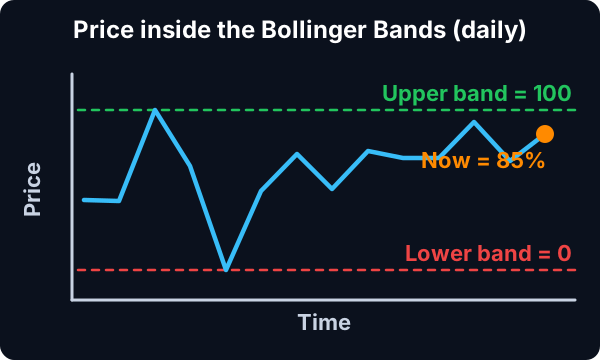
Bollinger Bands sit two standard deviations above and below a moving average. In Trade Ideas, the band position is a number you can filter and sort on: 0 is the lower band, 100 is the upper band, and anything past those is outside the bands.
Streaming Alerts (Scanner) run in TI Pro, our desktop app for Windows (on a Mac, through Parallels). Top Lists (Screeners) also run in the Web Dashboard, right in your browser.
Three kinds of stocks, mostly. Stocks pushing through the upper band, stocks stretched below the lower band, and stocks whose bands are pinching together because the range has gone quiet.
Most charting tools make you open one chart at a time to see that. Here the band position is a live number on every US stock, so you can rank the whole market by it.
One honest note up front: Trade Ideas does not have a single alert named "crossed the upper Bollinger Band." You get the same result by putting the band filter at 100 or more on an alert window, so only stocks outside the band come through.
| Alert or filter | What it does |
|---|---|
| Position in Bollinger Bands (Daily) (Boll) | Daily band position. 0 = lower band, 100 = upper band. A min of 90 shows stocks pressing the top. |
| Position in Bollinger Bands (5 min) (Boll5) | The same reading on a 5 minute chart, for day trades. |
| Position in Bollinger Bands (15 min) (Boll15) | Band position on a 15 minute chart. |
| Position in Bollinger Bands (60 min) (Boll60) | Band position on a 60 minute chart, a middle ground for swing entries. |
| Standard Deviation (BB) | How far price has moved since the prior close, in standard deviations of daily volatility. |
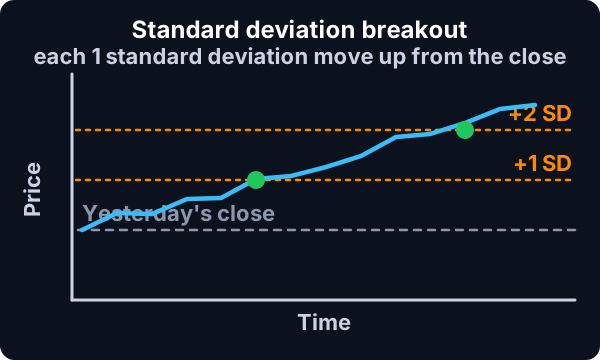
| Standard Deviation Breakout (BBU) | Fires when price breaks out one or more standard deviations above the prior close. |
| Standard Deviation Breakdown (BBD) | The same move to the downside. |
| Range Contraction (RC) | Days in a row the daily range has shrunk. A squeeze proxy. |
| NR7 (15 Minute) (NR7) | Narrowest range of the last seven bars. |
| Consolidation (C) | A tight consolidation forming, picked on the best timeframe for each stock. |
| 5 Minute Consolidation Breakout (CBO5) | Price breaks out of a 5 minute consolidation. |
| Position in Consolidation (RCon) | Where price sits inside its consolidation range. Above 100 means it broke out the top. |
Most intraday alerts also come in 10, 15 and 30 minute versions. The help page for each lists them.
A squeeze is a stock whose bands have pulled in tight because the range has shrunk. Traders watch for it because quiet stretches often end with a bigger move.
Trade Ideas measures the quiet directly. Range Contraction (RC) counts the days in a row the daily range has gotten smaller. Consolidation (ConDays) counts days in a tight consolidation. Put a minimum on either one and you have a contraction scan.
Then add the trigger. NR7 (15 Minute) (NR7) fires on the narrowest bar of the last seven. 5 Minute Consolidation Breakout (CBO5) fires when price leaves a consolidation. For the full setup, see the squeeze scanner page.
For breakouts, put Position in Bollinger Bands (Daily) (Boll) at a minimum of 100 on an alert window. Only stocks trading above the upper daily band come through.
Add Relative Volume (RV) at 1.5 or more so the break has volume behind it. Then pair it with Standard Deviation Breakout (BBU), which fires when the move from the prior close reaches one standard deviation. The two together show a stock outside its band and moving hard today.
For intraday breakouts, swap in the 5 or 15 minute band filter. The higher the timeframe, the fewer alerts and the bigger the move each one marks.
Some traders go the other way. A stock far outside its lower band is stretched, and some look for a snap back toward the middle.
Set Position in Bollinger Bands (Daily) (Boll) to a max of 0 for stocks under the lower band, or a min of 100 for stocks over the upper band. Standard Deviation (BB) at a max of -3 shows stocks down three standard deviations or more today.
Stretched can stay stretched. A stock riding the upper band in a strong trend is not "due" to come back. Use the band reading as a place to look, not a signal by itself.
Charting apps and code-based screeners can draw bands on any chart, and some let you write a band rule. The difference here is speed and coverage: the band position is computed live for every US stock and handed to you as a sortable number or a streaming alert.
You do not write code. You set a min and a max.
The middle line is a simple moving average, usually 20 periods. The upper band is that average plus two standard deviations of price over the same 20 periods; the lower band is the average minus two.
When prices swing a lot, the standard deviation grows and the bands spread apart. When prices sit still, the bands pull in. That is all a squeeze is: the bands pulling in because the stock went quiet.
Because the bands come from the stock's own recent swings, a 3% move can be outside the bands on a sleepy utility and well inside them on a busy small cap. That is why traders read band position, not percent change, when they want "unusual for this stock."
The filters turn the bands into one number per stock. Think of it as where price sits on a ruler from the lower band to the upper band.
You can set a min, a max or both. A min of 40 and max of 60 finds stocks sitting near the middle line, which some traders use for pullback entries in a trend.
Running two timeframes together tightens a scan. A stock above its upper band on Position in Bollinger Bands (15 min) (Boll15) and also above 80 on Position in Bollinger Bands (Daily) (Boll) is strong on both the day chart and the intraday chart.
The reverse works for weakness. Some traders look for stocks near the top of the daily bands that are dipping toward the middle of the 15 minute bands, a pullback inside a strong trend.
Traders search for "narrow Bollinger Band" or "contraction" scans. In Trade Ideas the direct measures are Range Contraction (RC), which counts shrinking daily ranges, and Consolidation (ConDays), which counts days in a tight range. Narrow bands follow narrow ranges, so these find the same stocks without needing a band-width number.
A "band blast" usually means a stock bursting outside the bands on a big move. Standard Deviation (BB) measures today's move in standard deviations of the stock's daily volatility. A min of 2 shows stocks up two standard deviations or more, which on most days means outside the upper band. Standard Deviation Breakout (BBU) fires live when the move reaches one standard deviation and again as it grows.
Upper band breakout
| Alert or filter | Setting |
|---|---|
| Position in Bollinger Bands (15 min) (Boll15) | Min 100, at or above the upper 15 minute band. |
| Standard Deviation Breakout (BBU) | On. |
| Relative Volume (RV) | Min 2. |
Lower band bounce
| Alert or filter | Setting |
|---|---|
| Position in Bollinger Bands (15 min) (Boll15) | Max 0. |
| 15 Minute Hammer (HMR15) | On. |
| Change From 200 Day SMA (%) (MA200P) | Min 0. |
Example numbers, not a real trade
Position in Bollinger Bands (5 min) (Boll5), Position in Bollinger Bands (15 min), Position in Bollinger Bands (60 min) and the daily Position in Bollinger Bands (Daily) can run in the same Top List. A stock above its upper band on the 5, 15 and 60 minute charts at once is in a strong push on every intraday timeframe.
A close outside the band is not a reversal signal and not a breakout signal by itself. In a strong trend, price can walk along the band for days.
Short timeframes give a lot of readings. A 5 minute band touch happens many times a day on active stocks; add volume and price filters to cut it down.
Squeezes can break either way. Know where you are wrong before the move, not after.
Test your rules in a simulated account first.
Free account, just an email. No card. Live access for a limited time.
Plain answers to what traders search for.
A scanner that checks where each stock sits relative to its Bollinger Bands and shows the ones near or outside them. In Trade Ideas the band position is a live filter from 0 (lower band) to 100 (upper band).
Use Range Contraction (RC) or Consolidation (ConDays) to find shrinking ranges, then turn on NR7 (15 Minute) (NR7) and 5 Minute Consolidation Breakout (CBO5) to see the break. The squeeze scanner page has the full setup.
Not a single alert by that name. Put the band filter at a min of 100 on an alert window, and only stocks above the upper band come through.
Daily, 5, 15 and 60 minute band positions, each as its own filter.
Those let you write or pick a band rule and run it. Trade Ideas computes the band position live on every US stock and streams the result, with no code.
You can try it with a free account, just an email, no card. Live access is for a limited time, then it is part of a paid plan.
0 is the lower band, 50 the middle, 100 the upper band. Below 0 or above 100 is outside the bands.
Yes, with Position in Bollinger Bands (60 min) (Boll60).
Past results, including backtests, don't guarantee future results.
Free account, just an email. No card. Live access for a limited time. Ready to buy? See plans & pricing

