
Light Mode

Every break of support or resistance, across the market, the moment it happens.
Trade Ideas draws its own support and resistance lines on every stock and alerts when price crosses them.
Free account, just an email. No card. Live access for a limited time.

Named to the Inc. 5000 list of America’s fastest-growing private companies six years in a row (2017–2022).

Investopedia: Best Short Term Stock Screener, 2024
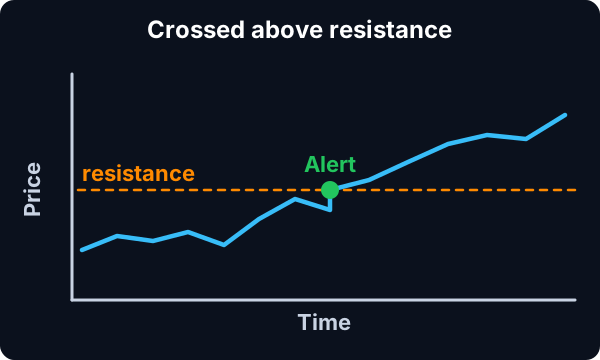
A resistance line sits where a stock has traded a lot but not gone above. Support is the same below. Trade Ideas finds those lines for each stock and fires when price breaks through.
Streaming Alerts (Scanner) run in TI Pro, our desktop app for Windows (on a Mac, through Parallels). See the Support and Resistance alerts.
Stocks breaking a level that has held. Levels matter because many traders watch the same ones. When price finally gets through, stops and new orders tend to pile in.
You do not draw the lines. Trade Ideas works them out from where each stock has traded.
| Alert | What it does |
|---|---|
| Crossed Above Resistance (CAR) | Crosses above resistance. Fires sooner, with less confirmation. |
| Crossed Above Resistance (confirmed) (CARC) | Crosses above resistance, volume confirmed. |
| Crossed Below Support (CBS) | Crosses below support. |
| Crossed Below Support (confirmed) (CBSC) | Crosses below support, volume confirmed. |
| Crossed Daily Highs Resistance (CDHR) | Breaks above prior daily highs, like a 5, 10 or 20-day high. Fires when the day count changes. |
| Crossed Daily Lows Support (CDLS) | Breaks below prior daily lows. |
| Channel Breakout (CHBO) | Breaks out of a channel. |
| Channel Breakdown (CHBD) | Breaks down out of a channel. |
Crossed Daily Highs Resistance (CDHR) tells you how many days of highs the stock just cleared. A break of a 20-day high reads very differently from a break of yesterday's high, and the alert description shows the count.
Breakouts. Buy the break of resistance, stop back under the line.
Breakdowns. Short the loss of support.
Failed breaks. A break that reverses back through the line fast is its own setup.
See the breakout scanner for range and channel breaks.
A resistance line is drawn where a stock has traded a lot but not gone above. The more trading near a price without getting through, the stronger the line. Support is the mirror image.
Trade Ideas works these out from each stock's own trading, so you get levels on every stock without drawing anything.
Real levels are zones, a few cents wide on cheap stocks and more on expensive ones.
A channel is support and resistance that slope together. Channel Breakout (CHBO) and Channel Breakdown (CHBD) fire on breaks of the channel, up or down.
Broken resistance often becomes support, and broken support becomes resistance. Some traders wait for price to come back and test the old line before acting.
Add Relative Volume (RV) so you see breaks with volume. The confirmed alerts already require it.
Pivot levels are another kind of support and resistance, built from yesterday's high, low and close. Distance From Pivot (Pivot), Distance From Pivot R1 (PivotR1) and Distance From Pivot S1 (PivotS1) show distance to them.
If you trade fast stocks and want the first look, use CAR and CBS. If you would rather see fewer, stronger alerts, use CARC and CBSC. Many traders keep the confirmed ones on sound and the unconfirmed ones silent.
| Alert or filter | What it does |
|---|---|
| Crossed Above Resistance (CAR) | Fires when price moves above one of Trade Ideas’ own resistance lines. |
| Crossed Below Support (CBS) | The same for support, on the way down. |
| Crossed Daily Highs Resistance (CDHR) | Fires when price passes the highs of past days, and says how many days. |
| Crossed Daily Lows Support (CDLS) | The same for prior daily lows. |
| Channel Breakout (CHBO) | Fires when price leaves a channel up. |
You do not draw anything. Each alert description gives the level and how long it held, so you can check it on the chart.
Example numbers, not a real trade
Many traders put orders at whole dollars, so $50.00 can act as a level even without a past turn. Decimal (Price Cents) (Dec), Decimal (Price Cents), looks only at the cents after the decimal point, so it can find stocks sitting right at a whole dollar, like $24.98 to $25.02. Position in Previous Day's Range (RPD) shows where price sits in yesterday’s range, which is another set of levels traders watch every day.
Our learning center covers how to draw and use zones instead of single lines: support and resistance zones.
Crossed Daily Highs Resistance (CDHR) fires only when the number of days in the new high changes. A stock crossing a 5 day high fires once, then fires again if it clears a 10 day high, and so on. The description tells you which. Crossed Daily Lows Support (CDLS) does the same on daily lows. This makes the alert a quick way to see when a stock moves through layer after layer of old highs.
The premarket high and low act as the first levels of the day. Position in Pre-Market Range (RPM), Position in Pre-Market Range, reads 100 at the premarket high and 0 at the low. Set a min of 100 to see stocks breaking out above it once the bell rings, or a max of 0 for breakdowns.
Floor trader pivots are calculated from yesterday’s high, low and close. Distance From Pivot (Pivot) shows distance from the main pivot, and Distance From Pivot R1 (PivotR1) and Distance From Pivot S1 (PivotS1) show distance from the first resistance and support levels. Set a narrow range around zero to see stocks sitting right on one.
Level break window
| Alert or filter | Setting |
|---|---|
| Crossed Above Resistance (confirmed) (CARC) | On. |
| Crossed Below Support (confirmed) (CBSC) | On. |
| Crossed Daily Highs Resistance (CDHR) | On. |
| Relative Volume (RV) | Min 1.5. |
| Spread (Spread) | Max 10 cents. |
Run the confirmed versions in the main window and the first-tick versions in a second, quieter one. You will see the early break and the confirmation separately.
Yesterday’s high and low are the levels almost every trader has on the chart. Position in Previous Day's Range (RPD) reads 100 at yesterday’s high and 0 at yesterday’s low.
Prior-day high break
| Alert or filter | Setting |
|---|---|
| Position in Previous Day's Range (RPD) | Min 100. Price is above yesterday’s high. |
| Crossed Daily Highs Resistance (CDHR) | On. Fires as it crosses the prior daily high. |
| Relative Volume (RV) | Min 1.5. |
| Time Of Day (Time) | Min 15, to skip the first minutes. |
Prior-day low hold
| Alert or filter | Setting |
|---|---|
| Position in Previous Day's Range (RPD) | Max 5. Price is at or near yesterday’s low. |
| 15 Minute Bottoming Tail (BT15) | On. A bottoming tail on the test. |
| 5 Minute Green Bar Reversal (GBR5) | On. A green bar reversal off the low. |
Whole dollars, and especially $10, $50 and $100, draw orders. Decimal (Price Cents) (Dec) looks only at the cents, so a window with it set to find prices within a couple of cents of a whole dollar shows stocks sitting right on one.
Round-number test
| Alert or filter | Setting |
|---|---|
| Decimal (Price Cents) (Dec) | Near the whole dollar, such as $x.98 to $x.02. |
| Price (Price) | $10 and up, where a whole dollar is a real level. |
| 5 Minute Bottoming Tail (BT5) | On, for a bounce off the number. |
| 5 Minute Topping Tail (TT5) | On, for a rejection at the number. |
A break of a round number on volume can run to the next one. A stall right under it is a common place for longs to take profit.
Lines are zones, not exact prices. Expect some back and forth.
Unconfirmed alerts fire sooner and fail more.
Test your rules in a simulated account first.
Free account, just an email. No card. Live access for a limited time.
Plain answers to what traders search for.
A scanner that alerts when stocks break through support or resistance levels. Trade Ideas finds the levels and streams the breaks.
No. Trade Ideas works them out for each stock.
CARC waits for volume confirmation, so it fires later and with more behind it.
CDHR fires on breaks of multi-day highs, and the alert shows how many days.
You can try it with a free account, just an email, no card. Live access is for a limited time, then it is part of a paid plan.
Streaming Alerts run in TI Pro, our desktop app for Windows. On a Mac, traders run it through Parallels. Top Lists (Screeners) also run in the Web Dashboard, in a browser.
A scan for stocks breaking through a level. Trade Ideas streams those breaks as they happen.
Past results, including backtests, don't guarantee future results.
Free account, just an email. No card. Live access for a limited time. Ready to buy? See plans & pricing

