







 CHBO
▲ Bullish
CHBO
▲ Bullish
Streaming Alert (Scanner)
Channel Breakout Alert (CHBO)
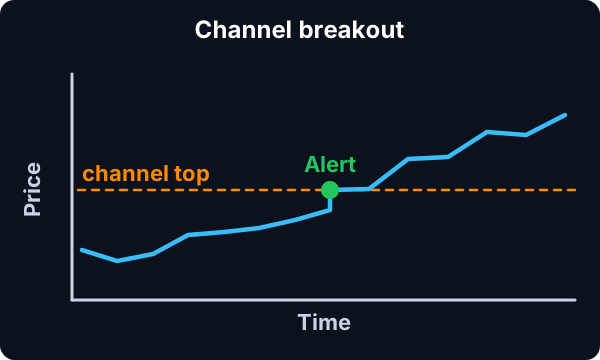
Find stocks breaking out of a consolidation channel in real time with Trade Ideas Streaming Alerts (Scanner). A channel breakout is when a consolidation ends abruptly with a move up. This fast version works on about a 1 minute scale and can give some false signals.
Know when price crosses your line.
Free account, just an email. No card. Live access for a limited time.
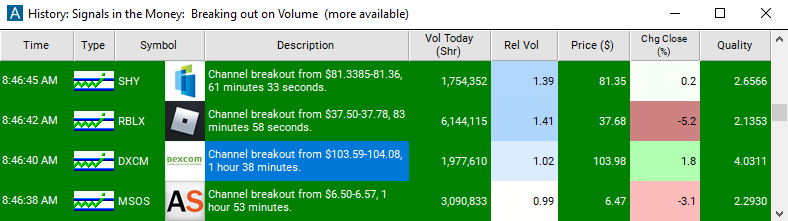
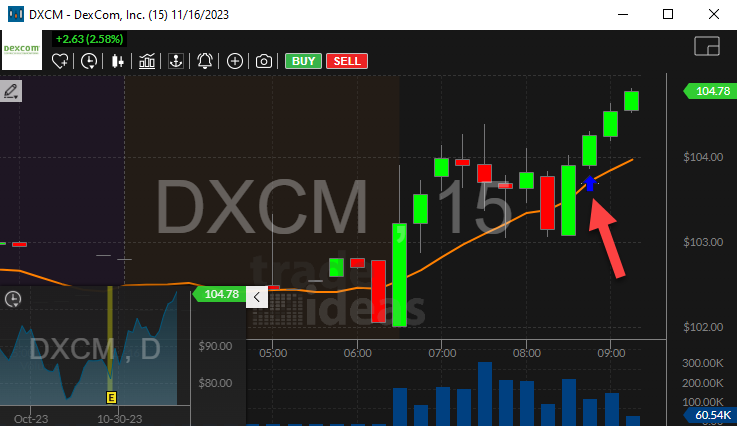
Streaming Alerts push each Channel Breakout alert the moment it triggers.
How Trade Ideas finds it: by default, the channel breakout alert will appear whenever a consolidation pattern ends abruptly by upward movement. See Trade Ideas plans and pricing to run it live.
How the Channel Breakout alert works
The user sees this alert whenever a consolidation pattern ends abruptly by upward movement. This alert attempts to identify the same chart patterns as its confirmed counterparts. The primary difference is that this alert attempts to notify the user as quickly as possible, while the confirmed alert waits until the chart pattern is clearer. As a trade-off for being notified sooner, the user may receive some false signals.
Very roughly speaking this alert is on the same time-scale as a one minute chart, and the confirmed version is on the same time-scale as a 15 minute chart. This alert pays less attention to volume and rate of price change than the confirmed version. This alert pays more attention to the order book and the precise position of support and resistance than the confirmed version. This alert is more common than the confirmed version.
Keep in mind
The volume confirmed version of this alert requires volume confirmed running up patterns. This alert does not require a corresponding running up alert. This alert includes analysis very similar to the analysis used by the running up alert. This alert can be triggered much more quickly than a running up alert.
Default settings
By default, the channel breakout alert will appear whenever a consolidation pattern ends abruptly by upward movement.
Custom settings
Settings
For 'Channel Breakout' alerts, you have the option to use an alert specific filter. This filter is located immediately to the right of the corresponding alert and is always optional. You can decide to leave it blank if you want to receive more alerts, or you can fill it in to restrict the number of alerts you receive. This filter allows you to specify the quality of the alert. When you set a higher number for this filter, you are telling the alerts server to display only alerts that meet a higher quality standard, resulting in fewer alerts being shown.
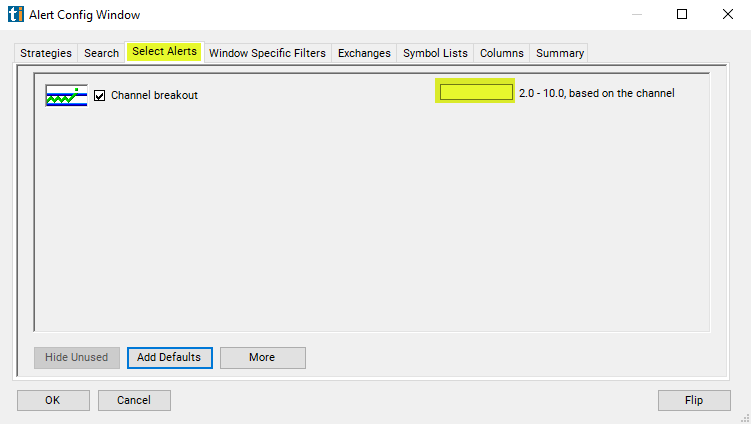
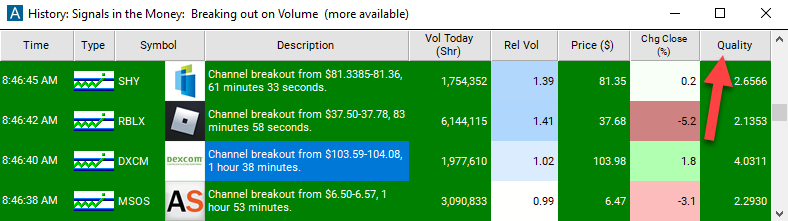
When setting an alert for 'Channel Breakout', the user can filter channel breakouts based on the quality of the consolidation pattern which was just broken. The quality of a consolidation is based on the chance that the consolidation pattern could be random, rather than interesting. The more time and volume in a consolidation, the higher the quality. For a given stock, the smaller the range, the higher the quality.
Settings
For different stocks, historical volatility is used to make the quality scales match. 2 is the lowest quality that the alerts server ever reports. That is the default. 5 is the cutoff for a "tight" consolidation.
That is reported in the description of the consolidation alert. 10 is the best quality reported by the alerts server. 10 means that the top and bottom of the trading range, as reported in the consolidation alert, are the same. This does not mean that all the prints were at exactly the same price. It means that, statistically speaking, this pattern is as good as we can measure or expect.
Keep in mind
Note: The alerts server reports breakouts and breakdowns as quickly as possible. This means that the alerts server cannot say anything about the size or the speed of the move when it happens. The only meaningful data at this time is the quality of the consolidation.
What the alert shows you
The description of the alert will report the price at which the breakout occured.
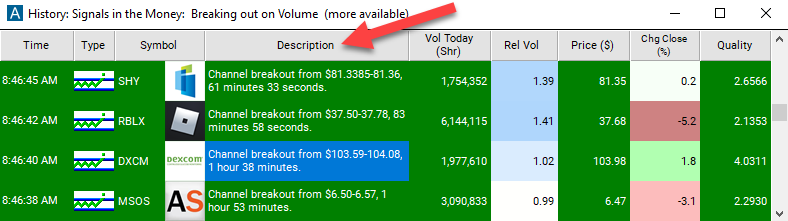
Add the quality column to a scan using the 'Channel Breakout' alert to see the Z-score of the stocks consolidation pattern that it is breaking out of.
Related alerts
Filters to pair with the Channel Breakout alert
FAQ
Find stocks breaking out of a range right now?
Turn on the Channel Breakout alert (CHBO) in Trade Ideas Streaming Alerts. By default, the channel breakout alert will appear whenever a consolidation pattern ends abruptly by upward movement.
What is the Channel Breakout alert?
A channel breakout is when a consolidation ends abruptly with a move up. This fast version works on about a 1 minute scale and can give some false signals.
How do I see fewer, higher-quality Channel Breakout alerts?
Use the optional alert-specific filter immediately to the right of the alert. A higher number tells the alerts server to show only higher-quality alerts, so fewer appear. Leave it blank to see more.