
Light Mode

Stocks where the 50-day crosses the 200-day, found across the market.
Build the 50/200-day test in the Formula Editor, then get live alerts on 200-day breaks and intraday 20/200 crosses.
Free account, just an email. No card. Live access for a limited time.

Named to the Inc. 5000 list of America’s fastest-growing private companies six years in a row (2017–2022).

Investopedia: Best Short Term Stock Screener, 2024
A golden cross is the 50-day simple moving average crossing above the 200-day. A death cross is the reverse. Trade Ideas has no single built-in "golden cross" alert, so the scan is built from real pieces:
sma_50 > sma_200, that you build. The Formula Editor is included in every TI Pro plan.Streaming Alerts (Scanner) run in TI Pro, our desktop app for Windows (on a Mac, through Parallels).
Stocks whose 50-day average has moved above the 200-day. Many investors and swing traders read that as the long-term trend turning up. A death cross, the 50 dropping under the 200, reads the other way.
These crosses are slow. They happen a few times a year on a given stock at most, so a scanner that checks the whole market saves a lot of chart flipping.
In the Formula Editor, add a custom filter with this formula. It uses the daily 50 and 200-day simple moving averages the editor exposes:
sma_50 > sma_200Set it to true and you get every stock currently in a golden cross state. For a death cross, flip the sign:
sma_50 < sma_200This shows the current state, not a time-stamped cross event. To find recent crosses, sort by how close the two averages are, for example with a formula like (sma_50 - sma_200) / sma_200 * 100, and look at small positive values.
Simple moving averages only; the Formula Editor does not support EMAs.
| Alert or filter | What it does |
|---|---|
| Crossed Above 200 Day Moving Average (CA200) | Price crosses above the 200-day moving average during the session. |
| Crossed Below 200 Day Moving Average (CB200) | Price crosses below the 200-day moving average. |
| Crossed Above 50 Day Moving Average (CA50) | Price crosses above the 50-day moving average. |
| 20 SMA Crossed Above 200 SMA (5 Min) (YCAD5) | 20 period SMA crosses above the 200 period SMA, 5 minute chart. |
| 20 SMA Crossed Above 200 SMA (15 Min) (YCAD15) | The same on 15 minute bars. |
| 20 SMA Crossed Below 200 SMA (5 Min) (YCBD5) | 20 period SMA crosses below the 200, 5 minute. |
| 20 SMA Crossed Below 200 SMA (15 Min) (YCBD15) | The same on 15 minute bars. |
| Change From 50 Day SMA (%) (MA50P) | How far price is from the 50-day SMA, in percent. |
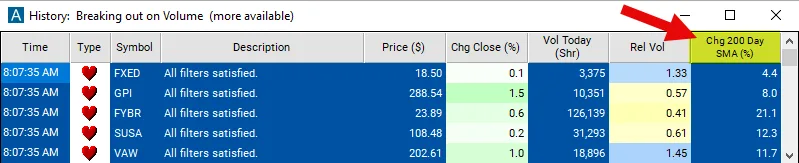
| Change From 200 Day SMA (%) (MA200P) | How far price is from the 200-day SMA, in percent. |
| 200 Day SMA (SMA200) | The 200-day SMA itself, in dollars. |
The golden cross compares two averages. A 200-day break compares price to one average. Price crossing the 200-day usually happens before the 50-day turns, so CA200 is often the earlier sign.
Many traders watch both: Crossed Above 200 Day Moving Average (CA200) for the early break, the formula for the confirmed state.
Swing entries. A fresh golden cross plus a pullback to the 50-day.
Filters for other scans. Add the formula to a breakout scan so you only trade breakouts in long-term uptrends.
Exits. A death cross or a 200-day break as a reason to step aside.
For shorter crosses, see the moving average crossover scanner.
On intraday charts, the closest match is the 20 period SMA crossing the 200. 20 SMA Crossed Above 200 SMA (5 Min) (YCAD5) and 20 SMA Crossed Above 200 SMA (15 Min) (YCAD15) fire it on 5 and 15 minute bars, where 200 bars covers a few days of trading. Some day traders call this an intraday golden cross.
A stock where the 50-day sits just under the 200-day and both are close to price is a stock that may cross soon. In the Formula Editor, a formula like (sma_50 - sma_200) / sma_200 * 100 gives the gap in percent. Sort by it and look at small negative values.
The golden cross is an old market term. Financial news reports it on big index funds and well-known stocks, which is part of why so many traders watch it. Watching the same thing as everyone else is not the same as having an edge, so test it.
Flip the formula to sma_50 < sma_200 and you have the death cross. Run both in the Formula Editor as two custom filters, and a Top List can show which side of the cross every stock is on.
For live breaks, Crossed Below 200 Day Moving Average (CB200) fires when price crosses below the 200 day, the usual early warning before a death cross.
| Alert or filter | What it does |
|---|---|
| Change From 50 Day SMA (%) (MA50P) | Distance from the 50 day in percent. A small positive value means price just cleared it. |
| Change From 200 Day SMA (%) (MA200P) | Distance from the 200 day. |
| Consecutive Days (Up) | Consecutive up days. Three or more after a cross shows follow-through. |
| Dollar Volume (DV) | Dollar volume, to keep the list liquid. |
The cross is slow on purpose. Investors use it to decide whether to own a stock at all, not when to buy it today. Many check it weekly. The custom formula in a Top List makes that weekly check a single click.
Golden crosses lag. By the time the 50 crosses the 200, much of the turn has happened.
In sideways markets, the averages can cross back and forth.
Test your rules in a simulated account first.
Free account, just an email. No card. Live access for a limited time.
Plain answers to what traders search for.
The 50-day simple moving average crossing above the 200-day. The reverse is a death cross.
No built-in one. You build the 50/200-day test in the Formula Editor, included in every TI Pro plan, and use the 200-day break alerts for live events.
Use the formula sma_50 < sma_200, and the Crossed Below 200 Day Moving Average alert for live breaks.
No. The Formula Editor works with simple moving averages, not EMAs.
You can try it with a free account, just an email, no card. Live access is for a limited time, then it is part of a paid plan.
No. It is a lagging trend signal. Plenty of crosses fail. Backtest your rules.
Many traders read it as bullish because it shows a longer-term uptrend. It lags, so the move may be partly done.
Past results, including backtests, don't guarantee future results.
Free account, just an email. No card. Live access for a limited time. Ready to buy? See plans & pricing

