
Light Mode

Calls, Puts and Movers in One View
Written by Daniel Mirkin, CEO of Trade Ideas, which makes the software described here.
Free account, just an email. No card. Live access for a limited time.

Named to the Inc. 5000 list of America’s fastest-growing private companies six years in a row (2017–2022).

Investopedia: Best Short Term Stock Screener, 2024
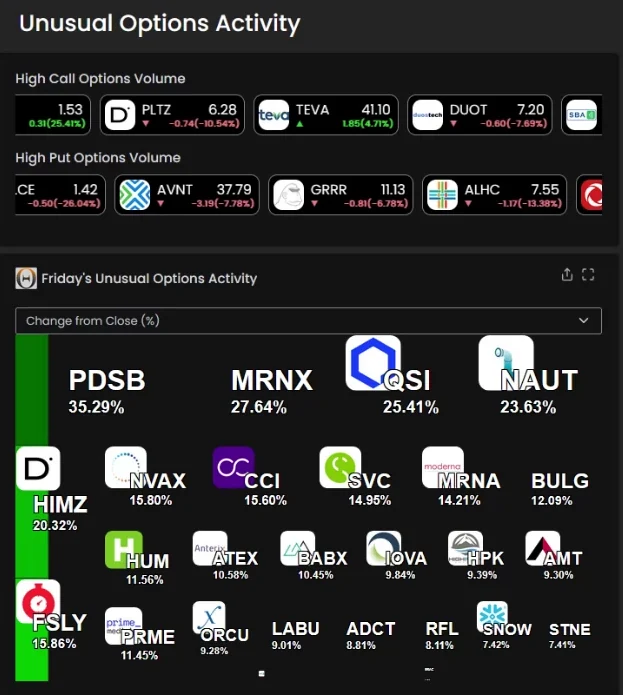
The short answer: The Unusual Options Activity channel in the Trade Ideas Web Dashboard shows a heat map of stocks with unusual options volume, above two Top Lists: High Call Options Volume and High Put Options Volume. Hover any tile for a snapshot chart. TI Pro, the desktop software, has the same data for scanning.
The Web Dashboard has a ready-made Unusual Options Activity channel. In the video below (from 3:59) Daniel opens it on the October 9, 2026 session: the two options volume Top Lists (Screeners) sit at the top, the heat map titled Friday's Unusual Options Activity sits below, and a Stock Race panel sits under that.
The High Call Options Volume Top List scrolls the stocks with heavy call volume, and the High Put Options Volume Top List does the same for puts. Each tile shows the stock's price and its change in dollars and percent. Top Lists are Trade Ideas' stock screener; in a live session they update every 15 seconds.
Trade Ideas covers U.S.-listed stocks. Its options data is volume-based: it flags unusual options volume on a stock, not individual contracts or order flow.
The heat map groups the stocks in the channel. The drop-down above it sorts by change from the close (the default in the video) and other measures. Green tiles are up, red tiles are down, and the label shows the percent move. Hover over a tile and a snapshot chart opens, so you can check the stock without clicking.
Unusual options volume tells you something is drawing attention. It does not tell you which way a stock will go. Treat it as a reason to look closer, not as a signal on its own.
Past results, including backtests, don't guarantee future results.
The channel shown here is in the Web Dashboard, and the live version is at trade-ideas.com/unusual-options-activity/. In TI Pro, the downloadable desktop software, the same unusual options data is available to scan and sort with Streaming Alerts (Scanner) and Top Lists (Screeners). See the streaming stock screener page for how the two work together.
Open the channel in any browser, Mac included; open a free account to sign in. Prefer desktop software? TI Pro installs on Windows and runs on a Mac under Parallels. See plans and prices.
Options volume on a stock that is well above its normal level. It shows a stock is drawing attention, not which way it will move.
In the Trade Ideas Web Dashboard, on the Unusual Options Activity channel, in any browser.
Two Top Lists (Screeners) on the same channel. One scrolls stocks with heavy call volume, the other stocks with heavy put volume, each with price and change.
No. Trade Ideas covers U.S.-listed stocks, and its options data is volume-based. It flags unusual options volume, not individual contracts.
Yes. TI Pro, the downloadable desktop software, has the same unusual options data to scan with Streaming Alerts and Top Lists.
Each tile is a stock. Green is up and red is down, with the percent move on the tile. Hover a tile for a snapshot chart.
No. It can come before a move either way, or before nothing at all. Past results, including backtests, don't guarantee future results.
Free account, just an email. No card. Live access for a limited time. Ready to buy? See plans & pricing

