
Light Mode

Trade Ideas doesn't have an official public API or webhooks. But you can program the scanner itself: write your own formulas, run them live across the whole US market, backtest them, and trade from them through your broker.
Free account, just an email. No card.

Named to the Inc. 5000 list of America’s fastest-growing private companies six years in a row (2017–2022).

Investopedia: Best Short Term Stock Screener, 2024
No official public API, no webhooks. Trade Ideas' alerts, Top Lists and AI run inside our own apps: TI Pro and the Web Dashboard. What you can do is program the scanner from the inside. The Formula Editor lets you script your own filters, they run live on Streaming Alerts and Top Lists across the whole market, OddsMaker backtests them, and Money Machine can trade from them through your broker.
Most people who search for an API want one of five things. Here is what Trade Ideas offers for each today, and where the honest answer is "not yet."
| You want to | In Trade Ideas today | Plan |
|---|---|---|
| Write your own scan logic | The Formula Editor: math, comparisons, Boolean logic and if-then on Trade Ideas data fields | TI Standard and TI Premium |
| Run it on the whole market, live | A saved formula works like a built-in filter on Streaming Alerts and Top Lists, across every US stock | TI Standard and TI Premium |
| Test it on history | OddsMaker replays your setup, formulas included, and shows every trade and its stats, with no code | TI Premium |
| Place or automate trades | Brokerage Plus connects to Interactive Brokers, Alpaca, TradeStation and E*TRADE, plus a simulator. Money Machine trades from your own scans with the rules you set. | Brokerage Plus: TI Pro; Money Machine: TI Premium |
| Skip the code entirely | Ask the AI Assistant in plain English and it builds the live Alert window or Top List for you | TI Standard and TI Premium |
| Send alerts to other apps (webhooks) | Not available today | — |
| Download raw market data by API | Not available; we don't sell a data feed | — |
The Formula Editor uses a C-style formula syntax with math operators, comparisons, Boolean logic and if-then, applied to Trade Ideas variables such as [Float] and [RV]. Save a formula, and it works like any built-in filter: set a min or a max, and it narrows live Streaming Alerts and Top Lists across the whole market.
v_up_1 / v_up_5 * 5v_up_1 / v_up_5 * 5: last minute's volume against the average one-minute pace of the prior five. Set the minimum to 2 to see only stocks trading at twice that pace.[Vol_10]/[Float]*100: the percent of the float traded in the last 10 minutes.(v_up_5/(v_up_10-v_up_5))*100: volume in the last 5 minutes compared with the 5 minutes before that.A formula combines fields Trade Ideas already provides; the rule you build is the custom part. Every field is documented in the filter library (249 filters). Coming from Pine Script or another chart language? See stock scanner scripting.
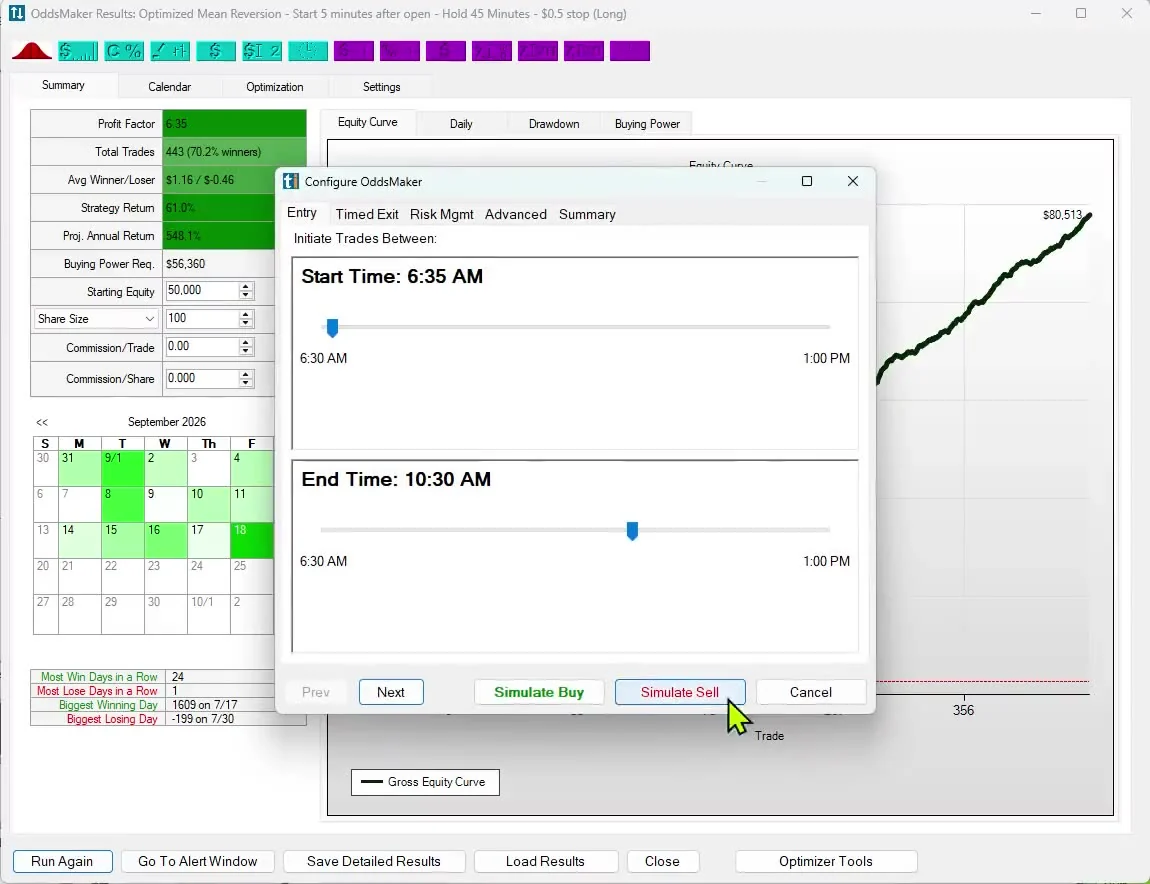
Drop your formula into a strategy and OddsMaker backtests it against real market events (TI Premium). When you are ready, place the trades by hand through Brokerage Plus, practice in the simulator, or let Money Machine trade from your scan with the entries, exits and risk rules you set (TI Premium).
Past results, including backtests, don't guarantee future results.
Want an API? Tell us what you would build with it. Requests shape what we build next. Contact us.
No. Trade Ideas doesn't have an official public API. You can program the scanner from the inside instead: the Formula Editor scripts your own filters that run live on Streaming Alerts and Top Lists across the whole market, OddsMaker backtests them, and Money Machine can trade from them through your broker.
No. Trade Ideas alerts don't post to outside apps or webhooks today. Alerts, Top Lists and the AI Assistant run inside TI Pro and the Web Dashboard.
Yes. The Formula Editor uses a C-style formula syntax with math, comparisons, Boolean logic and if-then on Trade Ideas data fields. A saved formula works like a built-in filter on live Streaming Alerts and Top Lists. It is included with TI Standard and TI Premium.
Yes. Put your formula in a strategy and OddsMaker backtests it against real market events, with no code. OddsMaker comes with TI Premium. Past results, including backtests, don't guarantee future results.
Yes. Money Machine, on TI Premium, places and manages trades from your own scans with the rules you set, through Brokerage Plus or in a simulator.
Brokerage Plus connects TI Pro to brokers including Interactive Brokers, Alpaca, TradeStation and E*TRADE, plus a simulator for practice.
No. Trade Ideas doesn't sell a raw data feed. Data vendors such as Massive (formerly Polygon.io) provide market data APIs; Trade Ideas turns live data into alerts, rankings and trade ideas inside its own apps.
Free account, just an email. No card. Ready to buy? See plans & pricing

