







Alert & Filter Category
Fundamental Stock Filters
Float, Short Float, Market Cap, P/E and Earnings Date
Find stocks by fundamentals (float, short float, market cap, P/E and PEG ratio, EPS and revenue growth, dividend, beta and earnings date) and see only the ones that are moving right now, with Trade Ideas Streaming Alerts (Scanner) and Top Lists (Screeners).
Every setup in this group, in real time.
Free account, just an email. No card. Live access for a limited time. See plans & pricing.
Key point
Searching for a fundamental stock screener or a low float stock screener? In Trade Ideas, this is Streaming Alerts: the fundamentals sit on top of live alerts, so the value screen and the move are in one window.
Seeing a stock that passes your fundamental screen start to move as it happens helps active traders. These values change once a day, so the real-time part is the alert they ride on: Streaming Alerts apply them the moment each alert fires, and you see only the stocks that pass while they are moving.
Key point
Fundamentals filters hold company data that changes once a day or less: shares and float, short interest, ownership, balance sheet, income, growth, valuation, dividend, beta and the next earnings date.
How Trade Ideas finds it: Float Filter (Float): adjust the minimum value to 1,000,000,000 to see only stocks with a more substantial float size. Adjust the maximum value to 10,000,000 to see only stocks with a float of 10,000,000 or less. Market Cap Filter (MCap): adjust the minimum value to 10,000,000,000 to see only stocks with a large market cap. Adjust the maximum value to 300,000,000 to see only stock with a small market cap.
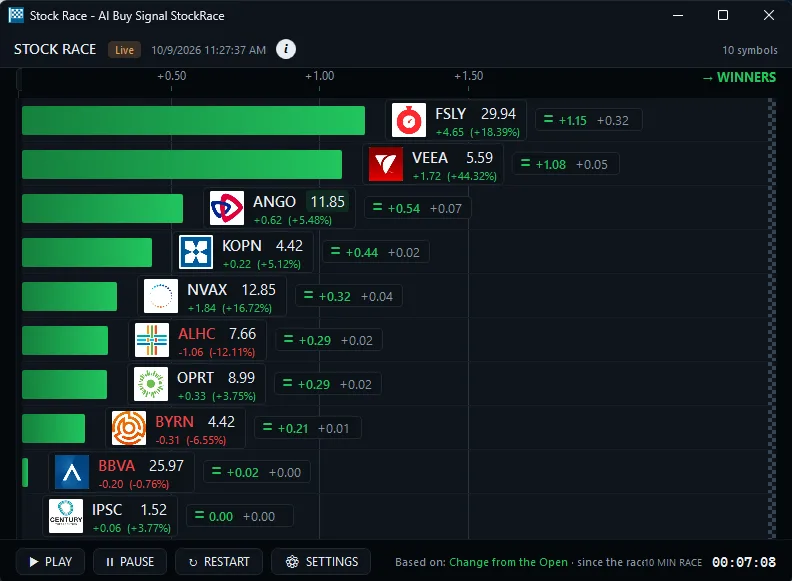
Find stocks by fundamentals, then watch them move
Low float stocks and high short float
Settings
Float, short float, short growth and days to cover. How Trade Ideas finds it: on the Short Float Filter (SFloat) page, adjust the minimum value to 20 to see only stocks with a high short float percentage (20% or more). Adjust the maximum value to 10 to see only stocks with a low short float percentage (10% or less).
Filters: Shares Outstanding Filter (ShOut) Days To Cover Filter (DTC) Short Growth Filter (ShortG) Short Float Filter (SFloat) Float Filter (Float)
Small cap and large cap stocks
Market cap and enterprise value. Find large-cap, small-cap or micro-cap stocks by market value. A min of $10 billion = large caps; a max of $300 million = small caps.
Filters: Market Cap Filter (MCap) · Enterprise Value Filter (Value) · Enterprise Value / Market Cap Ratio Filter (ValueMCap)
Low P/E, PEG and EPS growth
Valuation and growth. How Trade Ideas finds it: on the Price / Earnings Ratio Filter (PERatio) page, set the minimum value to 10 to see only stocks with a P/E Ratio of 10/1.
Filters: Income Filter (Income) Revenue Filter (Revenue) Quarterly Revenue Growth Filter (QRevG) EPS Filter (EPS) Estimated Annual EPS Growth Filter (EstAEPSG) Estimated Quarterly EPS Growth Filter (EstQEPSG) Quarterly Earnings Growth Filter (QEarnG) Price / Earnings Ratio Filter (PERatio) PEG Ratio Filter (PEG)
Dividend stocks and beta
Income and volatility vs. the S&P 500. How Trade Ideas finds it: on the Dividend Filter (Dividend) page, set the minimum value to 3 to see only stocks where the dividend is at least $3 per share.
Filters: Dividend Filter (Dividend) · Beta Filter (Beta)
Earnings today, tomorrow or this week
Earnings date windows. How Trade Ideas finds it: on the Earnings Date Filter (EarningD) page, min 0 and max 1 shows earnings reporting today; min 1 and max 2, tomorrow; min 0 and max 5, this week; min 5 and max 10, next week; min -1 and max 0, yesterday.
Filters: Earnings Date Filter (EarningD)
Balance sheet and ownership
Cash, debt, insiders and institutions. How Trade Ideas finds it: on the Held By Insiders Filter (Insider) page, adjust the minimum value to 20 to see only stocks where at least 20% of their shares are held by insiders.
Filters: Held By Insiders Filter (Insider) Held By Institutions Filter (Institution) Cash Filter (Cash) Current Assets Filter (Assets) Current Debt Filter (Debt) Cash / Debt Ratio Filter (CashDebt) Income / Debt Ratio Filter (IncomeDebt) Interest Income Filter (Interest)
All 28 Fundamentals filters
Market Cap
- Market Cap Filter (MCap): Find large-cap, small-cap or micro-cap stocks by market value. A min of $10 billion = large caps; a max of $300 million = small caps.
Shares Outstanding
- Shares Outstanding Filter (ShOut): Find stocks by shares outstanding, all the shares a company has issued that investors hold. Set a min of 1 billion for mega issuers, or a low max.
Days to Cover
- Days To Cover Filter (DTC): Find heavily shorted stocks by days to cover: short shares versus average volume. A min of 5 = heavy short interest; a max of 1 = light short interest.
Short Growth
- Short Growth Filter (ShortG): Find stocks where short interest is rising or falling. A min of 15 = short interest up 15%+ over the last month; a max of -10 = down 10%+.
Short Float
- Short Float Filter (SFloat): Find high short interest stocks by short float: shares sold short as a percent of the float. A min of 20 = heavily shorted; a max of 10 = lightly shorted.
Float
- Float Filter (Float): Find low float stocks, like 10 million shares or fewer, or large-float names. Float is the shares available to trade. Pair it with live volume alerts.
Held by Insiders
- Held By Insiders Filter (Insider): Find stocks with high insider ownership, the percent of shares held by executives, directors and other insiders. Set a min of 20 for 20%+ held.
Held by Institutions
- Held By Institutions Filter (Institution): Find stocks with high institutional ownership, the percent of shares held by funds, pensions and other institutions. Set a min of 50 for 50%+.
Cash
- Cash Filter (Cash): Find cash-rich stocks by cash and short-term investments on the latest quarterly balance sheet. Set a min of $500 million to see bigger cash piles.
Current Assets
- Current Assets Filter (Assets): Find stocks by current assets: cash, receivables, inventory and other assets expected to turn into cash within a year. Example: $500M to $1B.
Current Debt
- Current Debt Filter (Debt): Find low-debt companies: set a max such as $100 million in current debt. Debt is what a company owes through loans, bonds and other obligations.
Cash / Debt Ratio
- Cash / Debt Ratio Filter (CashDebt): Find companies with a strong cash-to-debt ratio, comparing cash holdings to total debt. Set a min of 10 for at least $10 of cash per $1 of debt.
Income
- Income Filter (Income): Find the most profitable companies by net income for the most recent fiscal year. Set a min of $3 billion for big earners, or screen out money-losers.
Income / Debt Ratio
- Income / Debt Ratio Filter (IncomeDebt): Find financially strong companies by income-to-debt ratio, comparing net income to total debt. Set a min of 20 to see a ratio of at least 20/1.
Interest Income
- Interest Income Filter (Interest): Find companies by interest income earned on interest-bearing assets in their investment portfolio. Set a min of $100 million to see big earners.
Revenue
- Revenue Filter (Revenue): Find stocks by total revenue over the last year. Set a min of $5 billion for large companies, or a low max for small, early-stage names.
Quarterly Revenue Growth
- Quarterly Revenue Growth Filter (QRevG): Find revenue growth stocks by quarterly revenue growth versus 12 months ago. Set a min of 50 for 50%+ growth, or a max of 0 for shrinking sales.
Enterprise Value
- Enterprise Value Filter (Value): Find stocks by enterprise value, a takeover-price measure that counts both equity and debt. Set a min of $10 billion to focus on large enterprises.
Enterprise Value / Market Cap Ratio
- Enterprise Value / Market Cap Ratio Filter (ValueMCap): Find leveraged or low-debt companies by EV-to-market-cap ratio. A smaller ratio suggests less debt relative to equity; a larger one more leverage.
EPS
- EPS Filter (EPS): Find stocks by earnings per share (EPS): net income after taxes and preferred dividends, per common share. Set a min of $3 to see $3+ EPS.
Estimated Annual EPS Growth
- Estimated Annual EPS Growth Filter (EstAEPSG): Find stocks with high estimated annual EPS growth, comparing current quarterly data to 12 months ago. Set a min of 25 for estimates up 25%+.
Estimated Quarterly EPS Growth
- Estimated Quarterly EPS Growth Filter (EstQEPSG): Find stocks with high estimated quarterly EPS growth versus the previous quarter. Set a min of 15 to see estimated quarterly earnings up 15%+.
Quarterly Earnings Growth
- Quarterly Earnings Growth Filter (QEarnG): Find earnings growth stocks by quarterly earnings growth, year over year. Set a min of 10 for earnings up 10%+, or a max of -10 for drops of 10%+.
Price / Earnings Ratio
- Price / Earnings Ratio Filter (PERatio): Find low P/E or high P/E stocks with the price/earnings ratio: share price divided by earnings per share. Set a min or max, such as a P/E of 10.
PEG Ratio
- PEG Ratio Filter (PEG): Find stocks by PEG ratio: P/E divided by expected earnings growth. Under 1 can mean paying less per unit of growth; a min of 1 finds pricier growth.
Earnings Date
- Earnings Date Filter (EarningD): Find stocks reporting earnings today (min 0, max 1), tomorrow, this week (0 to 5) or next week. Counted in days, skipping weekends.
Dividend
- Dividend Filter (Dividend): Find high dividend stocks by dividend per share. Set a min of $3 to see stocks paying at least $3 per share, then watch them with live alerts.
Beta
- Beta Filter (Beta): Find high beta or low beta stocks: volatility versus the overall market, usually the S&P 500. Min 1 / max 1.25 = close to market volatility.
Test it before you trade it

Don’t roll the dice. Test the odds. OddsMaker · TI Premium
Run any Fundamentals setup through OddsMakerTI Premium, the Trade Ideas backtesting tool: event-based backtesting across thousands of stocks, with no coding. Prefer finished trade ideas to building your own? Holly, the Trade Ideas AI, publishes its own signals: Holly AI signalsTI Premium.
Related categories
- Daily Stock Filters (28 shared)
- All alert and filter categories
FAQ
Show me small cap stocks with a low float that are moving right now?
Turn on the Short Float Filter (SFloat) in Trade Ideas Streaming Alerts. Adjust the minimum value to 20 to see only stocks with a high short float percentage (20% or more). Adjust the maximum value to 10 to see only stocks with a low short float percentage (10% or less). Related: Shares Outstanding Filter (ShOut), Days To Cover Filter (DTC), Short Growth Filter (ShortG), Float Filter (Float).
What are Fundamentals filters?
Fundamentals filters hold company data that changes once a day or less: shares and float, short interest, ownership, balance sheet, income, growth, valuation, dividend, beta and the next earnings date.
How do I combine fundamentals with real-time alerts?
Use the Market Cap Filter (MCap). Adjust the minimum value to 10,000,000,000 to see only stocks with a large market cap. Adjust the maximum value to 300,000,000 to see only stock with a small market cap.
How many filters are in the Fundamentals category?
The Fundamentals category has 28 filters. Each one links to its own help page with default settings and examples.
Is there a fundamental stock screener that works in real time?
Yes. In Trade Ideas, it is Streaming Alerts: the fundamentals sit on top of live alerts, so the value screen and the move are in one window. Each alert reaches you the moment it fires, not on the next refresh.
Can I backtest a strategy that uses Fundamentals filters?
Yes. Add Fundamentals filters to an alert-based strategy and test it in OddsMakerTI Premium, the Trade Ideas backtesting tool: event-based backtesting across thousands of stocks, with no coding.