







 QRevG
QRevG
Filter
Quarterly Revenue Growth Filter (QRevG)
Find revenue growth stocks in real time with Trade Ideas Streaming Alerts (Scanner) and Top Lists (Screeners). Quarterly Revenue Growth is the percent change in a company's current revenue compared with 12 months ago.
Watch the market turn, stock by stock.
Free account, just an email. No card. Live access for a limited time.
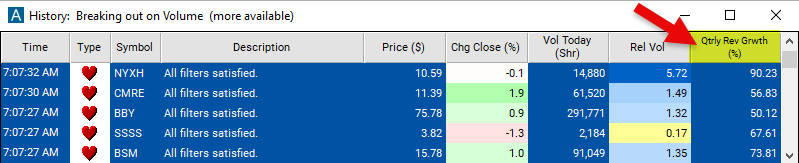
Seeing a fast-growing company start to move as it happens helps active traders. The Quarterly Revenue Growth filter value changes once a day, so Streaming Alerts apply it the moment each alert fires: you see only the stocks that pass it, while they are moving.
How Trade Ideas finds it: set the minimum value to 50 to see only stocks with a current revenue 50% higher than the previous quarter. Set the maximum value to 0 to see only stocks with a current revenue that is less than it was the previous quarter. See Trade Ideas plans and pricing to run it live.
How the Quarterly Revenue Growth filter works
Quarterly Revenue Growth refers to the percentage increase or decrease in a company's current revenue to that of 12 months ago. It is a key metric used by investors and analysts to assess a company's financial performance and growth trajectory over short-term periods.
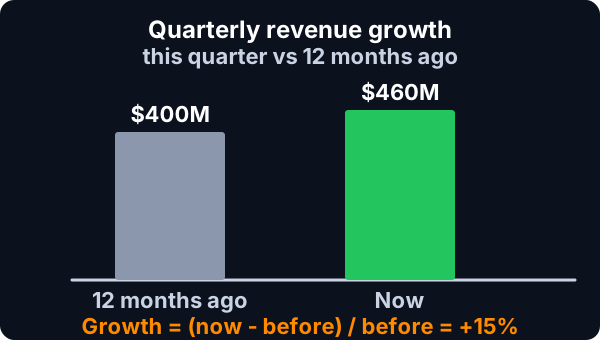
The result is expressed as a percentage, representing the increase or decrease in revenue relative to the previous quarter. A positive percentage indicates revenue growth, while a negative percentage indicates revenue decline.
Quarterly Revenue Growth provides insights into a company's sales momentum and revenue trends over shorter time frames, allowing investors to assess the company's ability to generate increasing or decreasing sales volumes.
Here's how it is used in stock trading:
Trader tip
Performance Evaluation: Traders use Quarterly Revenue Growth to evaluate a company's recent financial performance. Positive revenue growth may indicate strong demand for the company's products or services, effective sales strategies, and overall business expansion. Conversely, negative revenue growth may raise concerns about declining sales, market saturation, or operational challenges.
Comparative Analysis: Quarterly Revenue Growth allows traders to compare a company's revenue performance with its peers and industry averages. By analyzing revenue growth rates across companies within the same sector or industry, traders can identify relative winners and losers and make investment decisions accordingly.
Quarterly Revenue Growth filter settings
Settings
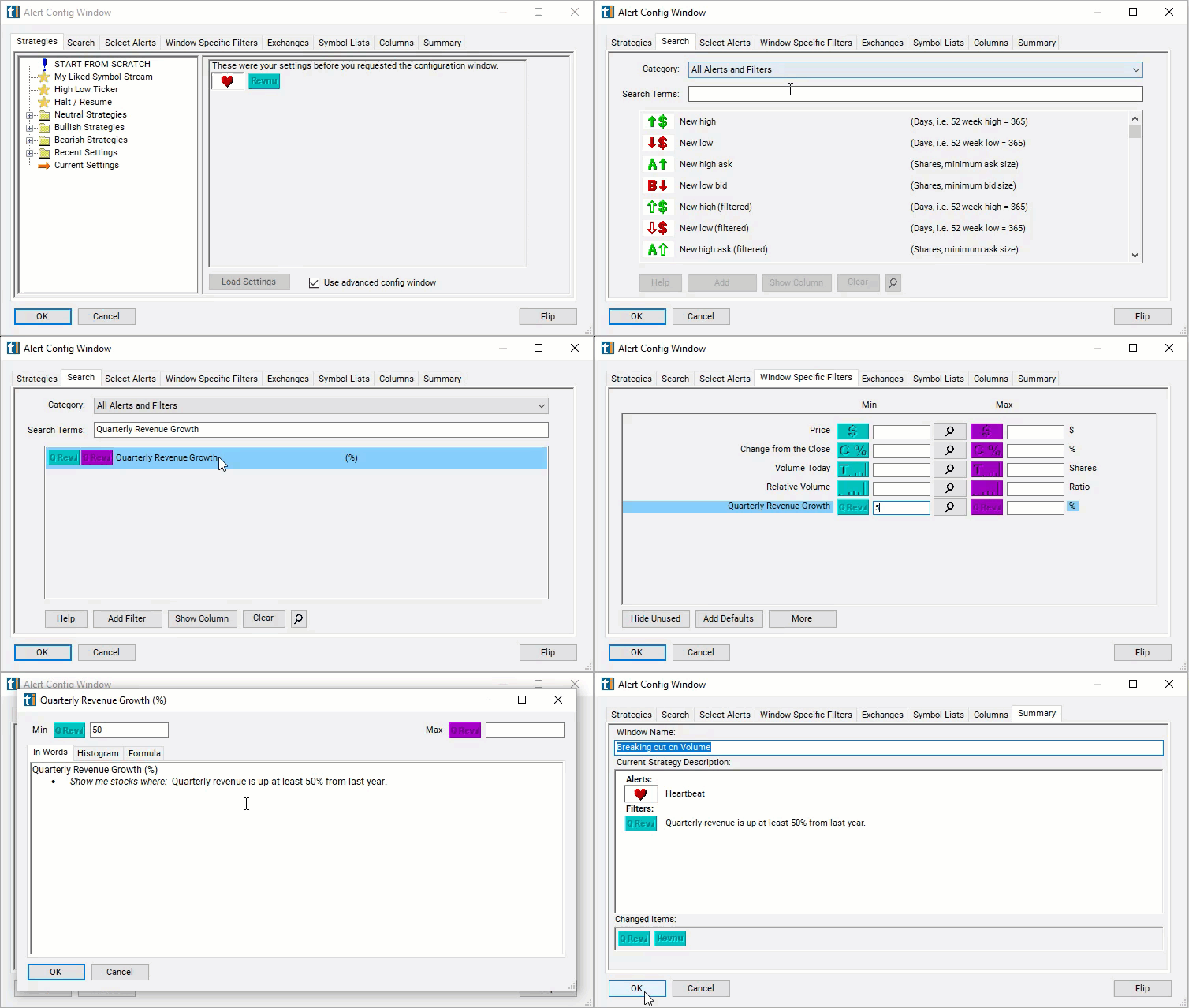
Configuring the "Quarterly Revenue Growth" filter is simple and can be done within the Window Specific Filters Tab of the Configuration Window in your Alert or Top List (Screener) window.
Here's how to set up the filter in your configuration window:
- Set the minimum value to 50 to see only stocks with a current revenue 50% higher than the previous quarter.
- Set the maximum value to 0 to see only stocks with a current revenue that is less than it was the previous quarter.
Using the Quarterly Revenue Growth Filter
The "Quarterly Revenue Growth" filter can be used in various trading strategies, including:
- Momentum Trading: Momentum trading strategies involve buying stocks of companies with positive Quarterly Revenue Growth and selling stocks of companies with negative or declining revenue growth. Traders aim to ride the momentum of revenue growth trends and capitalize on short-term price movements driven by changing revenue expectations.
- Earnings Surprises: Traders may focus on stocks with positive earnings surprises resulting from better-than-expected Quarterly Revenue Growth. By identifying companies that exceed revenue expectations in their earnings reports, traders can initiate long positions to capture potential price appreciation fueled by positive revenue surprises.
- Sector Rotation: Sector rotation strategies involve rotating investments among different sectors based on Quarterly Revenue Growth trends and sector performance. Traders may allocate capital to sectors or industries with strong revenue growth prospects while reducing exposure to sectors experiencing revenue declines or slower growth. Sector rotation strategies aim to capitalize on changing revenue dynamics across industries and sectors.
Filters to combine with Quarterly Revenue Growth
Categories
FAQ
Which stocks have the fastest revenue growth?
Add the Quarterly Revenue Growth filter (QRevG) to a Trade Ideas Streaming Alerts or Top List (Screener) window. Set the minimum value to 50 to see only stocks with a current revenue 50% higher than the previous quarter. Set the maximum value to 0 to see only stocks with a current revenue that is less than it was the previous quarter.
What is the Quarterly Revenue Growth filter?
Quarterly Revenue Growth is the percent change in a company's current revenue compared with 12 months ago.
How do I find revenue growth stocks?
Use the Quarterly Revenue Growth filter (QRevG) in Trade Ideas Streaming Alerts and Top Lists to find revenue growth stocks. Quarterly Revenue Growth is the percent change in a company's current revenue compared with 12 months ago.