







 Revenue
Filter
Revenue Filter (Revenue)
Find stocks by total revenue over the last year in real time with Trade Ideas Streaming Alerts (Scanner) and Top Lists (Screeners). The Revenue filter screens by a company's total sales over the last year.
Watch the market turn, stock by stock.
Free account, just an email. No card. Live access for a limited time.
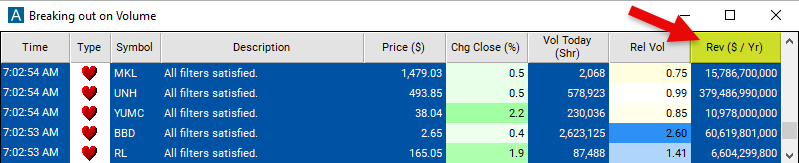
Seeing a big-revenue stock start to move as it happens helps active traders. The Revenue filter value changes once a day, so Streaming Alerts apply it the moment each alert fires: you see only the stocks that pass it, while they are moving.
How Trade Ideas finds it: set the minimum value to 5,000,000,000 to see only stocks with at least $5 billion in revenue in the last year. See Trade Ideas plans and pricing to run it live.
How the Revenue filter works
The revenue filter is a tool used to screen and analyze stocks based on their total revenue or sales generated over the last year. This filter allows traders to focus on companies that meet certain revenue criteria, helping them identify investment opportunities and make informed trading decisions. This is expressed in terms of $. Here's a breakdown of how the revenue filter works:
Definition: The revenue filter allows traders to filter stocks based on their total revenue, which represents the total amount of money earned by a company from its primary business activities, such as sales of goods or services. Revenue is a key indicator of a company's top-line growth and overall financial performance.
Purpose: The revenue filter serves several purposes in stock trading:
- Identifying Growth Opportunities: Traders may use the revenue filter to identify stocks of companies with robust revenue growth, indicating potential investment opportunities in companies that are expanding their market presence and increasing their market share.
- Assessing Financial Health: Revenue is a fundamental metric used to assess a company's financial health and viability. Traders may filter stocks based on revenue to focus on companies with stable or growing revenue streams, which may be indicative of strong underlying business fundamentals.
- Sector and Industry Analysis: Traders can use the revenue filter to conduct sector or industry analysis by comparing revenue metrics across different companies within the same sector or industry. This allows traders to identify trends, outliers, and opportunities within specific sectors based on revenue performance.
Revenue filter settings
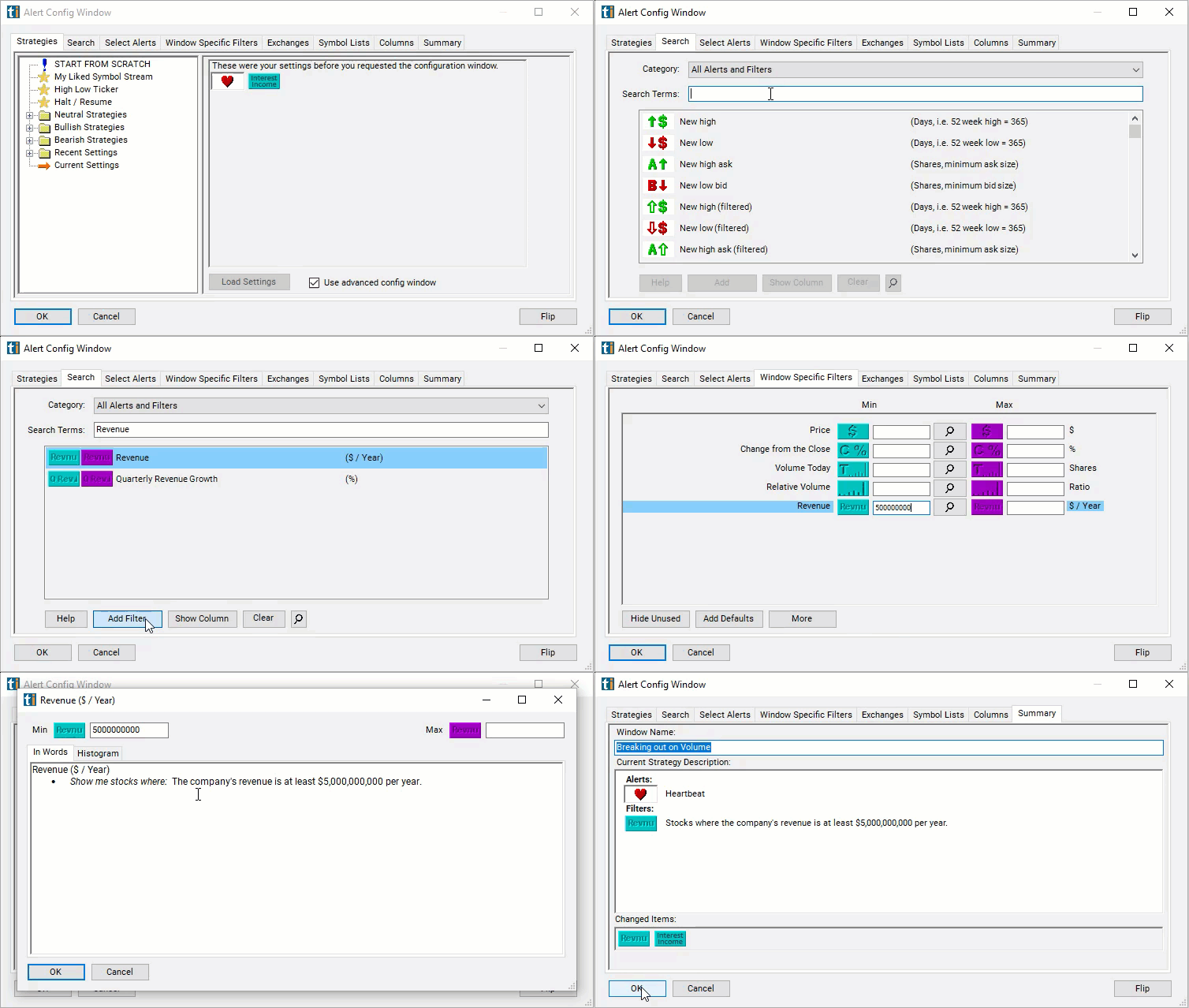
Configuring the "Revenue" filter is simple and can be done within the Window Specific Filters Tab of the Configuration Window in your Alert or Top List (Screener) window.
Here's how to set up the filter in your configuration window:
- Set the minimum value to 5,000,000,000 to see only stocks with at least $5 billion in revenue in the last year.
Using the Revenue Filter
The "Revenue" filter can be used in various trading strategies, including:
- Growth Investing: Growth investing involves identifying and investing in companies with strong revenue growth potential. Traders may look for companies that consistently increase their revenue quarter over quarter or year over year at a significant rate. By investing in companies with robust revenue growth, traders aim to capitalize on future earnings potential and stock price appreciation.
- Earnings Momentum: Earnings momentum strategies focus on trading stocks of companies that exceed revenue expectations in their quarterly or annual earnings reports. Traders may initiate long positions in stocks of companies with positive revenue surprises, anticipating upward price momentum driven by strong revenue performance. Conversely, traders may short stocks of companies with revenue disappointments, betting on downward price momentum.
- Sector Rotation: Sector rotation strategies involve rotating investments among different sectors based on revenue trends and economic cycles. Traders may allocate capital to sectors or industries with strong revenue growth prospects while reducing exposure to sectors experiencing revenue declines or slower growth. Sector rotation strategies aim to capitalize on changing revenue dynamics across industries and sectors.
Filters to combine with Revenue
Categories
FAQ
Which stocks have the most revenue?
Add the Revenue filter (Revenue) to a Trade Ideas Streaming Alerts or Top List (Screener) window. Set the minimum value to 5,000,000,000 to see only stocks with at least $5 billion in revenue in the last year.
What is the Revenue filter?
The Revenue filter screens by a company's total sales over the last year.
How do I screen stocks by revenue?
Use the Revenue filter (Revenue) in Trade Ideas Streaming Alerts and Top Lists to find stocks by total revenue over the last year. The Revenue filter screens by a company's total sales over the last year.