
7 Best After Hours Stock Screeners for Active Traders in 2026
7 Best After Hours Stock Screeners for Active Traders in 2026
The closing bell does not stop price discovery. Earnings releases, guidance changes, filings, and breaking company news can move stocks sharply when regular trading ends.
The problem is that a large post-market percentage move does not automatically make a stock worth watching. Thin volume, wide spreads, and isolated trades can make after-hours activity look more significant than it is.
A useful after-hours stock screener should help active traders move beyond a basic gainers list by combining extended-hours data with volume, customizable filters, alerts, charts, and catalyst context.
Here are seven screeners worth comparing in 2026 and where each fits into an active trader’s workflow.
Best After Hours Stock Screeners for 2026 at a Glance
| Screener | Extended-Hours Data | Custom Screening | Alerts | AI Features | Catalyst/News Context | Best For |
| Trade Ideas | Yes | Advanced | Real-time | Yes | Yes | Active traders who want continuous scanning and alerts |
| TradingView | Yes | Advanced | Yes | Some AI-assisted tools | Yes | Chart-focused traders |
| TrendSpider | Yes | Advanced | Multi-factor | Yes | Limited | Technical and strategy-driven traders |
| FINVIZ Elite | Yes | Strong | Yes | Limited | Yes | Fast filtering and visual screening |
| Market Chameleon | Yes | After-hours specific | Limited | Limited | Strong | Earnings and event-driven research |
| Scanz | Yes | Advanced | Multi-factor | Limited | Yes | Real-time momentum scanning |
| MarketWatch | Yes | Basic | Limited | No | Strong | Quickly checking movers and most-active stocks |
The right choice depends on whether you simply want to see today’s after-hours market movers or need software that continuously watches the market for conditions specific to your trading strategy.
The 7 Best After Hours Stock Screeners for Active Traders
1. Trade Ideas: Best for Continuous Real-Time Scanning and Alerts
Trade Ideas is designed less like a static stock-results page and more like a continuously running market scanner.
Its dedicated After Hours Channel gives traders a starting point for monitoring stocks moving after the close, including strong movers, high after-hours volume, new post-market highs and lows, and names moving quickly in either direction. Trade Ideas also provides customizable scans, screeners, price alerts, and more than 500 data points across its screening environment.
That distinction matters.
A static movers page answers:
What’s moving right now?
A continuously monitored scan can instead answer:
Tell me when a stock starts satisfying the conditions I care about.
Traders can combine factors such as price with other filters and alerts rather than relying only on a ranked percentage-gainers list. Trade Ideas filters can also be combined so stocks must satisfy multiple criteria before appearing in scan results.
Trade Ideas also adds AI through Holly and broader Premium functionality, but AI should not be confused with the platform’s after-hours scanning itself. The scanner, filters, alerts, and After Hours Channel remain distinct parts of the workflow.
The platform’s preconfigured channels can be particularly useful when traders want a starting layout before building more specialized scans. The Trade Ideas Channel Bar and preconfigured scan environment can then be customized around a trader’s own criteria.
Best fit: Active day and swing traders who want customizable scanning, real-time alerts, and a workflow that extends beyond checking a list of movers.
Consider if: You want the software to continuously monitor conditions rather than repeatedly refreshing a screener.
| Find Out What a Real-Time Scanner Adds to Your WorkflowCompare Trade Ideas plans and features to see which scanning, alerting, and AI tools match the way you trade.Compare Trade Ideas Plans |
2. TradingView: Best for Traders Who Start With the Chart
TradingView combines screening with one of the strongest chart-centered workflows in this group.
Its stock screener includes dedicated pre-market and post-market data fields, and its market-movers pages separate after-hours gainers, losers, and active stocks. Extended-session data can also be incorporated into supported alerts and watchlist monitoring.
That makes TradingView particularly useful when your process looks like:
Find mover → open chart → analyze price structure → set alert → continue monitoring.
Its strength is visual analysis. Traders who already spend much of their session working from charts may appreciate being able to move from post-market discovery into technical analysis without changing platforms.
Best fit: Traders who put chart analysis at the center of their screening process.
Consider if: You want broad market coverage and strong visualization alongside extended-hours screening.
3. TrendSpider: Best for Technical Conditions and Automated Alerts
TrendSpider is a stronger fit for traders who want their screens defined by technical conditions rather than simply ranking stocks by percentage movement.
Its Market Scanner can incorporate extended-session data, and traders can create scans using either its point-and-click editor or AI-assisted scan creation. TrendSpider also supports multi-factor and dynamic alerts using extended-hours data.
For example, a trader could look for a combination involving price, volume, indicators, and chart conditions rather than starting with the biggest post-market gainer.
One limitation worth understanding is alert timing. TrendSpider documents that alert behavior depends on the timeframe involved, and its alerts are not necessarily tick-by-tick instant notifications.
Best fit: Technical traders building repeatable multi-condition setups.
Consider if: Your after-hours screening relies heavily on indicators, chart structure, and predefined technical rules.
4. FINVIZ Elite: Best for Fast Filter-Based Discovery
FINVIZ has long been built around efficient tabular screening, and FINVIZ Elite adds real-time data that includes premarket and after-hours sessions. Its Elite screener also provides advanced customizable filters and integrated chart views.
The appeal here is speed and familiarity.
If you already know the characteristics you want, FINVIZ makes it relatively straightforward to narrow a large stock universe into a manageable list.
Its workflow is more naturally suited to:
Set criteria → generate candidates → inspect results
than to continuous event-driven scanning.
Best fit: Traders who prefer a straightforward filter-and-review process.
Consider if: You care more about quickly narrowing a universe of stocks than building a highly event-driven alert workflow.
5. Market Chameleon: Best for After-Hours Activity and Event Context
Market Chameleon takes a particularly after-hours-specific approach.
Its After Hours report separates stocks into positive movers, large decliners, and most-active securities. Its dedicated after-hours screener can also analyze after-hours VWAP, relative post-market volume, trading ranges, breakouts, news, and price behavior relative to prior levels.
That makes it useful for an earnings- or event-focused workflow where the question isn’t simply:
Which stock moved?
but also:
How unusual was the activity, and what may have triggered it?
One important detail is data timing: Market Chameleon currently labels its After Hours report and screener data as delayed by 15 minutes.
For an active trader, that distinction between after-hours availability and real-time after-hours data matters.
Best fit: Traders researching post-market volume, earnings reactions, and event-driven movers.
Consider if: Catalyst context matters more to you than second-by-second scanning.
6. Scanz: Best for Real-Time Momentum and Multi-Factor Screening
Scanz is built around real-time stock scanning and gives users separate control over premarket, regular-session, after-hours, and consolidated market sessions.
Its platform supports configurable filters, custom data columns, multi-factor alerts, watchlists, Level 2 data, charts, and time-and-sales information.
That combination can be useful to short-term traders who want to move from an unusual post-market event into closer examination of liquidity and trading activity.
Scanz is especially relevant when your screening process emphasizes momentum or technical setups, and you want after-hours activity treated as its own market session.
Best fit: Momentum-focused active traders who want detailed scanning and market-depth tools.
Consider if: Level 2, prints, and real-time scanning are important parts of how you validate a candidate.
7. MarketWatch: Best for a Quick Check of After-Hours Movers
Not every trader needs a complex scanner every time they check the market.
MarketWatch’s market-movers tools provide a straightforward way to see leaders, laggards, and actively traded names without first building custom conditions.
That simplicity makes it useful for answering:
What’s moving after the close?
But it is a different tool from an advanced scanner designed to monitor user-defined events continuously.
For traders who only want a quick snapshot, that may be enough. Traders building repeatable strategies will generally need deeper filtering, alerting, or chart integration.
Best fit: Traders who need a quick view of post-market activity.
Consider if: You want a simple movers list rather than an advanced active-trading workspace.
How We Compared After-Hours Stock Screeners
Feature counts alone do not tell you whether a screener is useful after 4 p.m. For active traders, these factors matter more.
Extended-Hours Data
First, the platform has to separate post-market activity from the regular session clearly enough to make the data useful.
That can include after-hours price, change, volume, highs and lows, and session-specific technical information.
Data Speed
“Supports after-hours data” does not necessarily mean “provides streaming real-time after-hours data.”
That distinction becomes important when a stock is reacting rapidly to earnings or breaking news.
After-Hours Volume
A large percentage change on very little trading activity can be misleading.
Volume gives the price move context and helps traders distinguish heavily participated moves from thin post-market prints.
Custom Filters
Active traders rarely want every mover.
A useful screener should let them narrow candidates using the characteristics relevant to their process, whether that means price, volume, technical conditions, stock universe, or other variables.
Trade Ideas, for example, lets traders build customizable screening configurations from hundreds of available alerts and filters. Its starter layouts and premade scans also provide starting points that can be modified rather than forcing traders to build every workspace from scratch.
Alerts
A list shows what has already reached the top of a ranking.
Alerts can reduce the need to keep checking the same screen by notifying traders when predefined conditions occur.
News and Catalyst Context
Price movement tells you what happened. News may help explain why.
That distinction is especially valuable after hours because earnings releases and other corporate announcements frequently occur outside the regular session.
Workflow
Finally, consider what happens after a stock appears.
Can you chart it, add it to a watchlist, create an alert, review market depth, test a strategy, or route an order without rebuilding your process elsewhere?
For traders who want screening and execution closer together, Trade Ideas’ Brokerage Plus workflow supports position management, simulated trading, one-click order entry, and integrations with participating brokers.
After-Hours Movers List vs. Stock Screener vs. Real-Time Scanner
These terms are often used interchangeably, but they solve different problems.
| Tool Type | Main Question | Most Useful When |
| Movers list | What’s moving right now? | You need a quick market snapshot |
| Stock screener | Which stocks match my criteria? | You already know what characteristics matter |
| Real-time scanner | When does a stock begin meeting my conditions? | You want continuous monitoring |
| AI-assisted platform | Are there additional setups or patterns worth investigating? | You want another discovery layer beyond manual screening |
A post-market movers page can be useful without being a full after-hours stock screener.
Similarly, an advanced screener becomes more valuable when you need to move beyond “largest percentage gainers” and identify stocks satisfying several conditions simultaneously.
What Should Active Traders Screen for After Hours?
A productive after-hours scan usually combines signals instead of depending on one headline number.
Price Movement
Percentage change is a logical starting point.
It identifies stocks behaving differently after the closing bell, but it says little about whether the move has broad participation.
After-Hours Volume
Volume adds important context.
A stock up 12% after only a few thin prints presents a different situation from one up 7% while hundreds of thousands of shares change hands.
FINRA notes that extended-hours markets generally have lower liquidity than the regular session and may make executions harder or less competitive.
That is why volume belongs beside percentage change rather than several screens away.
Liquidity and Spread
Trading activity alone is not enough. Bid-ask spread matters too.
The SEC warns that lower after-hours activity can produce wider spreads, greater volatility, and prices that differ from those available during the regular session.
A stock may look attractive in a screener while still being difficult to enter or exit at the displayed price.
New Highs and Lows
Session highs and lows can reveal stocks continuing to discover new prices after the close rather than simply printing one early gap and going quiet.
For momentum traders, this can help distinguish continued movement from a reaction that has already stalled.
Catalysts
Check what changed.
Common post-market catalysts include earnings, guidance, regulatory developments, SEC filings, acquisitions, and other company announcements.
A screener identifies the reaction. Catalyst research tells you what the market is responding to.
Persistence
Finally, examine whether the move holds.
A stock that jumps immediately after an announcement and gives back most of the move presents different information from one that continues attracting volume and holds near its post-market highs.
AI, Rules, and Alerts Solve Different Screening Problems
AI is useful, but it should not be treated as a replacement for ordinary screening.
These tools solve different problems.
Rule-based screening asks:
Which stocks currently satisfy the conditions I defined?
The trader chooses variables such as price, percentage change, volume, and technical criteria.
Real-time alerts ask:
Tell me when those conditions occur.
This is particularly useful when traders cannot monitor dozens of screens continuously.
AI-assisted discovery adds another layer by using models or automated analysis to surface setups that are not simply a sorted list of manually selected criteria.
For an active trader, these capabilities can complement each other.
A rule-based scan can define your universe. Alerts can tell you when conditions develop. AI can provide an additional discovery or strategy layer. The trader still decides whether the setup fits the risk and trading plan.
How to Separate Meaningful After-Hours Movers From Noise
The biggest percentage mover is not automatically the most useful candidate.
Consider this simplified example:
| Post-Market Move | After-Hours Volume | |
| Stock A | +16% | 2,500 shares |
| Stock B | +8% | 600,000 shares |
Stock A wins the percentage-change ranking.
That does not tell you which stock has the more meaningful market participation.
An active trader would still want to ask:
- Is there enough volume to support the move?
- How wide is the bid-ask spread?
- Is there a clear catalyst?
- Is price continuing to move or fading?
- Does the stock fit the trader’s preferred price and liquidity range?
- Does the setup remain relevant after the initial reaction?
This is where customizable screening becomes much more useful than simply sorting a table from highest to lowest percentage gain.
A scanner should help reduce thousands of stocks to a manageable research list. It should not turn the first name on a gainers table into an automatic trade.
A Practical After-Hours Screening Workflow
A useful after-hours scan is not just about spotting the biggest mover. The goal is to quickly confirm whether the move has enough volume, context, and follow-through to earn a spot on your watchlist. The workflow below shows that process at a glance.
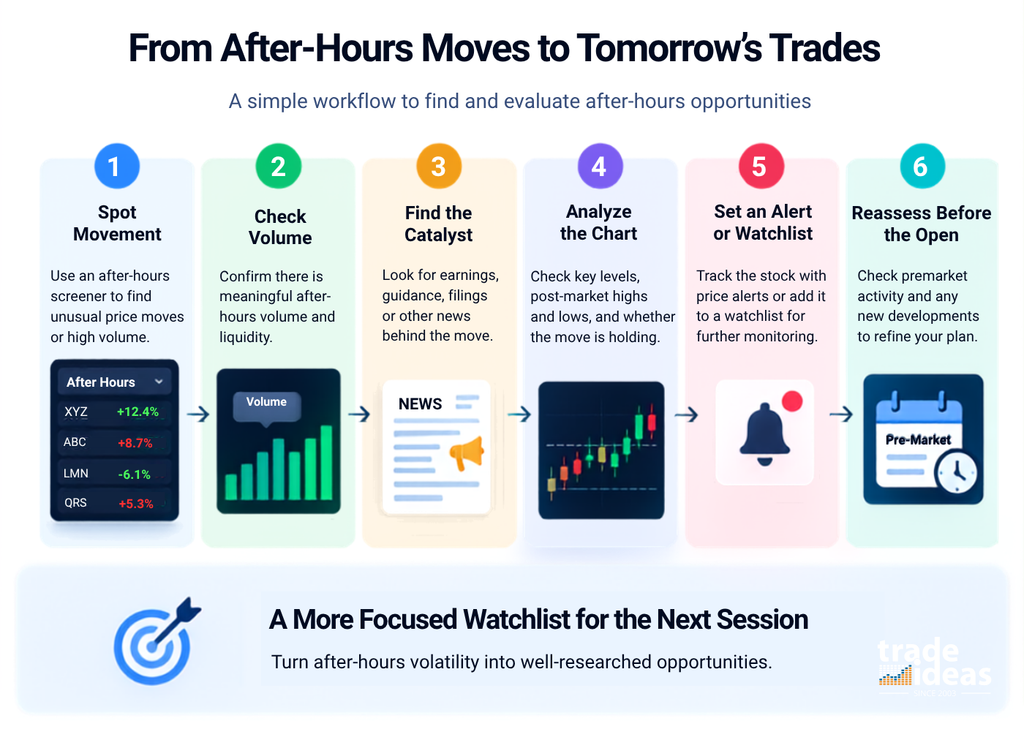
1. Find Unusual Movement
Start with gainers, decliners, high-volume names, new highs and lows, or stocks accelerating after the close.
2. Check Participation
Review after-hours volume and available liquidity.
The objective is to determine whether the move reflects meaningful trading activity or a small number of prints.
3. Identify the Catalyst
Check earnings, guidance, filings, corporate announcements, or other relevant news.
4. Inspect the Chart
Look at where the stock is trading relative to the regular-session close, key levels, post-market high and low, and the shape of the reaction.
5. Set an Alert or Build the Watchlist
If the setup is not actionable yet, monitoring it can be more useful than staring at the screen.
6. Reassess Before the Next Session
Post-market prices do not guarantee where the stock will open.
Investor.gov notes that after-hours sessions occur outside the standard 9:30 a.m. to 4:00 p.m. ET regular session and that available extended-hours sessions vary by market and brokerage firm.
Recheck volume, news, price direction, and liquidity when premarket trading begins.
| Turn the Workflow Into a Scan You Can MonitorStart with Trade Ideas’ scanning tools and build around the price, volume, and alert conditions that matter to your own trading process.Create a Free Trade Ideas Account |
Using After-Hours Screening to Build Tomorrow’s Watchlist
You do not have to place trades after hours for post-market screening to be useful.
For many active traders, the session is preparation time.
An earnings reaction at 4:15 p.m. may become tomorrow’s gap candidate. A stock with unusually heavy after-hours volume may deserve another look before the opening bell. A failed post-market breakout can also show how buyers and sellers are reacting to a catalyst.
A focused watchlist might record:
- the catalyst
- post-market price change
- after-hours volume
- important price levels
- post-market high and low
- alerts to monitor
- what would make the setup relevant the next morning
That produces a much more useful watchlist than simply saving the night’s biggest gainers.
Which Type of After-Hours Screener Fits Your Trading Style?
There is no single feature that every active trader should prioritize.
The better question is what the screener needs to do within your workflow.
| If You Mainly Need… | Prioritize… |
| A quick view of post-market activity | Gainers, losers, and most-active lists |
| Chart-based technical analysis | Strong charting plus extended-hours screening |
| Earnings and event research | Catalyst and news context |
| Repeatable technical setups | Advanced custom filters |
| Continuous market monitoring | Real-time scanning and alerts |
| Additional automated discovery | AI-assisted tools |
| Screening through execution | Scanning, alerts, charting, and brokerage integration |
For traders who check the market occasionally after the close, a simple movers page may be enough.
For active traders repeatedly searching for specific conditions, the value shifts toward customization, data speed, alerting, and workflow integration.
Conclusion
The best after-hours stock screener is not necessarily the one with the longest feature list. It is the one that helps you get from thousands of post-market prints to a small set of stocks worth investigating.
Start with what your strategy actually needs.
If you only want to know what moved, a simple gainers and most-active list may be sufficient. If you need to find specific setups as they develop, look more closely at real-time data, configurable filters, session-specific volume, alerts, charts, and catalyst context.
And regardless of the platform, treat the screen as the beginning of the process. A meaningful after-hours candidate still needs context, liquidity, and a setup that fits your own trading plan.
FAQs About After-Hours Stock Screeners
Do all U.S. stocks trade after hours?
No. Extended-hours availability depends on the security, trading venue, and brokerage. Even when a stock is eligible, it may have little or no activity after the close. Check both your broker’s session rules and actual trading volume.
Can stock options be traded after hours?
Most equity options do not follow the same broad after-hours schedule as stocks. Certain products may have extended sessions, but availability varies by contract and exchange. Confirm the eligible products and trading hours with your broker before placing an order.
Does an after-hours stock price become the next day’s opening price?
No. A stock’s post-market price does not determine its next regular-session opening price. Additional orders, news, overnight activity, and premarket trading can change supply and demand before the opening auction establishes the next session’s price.
Can I place a market order during after-hours trading?
That depends on your brokerage and trading venue. Some firms restrict extended-hours orders to specific order types, commonly limit orders. Always check your broker’s rules because eligible order types, routing, and session times can differ.
Can an after-hours stock screener include ETFs?
Yes, depending on the platform and data universe. Many stock-screening systems also monitor exchange-traded funds during extended sessions. Traders may use ETF activity to watch sector movement, broader risk sentiment, or unusually active themes outside regular hours.