







 GRTOP
▼ Bearish
GRTOP
▼ Bearish
Streaming Alert (Scanner)
Rectangle Top Alert (GRTOP)
By Daniel Mirkin, CEO, Trade Ideas. Updated October 2026.
Find stocks forming a rectangle top pattern in real time with Trade Ideas Streaming Alerts (Scanner). A rectangle top pattern is when a stock has formed a rectangle of roughly equal highs and equal lows, with the last turning point a high. Trade Ideas reports it after at least 5 turning points.
Know when the pattern finishes.
Free account, just an email. No card. Live access for a limited time.
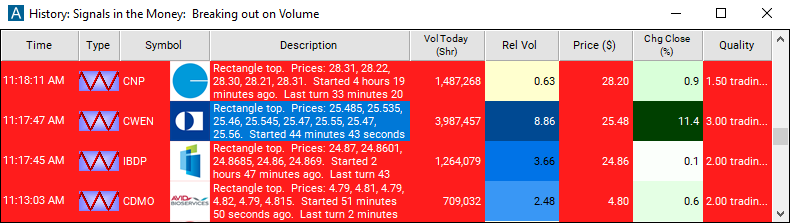
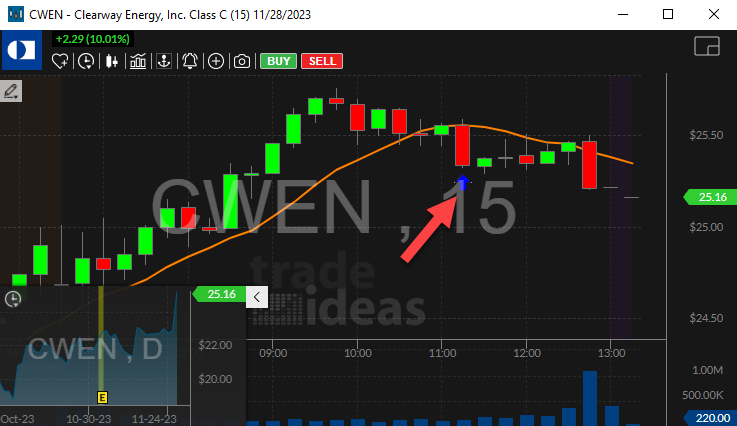
Streaming Alerts show a rectangle top the moment it completes, not on the next refresh.
How Trade Ideas finds it: by default, the 'Rectangle Top' alert will appear when there is a series of at least 5 consecutive highs and lows that are ending at approximately the same price as the other highs and lows. See Trade Ideas plans and pricing to run it live.
What is a rectangle top?
A rectangle is a stock trading sideways between a flat ceiling and a flat floor. The highs line up at about the same price, and so do the lows.
Trade Ideas calls it a rectangle top when the latest turn was at the ceiling and price is heading back down toward the floor.
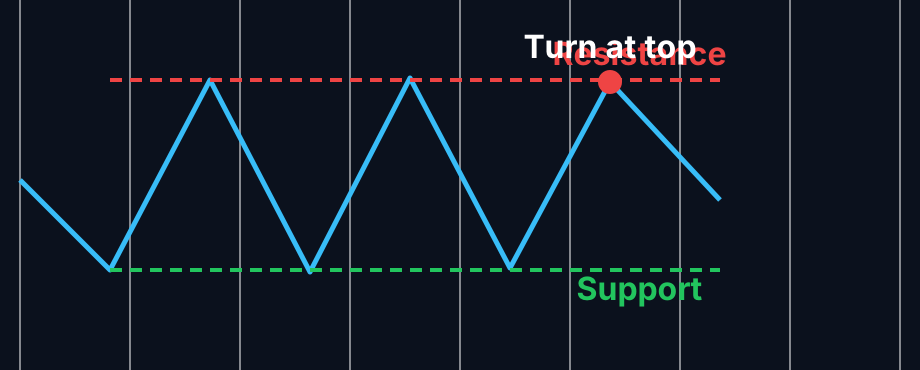
Parts of a rectangle top
Ceiling
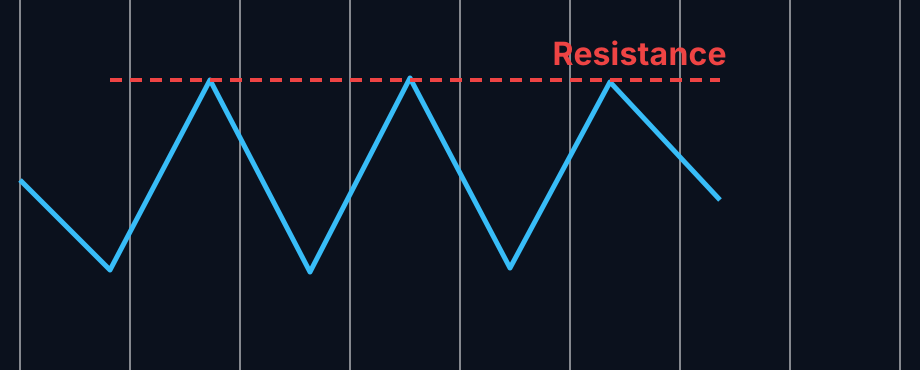
Each rally stops at about the same price. That level is resistance.
Floor
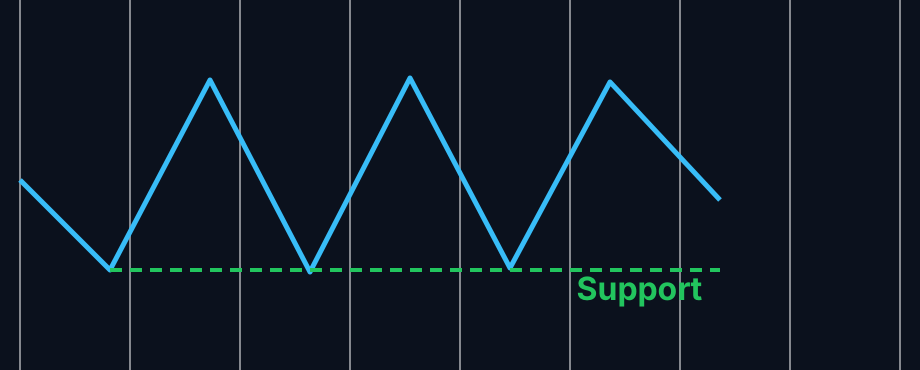
Each drop finds buyers at about the same price. That is support.
Turn at the top
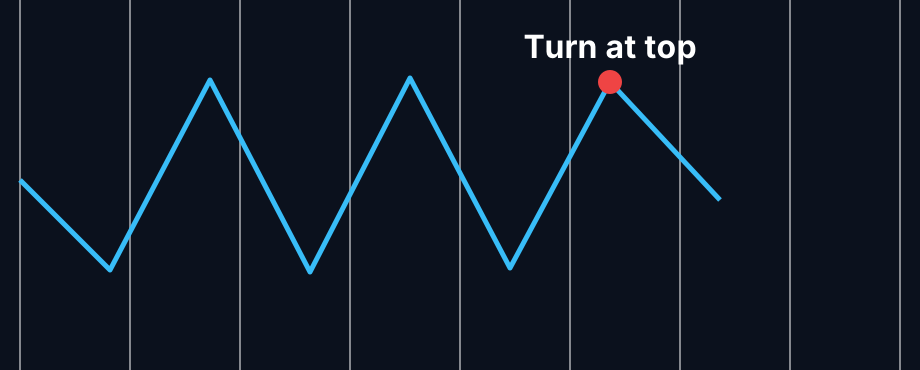
After at least five highs and lows, the stock turns down from the ceiling. That is when the Rectangle Top alert fires.
How traders use it
Step 1: Let the Trade Ideas alert find it
Key point
Turn on the Rectangle Top alert (GRTOP). Trade Ideas finds the flat highs and lows for you and alerts when price turns down from the top of the range. See it live in the Web Dashboard.
Step 2: Wait for the trigger
Some traders trade the range itself: a turn down from the ceiling is the signal. Others wait for the range to break.
Step 3: Entry
Range traders may short near the ceiling with the floor as the target. Breakout traders wait for a close above the ceiling or below the floor.
Step 4: Exit
Key point
Inside the range, a stop just above the ceiling is common. On a breakout, a stop back inside the box is typical. That is a common plan, not advice.
Tips
- The wider the box compared to the stock price, the more room a range trade has.
- Rectangles look like consolidation, but Trade Ideas uses a different method for each, so you can run both.
- Every new touch flips the alert between top and bottom.
- For bounces off the floor, use Rectangle Bottom (GRBOT).
Key point
Past results, including backtests, are not indicative of future results.
How the Rectangle Top alert works
Key point
A rectangle is another standard technical analysis pattern. A rectangle is defined by a series of highs and lows where each high is at approximately the same price as the other highs, and each low is at approximately the same price as the other lows. We report a rectangle pattern after seeing at least 5 consecutive highs and lows.
If the last turning point was a high, we call the pattern a rectangle top, and we draw a red icon to show that the price is going down. Each time we add another point to the rectangle, the direction changes.
Key point
Rectangles are similar to consolidation patterns, because they both show a stock trading in a channel. However, we use completely different algorithms to build the two types of channels. The consolidation algorithm depends heavily on the volatility of the stock, comparing the amount that the stock price moved recently to the amount that we would expect it to move.
A consolidation pattern can become stronger if the price just stays inside the channel. A rectangle pattern depends more on the specific prices near the edges of the pattern. The only way to confirm a rectangle pattern is for the price to move up and down through the entire range of the rectangle. A rectangle might not be a consolidation pattern if the rectangle is too tall.
Key point
A consolidation might not be a rectangle if the top and bottom edges are not precise enough.
We use the channels from our consolidation algorithm to create channel breakout alerts. This algorithm is good at finding a specific interesting price level. Our rectangle algorithm is best at exactly the opposite. The rectangle alert tells you that the channel has been confirmed, and the price is moving back inside the channel.
Default settings
Settings
By default, the 'Rectangle Top' alert will appear when there is a series of at least 5 consecutive highs and lows that are ending at approximately the same price as the other highs and lows. It is reported as a 'Rectangle Top' if the last turning point is a high.
Custom settings
Settings
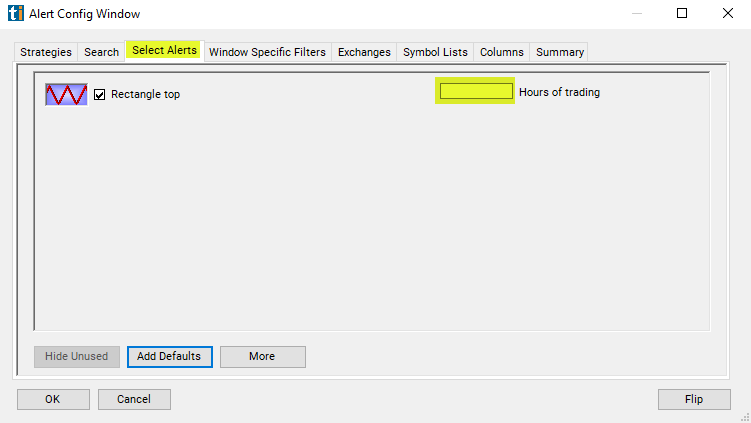
For 'Rectangle Top' alerts, you have the option to use an alert specific filter. This filter is located immediately to the right of the corresponding alert and is always optional. You can decide to leave it blank if you want to receive more alerts, or you can fill it in to restrict the number of alerts you receive. This filter allows you to specify the quality of the alert. When you set a higher number for this filter, you are telling the alerts server to display only alerts that meet a higher quality standard, resulting in fewer alerts being shown.
When setting an alert for 'Rectangle Top', the user can filter the alert by hours traded.
Key point
If I see a pattern that lasted from noon yesterday to noon today, is that any better than a pattern that lasted from the open this morning to the close this afternoon? How much better? We weight the pre and post market according to volume. On an average day an average NASDAQ 100 stock will trade roughly 1 hour's worth of volume between the close and the following open. If you want to see stock patterns that lasted for a whole day, a good estimate is 7.5 hours, 6.5 for normal hours plus 1 for the pre and post market.
The same rules apply during the day. If a chart pattern lasts for one hour starting from the open, it will almost always be considered a stronger pattern than if it lasted one hour starting from the beginning of lunch. Hours are just an estimate. Volume is the major factor in this filter. Stocks trading on higher than average volume will satisfy this filter faster than stocks trading on lower than average volume.
What the alert shows you
Key point
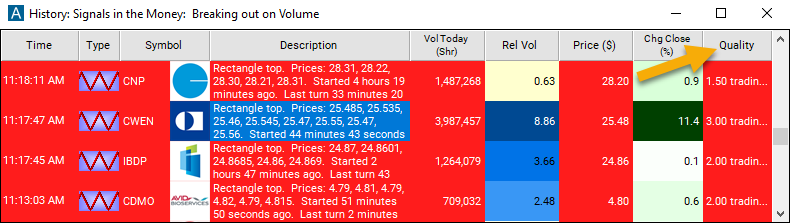
The description of each alert lists the prices that formed the pattern. It also includes the times of when the pattern started and ended.
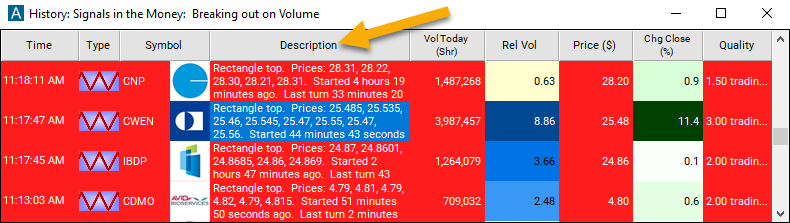
The quality value on a scan using the 'Rectangle Top' alert defines the number of hours since the measured pattern has been established.
Related alerts
Filters to pair with the Rectangle Top alert
Categories
FAQ
Which stocks are forming a rectangle top pattern right now?
Turn on the Rectangle Top alert (GRTOP) in Trade Ideas Streaming Alerts. By default, the 'Rectangle Top' alert will appear when there is a series of at least 5 consecutive highs and lows that are ending at approximately the same price as the other highs and lows.
What is the Rectangle Top alert?
A rectangle top pattern is when a stock has formed a rectangle of roughly equal highs and equal lows, with the last turning point a high. Trade Ideas reports it after at least 5 turning points.
How do I see fewer, higher-quality Rectangle Top alerts?
Use the optional alert-specific filter immediately to the right of the alert. A higher number tells the alerts server to show only higher-quality alerts, so fewer appear. Leave it blank to see more.
What is the opposite of the Rectangle Top alert?
What does a rectangle top mean?
The stock is trading in a flat range and just turned down from the top of it.
Is a rectangle the same as consolidation?
They look alike. Both show a stock in a channel, but Trade Ideas builds them with different methods and reports them separately.
How many touches does Trade Ideas need for a rectangle?
At least five consecutive highs and lows.
Do traders buy or sell a rectangle?
Both. Some trade bounces between support and resistance. Others wait for price to leave the box.