
Best Swing Trade Scanners in 2026: AI-Assisted Tools for Finding Multi-Day Setups
Best Swing Trade Scanners in 2026: AI-Assisted Tools for Finding Multi-Day Setups

Finding a strong multi-day setup can take time when you are manually working through hundreds of charts. A swing trade scanner cuts down that workload by filtering stocks based on conditions such as trend, volume, momentum, liquidity, pullbacks, breakouts, and price action.
Instead of looking at every stock, you start with a smaller list that already matches the characteristics you care about. The scanner handles the filtering; you still decide whether the setup is worth trading.
The right platform depends on how you find opportunities. Some traders want AI-assisted discovery, while others prioritize charting, automation, alerts, or highly specific technical rules.
This blog compares five swing trading scanners and then shows practical scan setups for finding multi-day opportunities.
Best Swing Trade Scanners in 2026: Quick Comparison
The best swing trade scanner depends on how you find, review, and validate setups. Here is a quick comparison of five platforms based on their scanning approach, alerts, and testing capabilities.
| Tool | Best For | Scanning Approach | Alerts | Testing |
| Trade Ideas | AI-assisted + custom scans | Custom rules + Holly AI | Streaming | OddsMaker + simulation |
| TradingView | Chart-first traders | Screener + Pine Script | Technical alerts | Pine strategies |
| TrendSpider | Multi-timeframe setups | Automated multi-factor scanning | Cloud alerts | Built-in backtesting |
| Finviz Elite | Straightforward market filtering | Rules-based screening | Price + screener alerts | Technical backtests |
| TC2000 | Custom technical conditions | EasyScan | Condition + price alerts | Not a core focus |
These tools take different approaches to narrowing the market. The right fit depends less on the number of available features and more on whether the platform supports the type of swing setup you actually trade.
Which Swing Trade Scanner Fits Your Trading Style?
Each platform approaches swing-trade discovery differently. The right fit depends on whether you prioritize AI-assisted discovery, charting, automation, fast filtering, or precise technical rules.
1. Trade Ideas — AI-Assisted and Custom Swing Scanning
Trade Ideas suits active U.S. stock traders who want customizable scan rules alongside AI-assisted idea discovery.
Traders can build scans around conditions such as price, moving averages, volume, volatility, technical events, and watchlists. That makes it possible to search for a defined swing setup rather than relying on a broad list of trending stocks.
Holly AI adds another discovery layer by surfacing strategy-driven opportunities beyond the rules traders configure themselves. Trade Ideas also connects scanning with streaming alerts, historical testing through OddsMaker, charting, watchlists, and simulated trading.
This makes the platform particularly useful for traders who want to move from idea discovery to testing and monitoring within the same workflow.
| Ready to find your next setup? Explore Trade Ideas’ AI-powered stock scanning tools to identify potential swing trading opportunities, monitor market movements, and receive real-time alerts. |
2. TradingView — Chart-First Swing Trading
TradingView fits traders who prefer to move quickly from screening into detailed chart analysis.
Its stock screener sits alongside technical charts, indicators, alerts, community-created tools, and Pine Script. Once a stock appears in the results, traders can immediately review trend structure, support and resistance, moving averages, volume, relative strength, and price extension
The platform makes the most sense when the scanner is mainly the starting point for deeper visual analysis.
3. TrendSpider — Multi-Timeframe Technical Scanning
TrendSpider is suited to traders whose setups depend on conditions across more than one timeframe.
For example, a trader may want:
Weekly uptrend → Daily pullback → Shorter-timeframe confirmation
Its scanner can combine indicators, fundamentals, relative performance, patterns, news, and other conditions, while the broader platform focuses heavily on technical automation.
That can be useful when a swing setup cannot be defined by one chart or one technical signal alone.
4. Finviz Elite — Fast, Straightforward Market Filtering
Finviz Elite works well for traders who want to narrow the U.S. stock market quickly using familiar screening criteria.
Filters include price, average volume, relative volume, moving averages, performance, volatility, market capitalization, and technical patterns. The Elite version adds real-time data, alerts, saved screens, charting, and technical backtesting.
Its strength is simplicity. Traders who already know what they want can narrow a large stock universe without building a complex scanning workflow.
5. TC2000 — Rules-Based Technical Scanning
TC2000 fits traders who already have clearly defined technical conditions and want to turn them into repeatable scans.
For example, a swing trading stock screener could look for stocks above a key moving average, meeting a volume threshold, and satisfying a momentum condition within a selected watchlist.
This approach works well for traders who prefer to define exactly what the scanner should look for rather than rely primarily on AI-led discovery.
How to Scan Stocks for Swing Trading
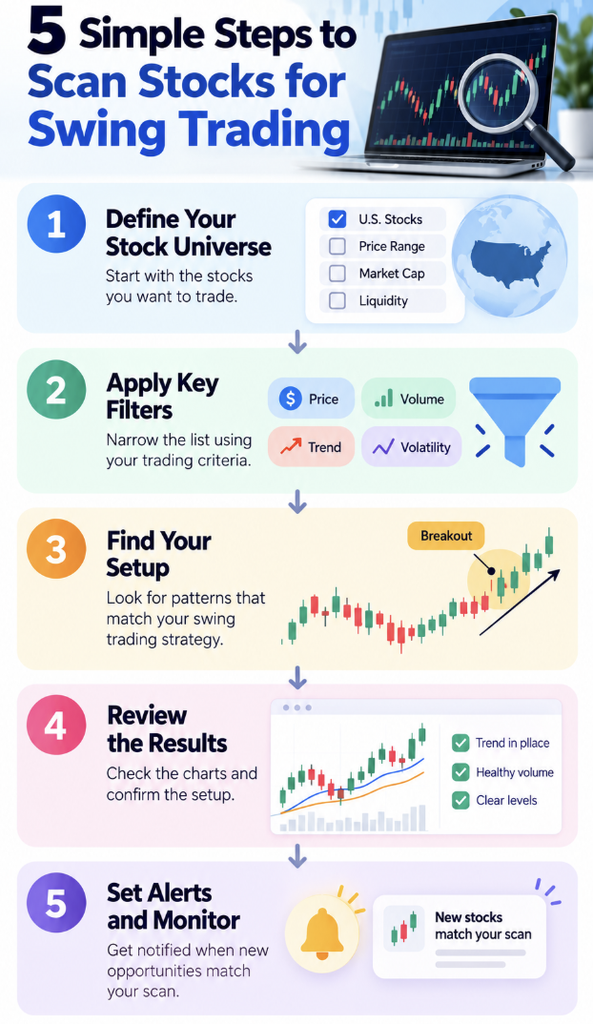
Scanning stocks for swing trading is less about finding one perfect indicator and more about narrowing the market in stages.
A useful scanner starts broad and gradually removes stocks that do not fit your strategy.
Step 1: Define Your Tradable Universe
Start by filtering out stocks you would not consider trading.
Depending on your strategy, that could include:
- Exchange
- Minimum stock price
- Average trading volume
- Liquidity
- Market capitalization
- Selected watchlists
These filters prevent unsuitable stocks from reaching later stages of the scan.
Filtering by stock price and trading volume is especially important when evaluating swing trading opportunities. As FINRA explains, low-priced stocks can carry higher risks due to volatility and limited liquidity, making them harder to buy or sell at expected prices.
Step 2: Confirm the Broader Trend
Next, determine whether the stock is moving in the direction required by your setup.
For a bullish swing trade, that might include:
- Price above a rising moving average
- Positive recent performance
- Higher highs and higher lows
- Positive relative strength
Trend filters add context. A stock can trigger a short-term indicator without being part of a strong multi-day trend.
Step 3: Define the Setup You Actually Trade
Now add the structure you want the scanner to find.
Common swing trading setups include:
- Pullbacks
- Breakout preparation
- Consolidations
- Trend continuation
- Moving-average retracements
- Support tests
The best stock screener criteria for swing trading are not simply the filters that return the fewest stocks. They are the conditions that describe your setup accurately enough to remove irrelevant candidates while still surfacing opportunities worth reviewing.
If you want to translate those conditions into actual scanner rules, Trade Ideas has a deeper guide to building swing trading scans.
Step 4: Add Confirmation Filters
Once you define the core setup, additional filters can improve result quality.
Depending on the strategy, consider:
- Relative volume
- Momentum
- Relative strength
- Volatility
- Distance from moving averages
- Position within the recent price range
Avoid adding filters simply because they are available. Every condition should have a clear purpose in the setup.
Liquidity deserves attention alongside momentum and volatility. FINRA notes that securities with higher trading volumes are generally more liquid, while low-volume securities can be harder to trade quickly without affecting the execution price.
Step 5: Review the Chart Before Acting
A result from a swing trading scanner is not automatically a trade.
Review:
- Price action
- Volume
- Liquidity
- Support and resistance
- Entry location
- Invalidation level
- Whether the original setup is still intact
The scanner performs the filtering. The trader still makes the decision. And if you use stop orders as part of your risk management, remember that stop orders may execute at a different price, particularly when markets move quickly.
Final Thoughts: Finding the Right Swing Trade Scanner
The right swing trade scanner should make it easier to move from a broad market to a focused list of setups that fit your strategy. Whether you trade pullbacks, breakouts, or momentum setups, the goal is not to find more stocks; it is to find more relevant opportunities and spend your time reviewing the ones that deserve attention.
Trade Ideas brings that workflow together with customizable scans, Holly AI, streaming alerts, historical testing through OddsMaker, and simulated trading. Traders can define their own technical criteria while also using AI-assisted discovery to uncover additional setups.
Ultimately, the best scanner fits how you trade, gives you enough control over your filters, and helps you evaluate opportunities efficiently.
| Find Your Next Swing Trading Setup FasterDiscover how Trade Ideas helps you identify potential breakouts, pullbacks, and swing trading opportunities with customizable stock scans.Get started for free |
Frequently Asked Questions
What timeframe works best for a swing trade scanner?
Daily data is often useful for finding multi-day setups because it makes broader trends, consolidations, pullbacks, and breakout structures easier to evaluate. Shorter timeframes can then help refine entry timing after a stock qualifies on the broader setup.
When should you run a swing trading scanner?
It depends on your strategy. End-of-day traders may run scans after the market closes to prepare a watchlist for the next session. Traders looking for developing setups during market hours may instead use real-time scans or condition-based alerts.
How many stocks should a swing trade scanner return?
There is no ideal number. The results should be manageable enough that you can properly review each chart. If a scanner consistently returns hundreds of stocks, the criteria may be too broad for the specific setup you are trying to find.
Can a swing trade scanner identify stocks before a breakout?
Yes. A scanner can look for stocks already in an uptrend that are consolidating near resistance, holding above key moving averages, and maintaining healthy volume. These conditions can help surface potential breakout setups before price becomes extended.
What is the difference between a stock screener and a stock scanner for swing trading?
A stock screener generally filters a market using selected criteria, while a scanner can monitor stocks for qualifying conditions as they occur. In practice, modern trading platforms often combine both capabilities, so traders may use the terms interchangeably.