
Backtest Your Trading Strategy Before You Risk a Dollar
Backtest Your Trading Strategy Before You Risk a Dollar
Trade Ideas’ built-in backtesting tool, OddsMaker, lets you test any strategy against historical market data; no coding required. Right-click an alert, hit Backtest Strategy, and get a full performance report in seconds.
How It Works
- Right-click any alert window and select Backtest Strategy
- OddsMaker runs your strategy against up to 64 days of historical data
- Get instant metrics: profit factor, win rate, average winner/loser, and equity curve
No setup. No spreadsheets. Just click and analyze.
See the Difference Optimization Makes
An unoptimized 30-minute opening range breakout alert can flood your window with noise.
Here’s what happened when we ran it through OddsMaker:
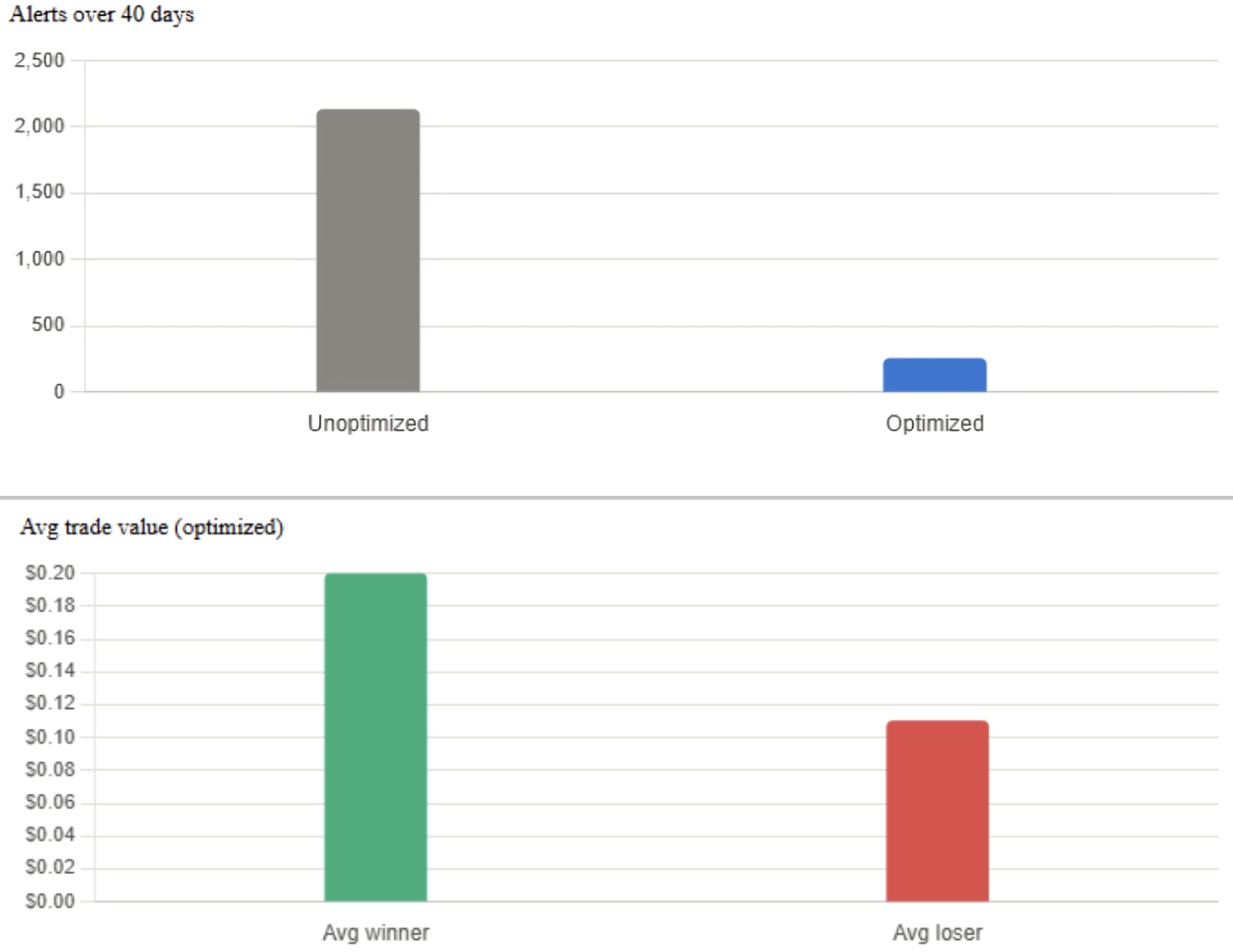
Fewer, sharper alerts. Same 40 days. That’s the value of testing before you trade.
What You Get With Every Backtest
- Daily distribution chart of strategy performance
- Color-coded calendar view of individual trades
- Longest winning/losing streaks
- Best and worst days by share size
- Full trade-by-trade breakdown, exportable to CSV
One Thing to Know
OddsMaker uses 1-minute candle data, not tick-by-tick, so results won’t account for slippage. Treat backtests as a strategy filter, then validate further with paper trading before going live.
Start Today
Frequently Asked Questions
Is OddsMaker included in every Trade Ideas plan?
No, backtesting is available on premium subscriptions.
How much historical data does OddsMaker use?
Typically 40–64 trading days, depending on the strategy and alert type.
Does backtesting guarantee future results?
No. It shows how a strategy would have performed historically, useful for filtering out weak setups, not for predicting outcomes.
Can I backtest AI-generated strategies too?
Yes, strategies from Holly AI can be backtested the same way as manually built alerts.
What happens after I optimize a strategy?
You can save it, run it live in your alert window, or move to simulated trading to validate it further before risking real capital.