







 DCC5
▼ Bearish
DCC5
▼ Bearish
Streaming Alert (Scanner)
5 Minute Dark Cloud Cover Alert (DCC5)
By Daniel Mirkin, CEO, Trade Ideas. Updated October 2026.
Find stocks printing a dark cloud cover candle on the 5-minute chart in real time with Trade Ideas Streaming Alerts (Scanner). A dark cloud cover is a red candle that opens above the prior green candle and closes below its midpoint. This alert checks 5 minute candles.
Candle patterns as they form.
Free account, just an email. No card. Live access for a limited time.
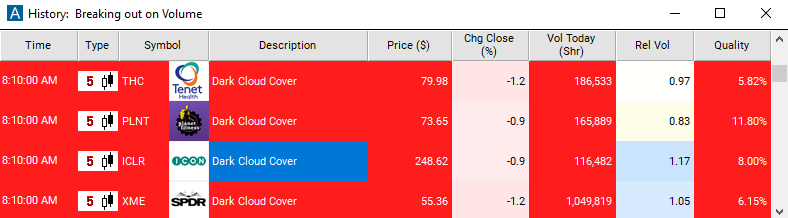
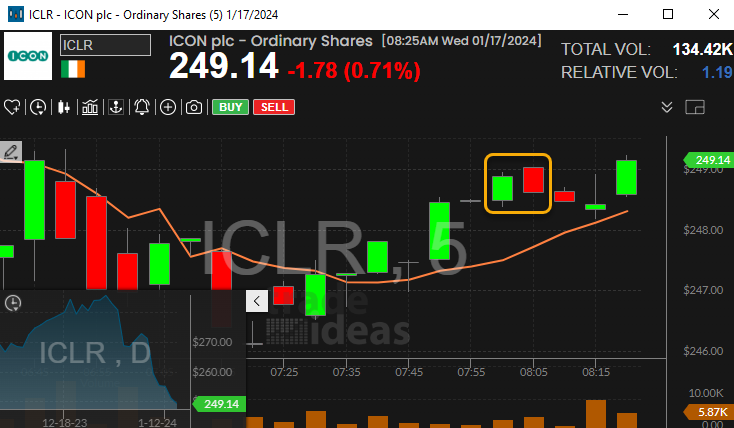
Streaming Alerts show a dark cloud cover the moment it completes, not on the next refresh.
How Trade Ideas finds it: by default, the 5 minute dark cloud cover alert triggers when this pattern appears on a 5-minute candlestick chart. See Trade Ideas plans and pricing to run it live.
What is dark cloud cover?
Dark cloud cover is a two-candle turn signal after a rise. A strong green candle is followed by a red candle that opens above the green close and then falls to close below the middle of the green body.
It is a softer version of bearish engulfing. Sellers took back more than half the gain, not all of it.
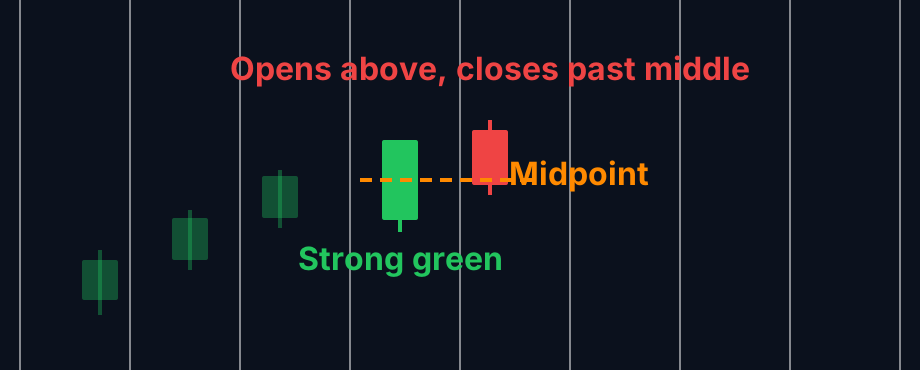
Parts of dark cloud cover
Strong green candle
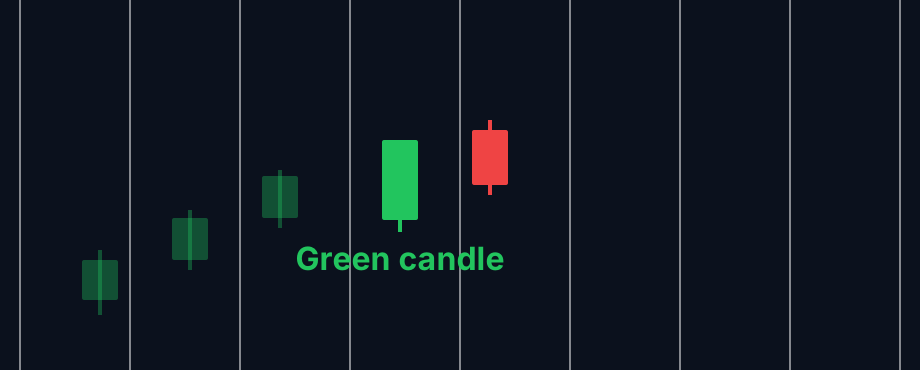
A solid up candle with a decent body, during an advance.
Open above
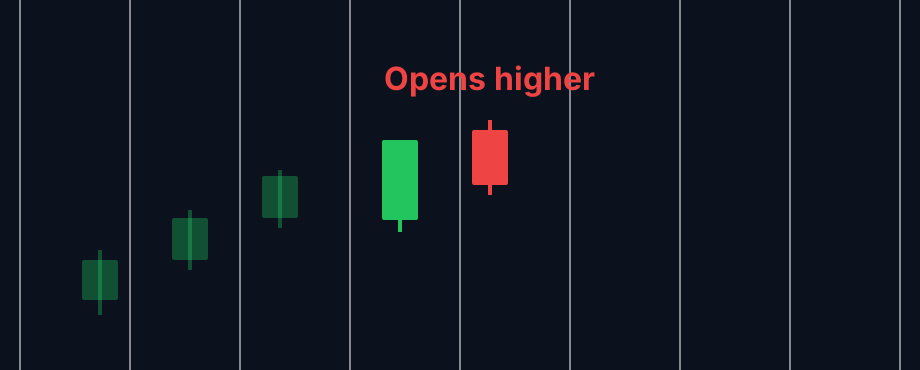
The red candle starts higher than the green close. Buyers look in control for a moment.
Close below the midpoint
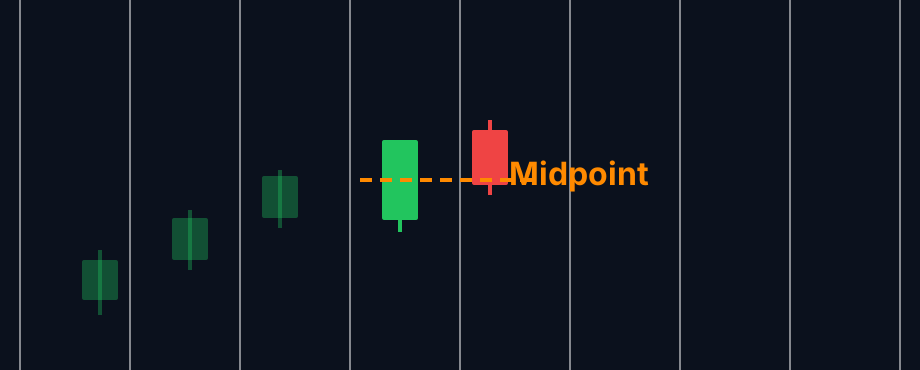
Then it drops and closes under the halfway point of the green body. That is the cloud.
How traders use it
Step 1: Let the Trade Ideas alert find it
Turn on the 5 Minute Dark Cloud Cover alert (DCC5). It flags the pattern when the red candle finishes on a 5 minute chart. See it live in the Web Dashboard.
Step 2: Wait for the trigger
Key point
Many want the next candle to trade under the red candle's low before acting.
Step 3: Entry
Shorts often enter on that break. Long holders may lighten up instead.
Step 4: Exit
Above the red candle's high is the usual stop for a short. That is a common setup, not advice.
Tips
- The deeper the red close goes into the green body, the stronger it reads.
- After a long run, it carries more weight.
- On low volume it is easy to get false signals.
- The bullish counterpart is the Piercing Pattern (PP5).
Past results, including backtests, are not indicative of future results.
How the 5 Minute Dark Cloud Cover alert works
This alert signals the appearance of a dark cloud cover pattern on a traditional 5-minute candlestick chart. Components of a dark cloud cover pattern include:
- The first candlestick is typically a green or bullish candlestick, indicating an upward price movement
- The second candlestick is a red or bearish candlestick, indicating a downward price movement
- The bearish candlestick "covers" or partially engulfs the body of the bullish candlestick, opening above the previous candle and closing below the midpoint of the previous bullish candle.
Here are some potential benefits and implications of using the Dark Cloud Cover alert:
- Reversal Signal: The Dark Cloud Cover is a bearish reversal pattern. It occurs after an uptrend and suggests a potential shift in momentum from bullish to bearish.
- Identification of Weakness: The pattern consists of two candlesticks – the first is a strong bullish candle, and the second opens higher but closes significantly lower, forming a dark cloud over the preceding candle. This indicates that the bulls lost control, and the bears gained strength.
- Confirmation of Resistance: The dark cloud cover often forms near a resistance level, adding confirmation to the potential reversal. Traders may use this signal to assess the strength of resistance and make informed trading decisions.
- Entry Signal for Short Positions: Traders may interpret the Dark Cloud Cover as a signal to enter short positions or consider closing long positions. This is based on the expectation of a downtrend following the bearish reversal pattern.
- Risk Management: The pattern provides a clear point for placing a stop-loss order. Traders often set the stop-loss just above the high of the second candlestick in the pattern, helping manage potential losses if the reversal does not occur as anticipated.
- Confirmation with Other Indicators: To increase the reliability of the alert, traders often use it in conjunction with other technical indicators, such as trendlines, support/resistance levels, or other candlestick patterns.
- Adaptability to Different Timeframes: The Dark Cloud Cover alert is applicable across various timeframes, making it adaptable for different trading styles and time horizons.
Default settings
By default, the 5 minute dark cloud cover alert triggers when this pattern appears on a 5-minute candlestick chart. To align with each alert, it's essential to utilize the corresponding time frame on the chart. For instance, this alert is visualized on the 5-minute candlestick chart.
Custom settings
Settings
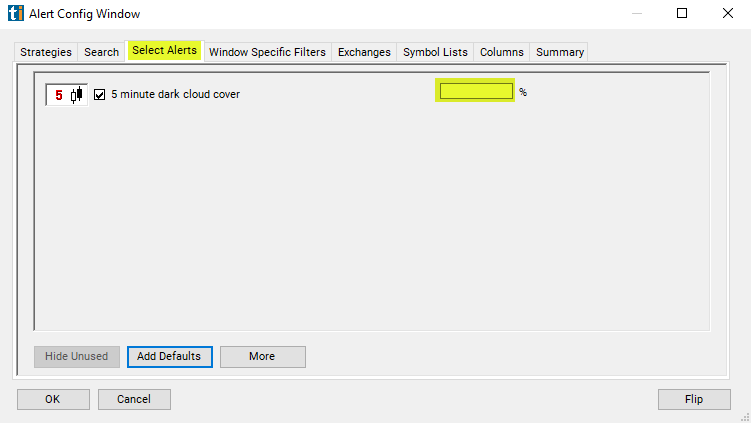
For '5 Minute Dark Cloud Cover' alerts, you have the option to use an alert specific filter. This filter is located immediately to the right of the corresponding alert and is always optional. You can decide to leave it blank if you want to receive more alerts, or you can fill it in to restrict the number of alerts you receive. This filter allows you to specify the quality of the alert. When you set a higher number for this filter, you are telling the alerts server to display only alerts that meet a higher quality standard, resulting in fewer alerts being shown.
When setting an alert for '5 Minute Dark Cloud Cover', the user can filter these alerts by a grade of how on how closely the stock chart matches the ideal shape of the stock pattern. 0 would mean there was no match. 100 would mean it's an ideal match.
What the alert shows you
Key point
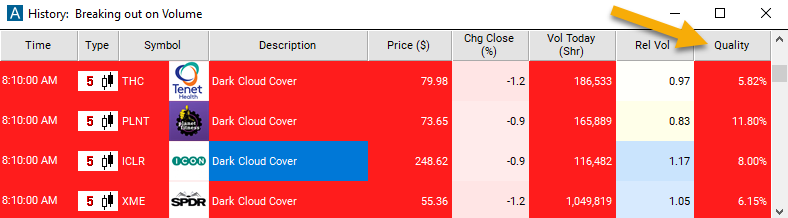
The description of the alert will display "Dark Cloud Cover", providing you with a clear indication of the specific alert that has been triggered.
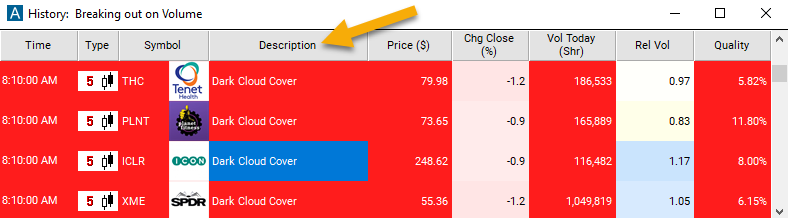
The quality value on a scan using the "5 Minute Dark Cloud Cover" represents the grade based on how closely the stock chart matches the ideal shape of the stock pattern. 0% would mean that there was no match at all. Of course, if a stock pattern is this poor a match, then we are unlikely to report an alert. 100% would be an ideal match. Again, this would be an ideal and extreme case. Few if any alerts come close to 100%.
Related alerts
Filters to pair with the 5 Minute Dark Cloud Cover alert
Categories
FAQ
Which stocks are forming a dark cloud cover candle on the 5 minute chart right now?
Turn on the 5 Minute Dark Cloud Cover alert (DCC5) in Trade Ideas Streaming Alerts. By default, the 5 minute dark cloud cover alert triggers when this pattern appears on a 5-minute candlestick chart.
What is the 5 Minute Dark Cloud Cover alert?
A dark cloud cover is a red candle that opens above the prior green candle and closes below its midpoint. This alert checks 5 minute candles.
How do I see fewer, higher-quality 5 Minute Dark Cloud Cover alerts?
Use the optional alert-specific filter immediately to the right of the alert. A higher number tells the alerts server to show only higher-quality alerts, so fewer appear. Leave it blank to see more.
What is the opposite of the 5 Minute Dark Cloud Cover alert?
Is dark cloud cover bearish?
Yes. It is read as a possible top after a rise.
How far must the red candle close?
Below the midpoint of the green candle's body.
What is the opposite of dark cloud cover?
The piercing pattern, which forms after a decline.
Should I use a 5 minute chart for DCC5?
Yes. Match the chart to the alert's timeframe so you see the same candles.