
Simulated Trading: Practice Before You Risk Real Money
Simulated Trading: Practice Before You Risk Real Money
Build trading experience in a simulated environment where you can test ideas, practice entries and exits, and learn how to manage positions without putting real capital at risk.
Simulated trading, also known as paper trading or demo trading, lets you practice with virtual funds while following real market movements. It can help you understand how trading decisions play out, refine your process, and become more familiar with the tools you may use when trading live.
For traders who want a more structured way to practice, Trade Ideas combines simulated trading with real-time market data and market-analysis tools, making it easier to move from finding a setup to testing and reviewing it.
Build Confidence Before You Trade Live
Use Trade Ideas Paper Trading to practice your setups, test trading ideas, and learn how your strategy behaves with real-time market data, without risking real money.
| Quick Answer: Simulated trading, also commonly called paper trading or demo trading, lets you practice buying and selling stocks using virtual money instead of real capital. A trading simulator can help you learn order placement, test strategies, practice risk management, and review your performance before trading live. |
What Is Simulated Trading?
Simulated trading is the practice of making virtual trades without putting real money at risk.
A simulated trading platform typically gives you a virtual account balance that you can use to place hypothetical orders and track positions.
Instead of actual financial gains or losses, the platform records simulated results.
A basic simulated trade follows this process:
| Market data → Trading setup → Virtual order → Simulated position → Result → Review |
Beginners can use simulation to learn trading mechanics, while experienced traders can use it to test new ideas or become familiar with a different workflow.
Why Use a Trading Simulator?
A trading simulator gives you practical experience that reading alone cannot provide.
You can use it to learn how trading decisions work together, from finding a setup to managing the position.
Learn the Trading Platform
Trading software can include charts, scanners, alerts, watchlists, indicators, and order controls.
Practicing in a simulated environment gives you time to understand those tools before real money is involved.
Practice Risk Management
Paper trading gives you an opportunity to practice:
- Position sizing
- Stop-loss placement
- Risk-reward planning
- Daily loss limits
- Trade selection
The important part is treating these rules seriously even though the money is virtual.
Build a Repeatable Process
A few profitable simulated trades do not tell you much.
Repeated practice can help you determine whether you can identify the same type of setup, apply the same rules, and manage risk consistently.
Try New Approaches
More experienced traders can also use simulated trading when testing unfamiliar strategies or adjusting their process.
You can also try simulation as a way to practice with market data, test strategies, and work toward greater trading confidence before risking capital.
Practice, Test, and Refine Trades With Trade Ideas
A useful stock trading simulator should do more than give you fake money to buy and sell stocks. It should help you practice the same decisions you would need to make when trading with real capital.
Trade Ideas brings simulated trading into a broader market-analysis workflow, so you can move from finding a potential opportunity to planning, practicing, and reviewing the trade.
Practice Without Funding a Live Account
TI Paper Trading allows you to practice in a simulated account without putting real money into the market. Trade Ideas describes this as a way to gain experience taking action in the market without having to risk real capital.
This can be useful if you are still learning:
- How to enter and exit trades
- How different order decisions affect a position
- How much capital to allocate
- Where to set a stop
- How to manage a trade after entering
The goal is not simply to make the virtual account grow. It is to become more comfortable following a repeatable trading process.
Practice With Real-Time Market Data
A simulator becomes more useful when your decisions are based on actual market activity.
Trade Ideas states that its simulated trading feature applies real-time market data to your simulated portfolio.
That gives traders a practical environment for watching prices change, identifying setups, and seeing how their simulated positions respond.
Test Trading Strategies Before Going Live
A strategy can look promising until you start applying its rules repeatedly.
Simulated trading gives you a place to test questions such as:
- Does this setup appear often enough?
- Where should I enter?
- Where should I exit if the trade moves against me?
- How large should my position be?
- Am I following the same rules on every trade?
- What happens after several wins or losses?
Trade Ideas also provides strategy-testing capabilities, with backtesting and optimization available through its Premium offering.
Use Trade Ideas Tools to Find and Practice Market Setups
A stronger simulated trading process starts before you place the trade. Trade Ideas includes tools for finding stocks, evaluating setups, testing ideas, and practicing execution, so each stage of the workflow can connect to a specific feature.
| Find → Evaluate → Test → Plan → Simulate → Review |
1. Find a Setup With the Trade Ideas Stock Scanner
Use the Trade Ideas Stock Scanner to identify stocks as they meet conditions you want to track.
Its Streaming Alerts monitor live market activity and surface stocks when they match selected criteria, while Top Lists continuously rank stocks based on filters you define. This can help you start with a specific market setup rather than choosing a stock randomly.
For traders who prefer a more visual way to spot momentum, Stock Races compare stocks against one another in real time and can help surface names showing stronger relative movement.
2. Evaluate the Setup With Trade Ideas Charts
Once a stock appears in your scan, use Trade Ideas Charts to examine whether the setup fits your trading plan.
Trade Ideas charts can display common technical studies such as:
- Moving averages
- RSI
- MACD
- Bollinger Bands
- Volume
Alerts can also appear directly on the chart, making it easier to connect the reason a stock appeared in your scan with the price action that followed.
This is where you can evaluate factors such as trend direction, momentum, volume, and whether the current setup matches the type of trade you want to practice.
3. Test the Idea With OddsMaker
Before repeatedly practicing a strategy, you can use OddsMaker Backtesting to see how the underlying scan or strategy performed over recent historical data.
OddsMaker reports metrics including:
- Win rate
- Average winner versus average loser
- Profit factor
- Maximum drawdown
- Equity curve
- Daily profit and loss
It also lets you adjust filters and review how those changes affect historical results.
This gives you another layer of information before deciding whether a setup is worth practicing repeatedly in simulation.
4. Plan the Trade Using Charts and Price Alerts
After deciding that a setup is worth practicing, define the trade before entering it.
Set your:
- Entry price
- Position size
- Maximum planned loss
- Stop level
- Profit target
- Reason for taking the trade
Trade Ideas charts also support Price Alerts, so you can mark important levels and wait for the stock to reach them instead of reacting to every movement.
This helps turn a market idea into a predefined trading plan.
5. Practice the Trade With TI Paper Trading
Once the setup and trade plan are ready, place the trade in TI Paper Trading using virtual capital.
This is where you can practice following the plan without putting real money at risk. Because the simulated portfolio uses real-time market data, you can see how the position behaves as market conditions change.
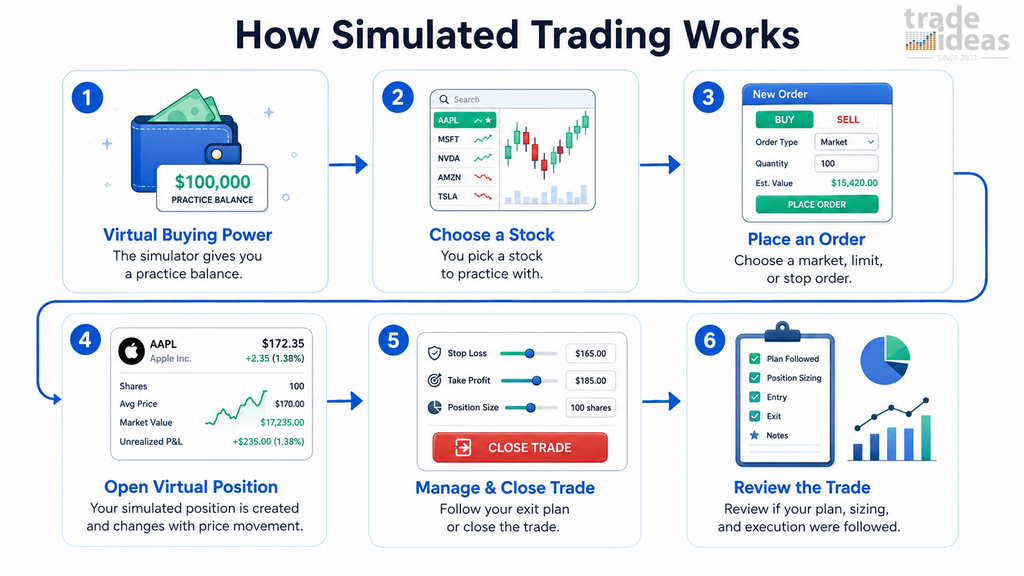
Since the dedicated TI Paper Trading page is already linked elsewhere in the article, I would not add the same URL again here. Instead, keep this step explanatory and let the earlier or nearby CTA handle navigation.
6. Review the Trade and Refine the Setup
After the position is closed, review more than just whether it made or lost virtual money.
Compare the result with the original Trade Ideas signal, chart setup, and trading plan:
- Did the stock meet the scan criteria you intended to practice?
- Did the chart confirm the setup?
- Did you enter near the level you planned?
- Did you follow the position-size and stop rules?
- Did the setup behave similarly to what you saw in OddsMaker?
- What would you change before practicing it again?
[Suggested screenshot: Trade Ideas Stock Market Dashboard showing charts, indicators, and trade controls]
Explore the Trade Ideas Stock Market Dashboard
Simulated Trading vs. Live Trading
Simulated trading can recreate many parts of the trading process, but it is not identical to trading with real capital.
| Factor | Simulated Trading | Live Trading |
| Capital | Virtual funds | Real money |
| Financial loss | No real capital is lost | Capital can be lost |
| Orders | Simulated | Sent for real execution |
| Market data | Can be real-time or delayed depending on the platform | Live trading data depends on platform/data access |
| Fills | Simulated | Depend on actual market execution |
| Slippage and liquidity | May not be fully reproduced | Affect actual execution |
| Emotional pressure | Usually lower | Often much higher |
| Main purpose | Learning, testing, and practice | Actual investing or trading |
This distinction matters.
Simulation should therefore be viewed as practice—not proof that a strategy will be profitable with real money.
How to Make Simulated Trading More Realistic
One of the biggest mistakes beginners make is treating virtual money differently from real money.
If you would realistically trade a $10,000 account, practicing with $1 million of virtual capital can encourage position sizes and risks you would never take live.
To make your simulated trading practice more meaningful:
- Use a realistic virtual account size.
- Set position sizes you could actually use.
- Define your risk before every trade.
- Do not erase or reset losing trades simply because you can.
- Follow your planned stop.
- Record every trade, not just your winners.
- Avoid taking setups you would reject with real money.
- Account for potential commissions, spreads, slippage, or execution differences where relevant.
- Judge yourself on whether you followed your process, not only on P&L.
The closer your paper trading rules resemble the discipline you expect to use live, the more useful your practice is likely to be.
What Simulated Trading Cannot Fully Teach You?
A simulator is a learning tool, not a perfect copy of live trading.
There are several limitations to understanding.
Real Money Changes Decision-Making
A $500 simulated loss does not normally create the same reaction as losing $500 of your own money.
Fear, hesitation, greed, and the urge to recover losses can become much more pronounced in live trading.
Simulated Fills May Differ
Actual orders interact with real liquidity, bid-ask spreads, market depth, and changing prices.
A virtual fill does not always mean you would have received the same execution in a live account.
Good Simulated Results Do Not Guarantee Live Results
A strategy performing well in simulation can still perform differently when market conditions, execution, costs, and human behavior are involved.
That is why simulator performance should be used to learn and evaluate, not to promise future returns.
What Should You Track in a Paper Trading Account?
Total profit alone does not tell you whether a simulated strategy is working.
Track several measures together.
| Metric | What It Shows |
| Win rate | Percentage of trades that finish profitable |
| Average win | Typical gain on winning trades |
| Average loss | Typical loss on losing trades |
| Risk-reward ratio | Potential or realized reward compared with risk |
| Expectancy | Average result expected across multiple trades |
| Maximum drawdown | Largest decline during the testing period |
| Profit factor | Gross profits compared with gross losses |
| Rule adherence | How consistently you followed your trading plan |
The existing Trade Ideas article already encourages traders to track performance rather than simply place virtual trades. Simulated Trading
For beginners, rule adherence can be just as important as profitability. A profitable trade taken outside your plan can still reinforce a poor habit.
Common Simulated Trading Mistakes
| Mistake | Better Approach |
| Overtrading | Set limits on the number of setups you will take |
| Using unrealistic position sizes | Match virtual sizing to what you could realistically trade |
| Ignoring risk | Define maximum risk before entering |
| Focusing only on profit | Review execution quality and rule adherence |
| Resetting after losses | Keep losing trades in your records |
| Changing strategies constantly | Test one approach across enough trades to evaluate it |
| Treating virtual money casually | Follow the same trading plan you would use live |
| Becoming overconfident | Remember that simulator results may differ from live results |
Is Trade Ideas the Best Trade Simulator for You?
There is no single trading simulator that is best for every trader.
The right choice depends on what you want to practice.
When comparing trading simulators, consider:
- Market data quality
- Supported markets
- Simulated order functionality
- Strategy-testing features
- Charting and analysis tools
- Market scanners
- Performance-review capabilities
- Whether the workflow resembles how you plan to trade
Trade Ideas is particularly relevant for traders who want to combine stock-market discovery, analysis, and simulated trading in one workflow.
Its Paper Trading offering uses real-time market data, while the wider Trade Ideas platform includes market-analysis and trading tools that can help traders identify and evaluate potential setups.
Trade Ideas Simulated Trading May Be Useful If You Want To:
- Learn how to manage stock trades
- Practice day trading setups
- Test strategies before using real capital
- Combine scanning with paper trading
- Become familiar with Trade Ideas tools
- Develop a more structured trading routine
When Should You Move From Simulated to Live Trading?
There is no fixed number of days or simulated trades that makes someone ready for live trading.
A better question is whether you have developed a process you can consistently follow.
Before considering live trading, you should be able to:
- Explain your strategy clearly
- Identify valid and invalid setups
- Use the trading platform comfortably
- Define risk before entering
- Size positions consistently
- Follow your stop rules
- Record and review trades
- Evaluate results across multiple trades
- Accept losing trades without immediately abandoning the strategy
- Understand that live execution can differ from simulated execution
Even then, simulation cannot fully prepare you for the emotional impact of risking real money.
A Better Simulated Trading Workflow With Trade Ideas
Instead of treating a simulator as a standalone game, use it as part of a repeatable process.
Step 1: Scan
Use market tools to identify stocks or conditions that fit what you want to practice.
Step 2: Evaluate
Review the chart, indicators, market context, and reasons the setup qualifies.
Step 3: Plan
Set your entry, size, risk, stop, and potential exit before placing the trade.
Step 4: Simulate
Practice the position through TI Paper Trading rather than risking live capital.
Step 5: Review
Record the result and whether you followed the plan.
Step 6: Refine
Look for repeated strengths and mistakes across multiple simulated trades.
That creates a much more useful loop:
| Scan → Plan → Practice → Review → Improve |
Trade Ideas combines paper trading with real-time market data, while its broader platform provides market scanning and trading-analysis capabilities.
Start Practicing With Trade Ideas
Simulated trading works best when you use it to build a process rather than chase virtual profits.
Use your practice time to:
Find the setup → Plan the trade → Simulate the execution → Review the result → Improve the process
Trade Ideas Paper Trading lets you practice with simulated capital and real-time market data while using the broader Trade Ideas environment to research and evaluate market opportunities.
| Build your trading process before putting real capital behind it.Start With Trade Ideas Paper Trading |
Simulated Trading FAQs
What is the best trade simulator?
The best trade simulator depends on what you need to practice. Look for features such as relevant market data, realistic order functionality, useful performance tracking, strategy-testing capabilities, and tools that match the way you expect to trade.
For active stock traders who want to combine market discovery with practice, Trade Ideas TI Paper Trading is one option to consider because it connects simulated trading with real-time market data and the broader Trade Ideas trading toolkit.
Where can I do simulated trading?
You can practice simulated trading through platforms that offer a paper trading or demo trading account. Trade Ideas offers TI Paper Trading for simulated stock trading, while platforms and exchanges may provide their own simulators for different markets or asset classes.
Is simulated trading the same as paper trading or Demo Trading?
Yes, the terms are generally used interchangeably. Paper trading traditionally referred to recording hypothetical trades manually, while modern paper trading typically uses software to simulate orders, positions, and account performance. Demo trading is another common term for practicing in a virtual trading environment. Different platforms may use different terminology, but the purpose is similar: learn and test before committing real capital.
Can you lose real money with simulated trading?
Not from the simulated position itself, because the account uses virtual rather than real funds. However, simulated performance should not be treated as a guarantee of future results if you later move to live trading.
Does simulated trading use real-time market data?
It depends on the platform. Some simulators use delayed data while others use real-time information. Trade Ideas states that TI Paper Trading applies real-time market data to its simulated portfolio.
Is simulated trading good for beginners?
Simulated trading can be particularly useful for beginners because it lets them practice platform navigation, order entry, position sizing, risk management, and trade review without immediately putting real capital at risk. The quality of the practice matters, though; unrealistic position sizes and careless virtual trades can build poor habits.
How long should you practice simulated trading?
There is no fixed period that works for everyone. Instead of targeting a certain number of days, practice until you can execute your strategy consistently, manage risk according to predefined rules, use the platform confidently, and evaluate results across a meaningful sample of trades.
Yes. Paper trading and simulated trading generally mean practicing trades without risking real capital. “Paper trading” originally referred to recording hypothetical trades manually, while modern traders usually use digital simulators. You may also see terms like virtual trading, demo trading, or simulated stock trading.