
Best Stock Screeners and Scanners
Best Stock Screeners and Scanners
Most trading days start the same way: too many stocks, too little time, and no clear shortlist. When you try to find setups by scrolling charts or chasing what’s moving on social media, you end up with a noisy watchlist and inconsistent trades.
Here we’ll show you a cleaner way. We’ll explain how stock screeners and real-time scanners help you narrow the market fast, spot the right moves early, and build a simple, repeatable workflow that fits your trading style.
How to Find the Best Stock Screeners
1. Start With Your Trading Style
Choose a screener that fits how you trade.
Your timeframe decides what features matter most. Intraday traders need speed and real-time filters, swing traders need multi-timeframe technical screens, and long-term investors need deep fundamentals. Start with style first, tools second.
2. Advanced Filtering Options
Find exactly what you trade, fast.
A strong screener lets you stack multiple conditions easily: price + volume + volatility, trend + relative strength, or valuation + growth. Better filters reduce noise and produce cleaner watchlists.
3. Fundamental & Technical Indicators
One tool for your full strategy.
The best screeners support both fundamental and technical inputs, so you’re not boxed into one approach. Whether you trade breakouts or balance sheets, you should be able to screen with the indicators you actually use.
4. Customizable Screens
Build screens that match your edge.
Look for tools that let you create, save, and reuse your own screens. Markets shift, and your screener should adapt quickly without forcing you to rebuild your process.
5. Data Accuracy
Great filters fail with bad data.
Reliable screeners use clean price, volume, and fundamental data, updated consistently and adjusted for splits/dividends. Accurate inputs prevent false signals and keep your candidates trustworthy.
6. Tradability & Liquidity Filters
A good setup must be tradable.
Always filter for liquidity before getting excited about a chart. Average volume, spreads, float, and volatility help you avoid names that look great but trade poorly.
7. Test With Your Own Trades
If it can’t find your winners, skip it.
Recreate your last 5 strong trades and see if the screener would’ve flagged them before the move. This simple test shows whether the tool fits your strategy and signal quality.
Integrating Screeners and Scanners Into a Workflow
Experienced traders often combine screeners and scanners into a simple, structured routine. The goal is to separate finding candidates from timing entries and exits.
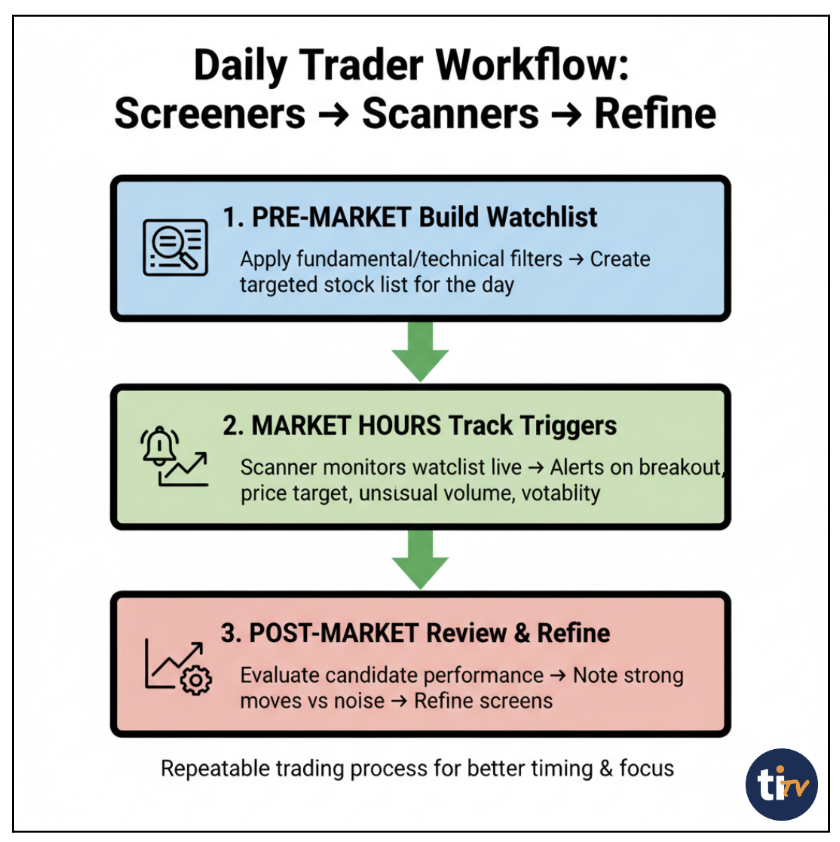
This workflow keeps you focused on high-quality setups, improves timing, and makes your process repeatable day after day.
Example Filters You Can Start With
Below are simple, proven filters you can adapt to your style. The goal isn’t to copy these exactly; it’s to use them as a starting point and refine based on what you trade.
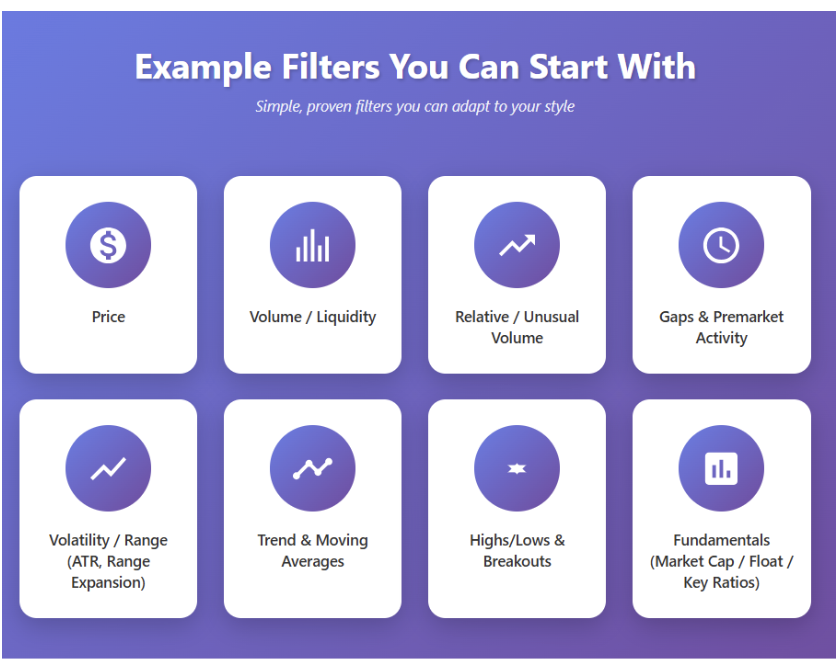
- Price
- Volume / Liquidity
- Relative / Unusual Volume
- Gaps & Premarket Activity
- Volatility / Range (ATR, Range Expansion)
- Trend & Moving Averages
- Highs/Lows & Breakouts
- Fundamentals (Market Cap / Float / Key ratios)
Common Mistakes Traders Make
Even with a great tool, results suffer if the process is sloppy. Here are the most common pitfalls to avoid:
- Over-filtering too early
If your screener is too strict, you’ll miss good opportunities. Start broad, then tighten based on results.
- Ignoring liquidity
A setup that can’t be traded cleanly (low volume, wide spreads) isn’t a real setup. Always filter for tradability first.
- Scanning without a plan
Random alerts lead to random trades. Screen first to define what you’re looking for, then scan only for those triggers.
- Using the same filters in every market
What works in trend markets often fails in choppy markets. Adjust filters to match the current regime.
- Not reviewing what your filters produce
If you don’t track which screens and alerts lead to winners, you can’t improve them.
A good screener/scanner doesn’t replace thinking; it amplifies a disciplined process.
Screeners and scanners handle the two hardest parts of trading: finding the right stocks and catching the right moment. Use screeners to build a clean watchlist, scanners to spot real-time triggers, and review results to keep improving. With a simple workflow, you spend less time hunting and more time trading setups that actually fit your strategy.
Ready to put this into action?
Use Trade Ideas to screen smarter, scan faster, and get real-time alerts built around your strategy.
FAQs About Stock Screeners and Scanners
What is the difference between a stock screener and a scanner?
A stock screener filters the market using your chosen rules and returns a watchlist of candidates, usually based on end-of-day or delayed data. A stock scanner runs in real time and alerts you when a stock meets live conditions like gaps, breakouts, or volume spikes.
Do professional traders use stock scanners?
Yes. Professional traders rely on scanners to spot real-time opportunities faster than manual chart watching. They use scanners for timing (entries/exits) and screeners for selection (watchlists). This combination helps them stay consistent, focused, and responsive to market moves.
What is the most important metric in stock screening?
There isn’t one universal “best” metric; it depends on your strategy. For fundamentals, EPS growth and profitability matter most. For active trading, liquidity, relative volume, and volatility are key. The right metric is the one tied to your edge and timeframe.
How to effectively use a stock screener?
Start broad, then refine. Screen for liquidity first, add your strategy filters (technical, fundamental, or catalyst), and save the screen as a template. Build a focused watchlist, review performance regularly, and adjust filters based on what consistently produces good setups.
Why Trade Ideas for Screening and Scanning?
Trade Ideas combines powerful screening with real-time scanning built for active traders. You get fast market-wide alerts, deep customization, pattern and trend filters, and tools to test and refine setups. It helps you find quality opportunities quickly and act with better timing.