







 60SmaLa10
Filter
Change From 10 Period SMA (60m) Filter (60SmaLa10)
Find stocks trading above or below the 10-period moving average on the 60-minute chart in real time with Trade Ideas Streaming Alerts (Scanner) and Top Lists (Screeners). The Change From 10 Period SMA (60 min) filter compares the last print to the 10-period simple moving average on a 60-minute chart, in percent. Positive means above the average.
See the cross when it happens, not on tomorrow’s chart.
Free account, just an email. No card. Live access for a limited time.
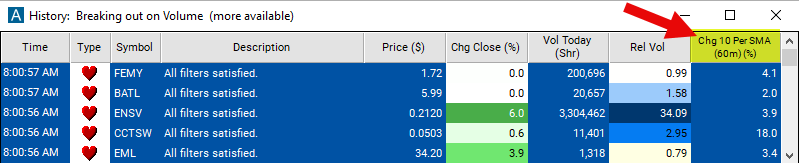
Streaming Alerts check the Change From 10 Period SMA (60 min) filter the moment each alert fires, and Top Lists can sort by it.
How Trade Ideas finds it: adjust the minimum value to 1 to filter for stocks that are currently positioned above their 10-period SMA on a 60-minute chart. To focus on stocks currently below their 10-period SMA on a 60-minute chart, set the maximum value to -1. See Trade Ideas plans and pricing to run it live.
How the Change From 10 Period SMA (60 min) filter works
Trader tip
The "Change From 10 Period SMA 60m Filter" serves as an indispensable analysis tool for traders focusing on the broader intraday trends or short-term swing trading scenarios. By comparing the current price of a stock to its 10-period Simple Moving Average (SMA) on a 60-minute chart, this filter illuminates the stock's momentum over the last 10 hours. It is especially beneficial for those looking to grasp the momentum and direction of a stock's trend within a single trading day or over a couple of days.
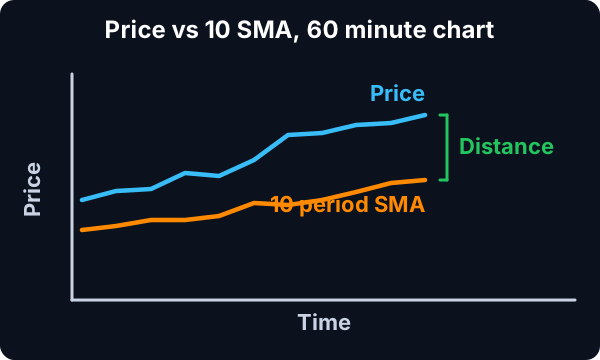
Here’s an in-depth look at its mechanics:
Simple Moving Average (SMA)
10-Period SMA on a 60-Minute Chart: Calculates the average of the closing prices for the last 10 sixty-minute periods, effectively smoothing out price data over roughly the last 10 hours of trading to help identify the overarching trend.
Calculation: This filter expresses its values in percentage (%), following the formula: Percent Change = ((Last Price - SMA) / SMA) * 100
Key point
A positive result signifies that the stock's current price is higher than its average, suggesting an uptrend. Conversely, a negative value indicates that the current price is lower than the average, pointing to a downtrend.
Change From 10 Period SMA (60 min) filter settings
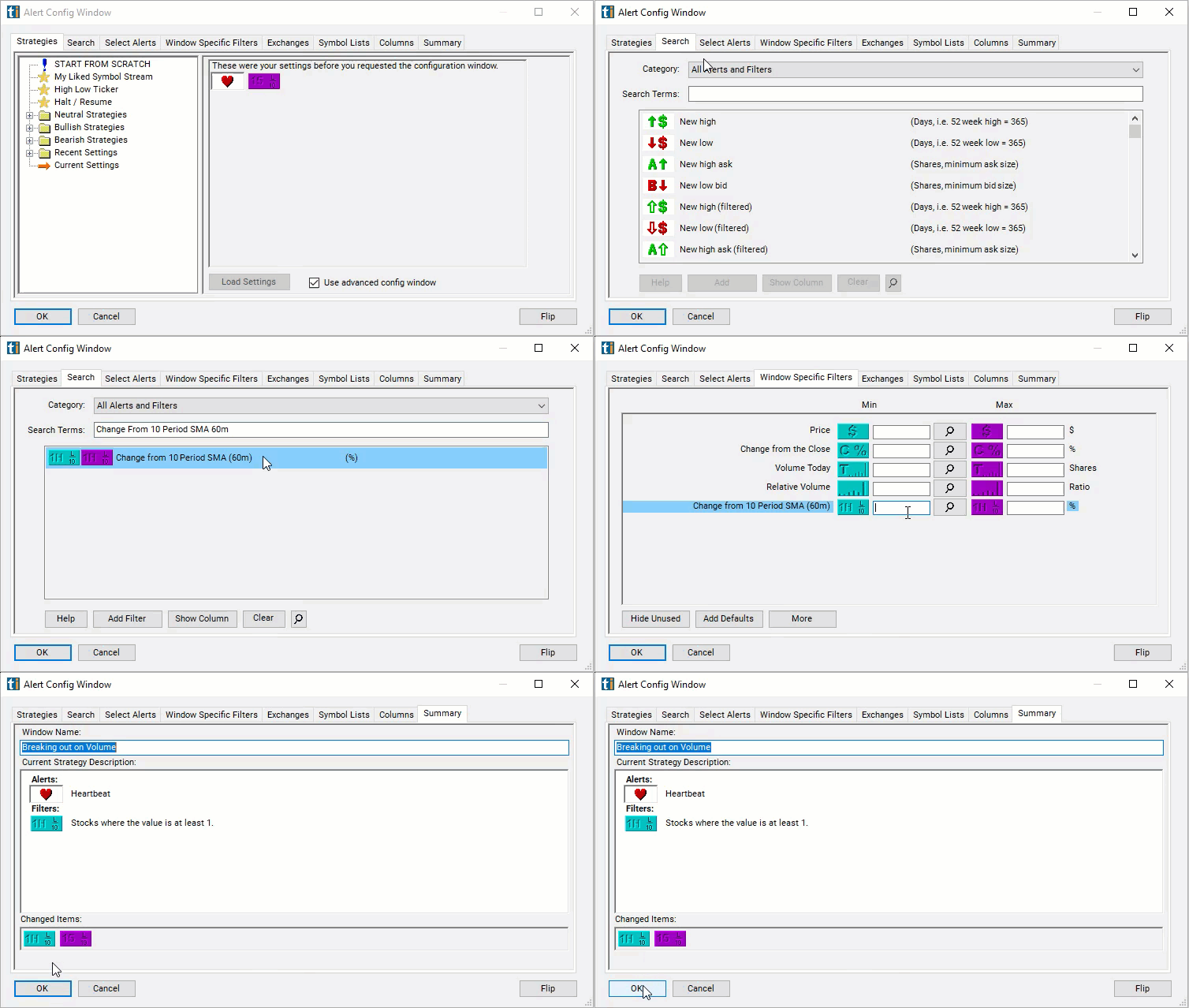
Configuring the "Change From 10 Period SMA 60m Filter" is straightforward, located within the Window Specific Filters Tab of the Configuration Window in your Alert or Top List (Screener) window.
Here's how to set up the filter in your configuration window:
- Adjust the minimum value to 1 to filter for stocks that are currently positioned above their 10-period SMA on a 60-minute chart.
- To focus on stocks currently below their 10-period SMA on a 60-minute chart, set the maximum value to -1.
Using the Change From 10 Period SMA 60m Filter
The "Change From 10 Period SMA 60m Filter" can underpin various trading strategies tailored to longer intraday periods or short-term swing trading. Among these strategies are:
- Momentum Trading: Significant positive changes can indicate a strong entry point for long positions due to upward momentum. Conversely, distinct negative changes may serve as a signal for short opportunities.
- Reversion to Mean Strategies: Substantial deviations from the 10-period SMA often hint at an overextended move, likely to revert to the mean (the SMA), presenting counter-trend trade opportunities.
- Scalping: While primarily aimed at longer timeframes, the filter can also aid scalpers in identifying larger, more strategic opportunities that align with the broader market trend.
- Dynamic Stop Loss and Take Profit: The 10-period SMA acts as a moving reference point for adjusting stop loss and take profit levels, responding to the stock's latest trend dynamics and volatility.
Filters to combine with Change From 10 Period SMA (60 min)
Categories
FAQ
Which stocks are above their 10-period moving average on the 60-minute chart?
Add the Change From 10 Period SMA (60 min) filter (60SmaLa10) to a Trade Ideas Streaming Alerts or Top List (Screener) window. Adjust the minimum value to 1 to filter for stocks that are currently positioned above their 10-period SMA on a 60-minute chart. To focus on stocks currently below their 10-period SMA on a 60-minute chart, set the maximum value to -1.
What is the Change From 10 Period SMA (60 min) filter?
The Change From 10 Period SMA (60 min) filter compares the last print to the 10-period simple moving average on a 60-minute chart, in percent. Positive means above the average.
How do I scan for stocks above an intraday moving average?
Use the Change From 10 Period SMA (60 min) filter (60SmaLa10) in Trade Ideas Streaming Alerts and Top Lists to find stocks trading above or below the 10-period moving average on the 60-minute chart. The Change From 10 Period SMA (60 min) filter compares the last print to the 10-period simple moving average on a 60-minute chart, in percent.