







 5SmaLa10
Filter
Change From 10 Period SMA (5m) Filter (5SmaLa10)
Find stocks trading above or below the 10-period moving average on the 5-minute chart in real time with Trade Ideas Streaming Alerts (Scanner) and Top Lists (Screeners). The Change From 10 Period SMA (5 min) filter compares the last print to the 10-period simple moving average on a 5-minute chart, in percent. Positive means above the average.
See the cross when it happens, not on tomorrow’s chart.
Free account, just an email. No card. Live access for a limited time.
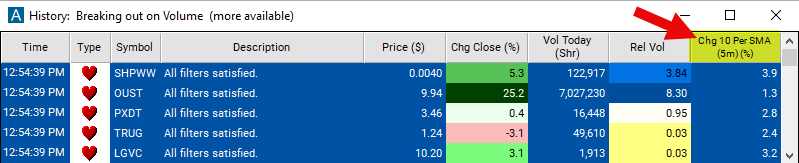
Streaming Alerts check the Change From 10 Period SMA (5 min) filter the moment each alert fires, and Top Lists can sort by it.
How Trade Ideas finds it: to screen for stocks currently trading above their 10-period SMA on a 5-minute chart, set the minimum value parameter to 1. To focus on stocks currently below their 10-period SMA on a 5-minute chart, set the maximum value to -1. See Trade Ideas plans and pricing to run it live.
How the Change From 10 Period SMA (5 min) filter works
Trader tip
The "Change From 10 Period SMA 5m Filter" is an invaluable resource for traders targeting short to medium-term market trends. By comparing the current stock price to its 10-period Simple Moving Average (SMA) on a 5-minute chart, this filter illuminates the stock's momentum over the last 50 minutes. It's particularly suited for day traders and those engaging in more extended intraday strategies by offering insights into the prevailing trend direction.
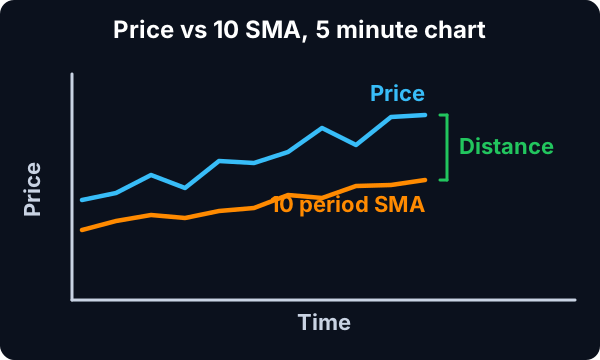
Here's an overview of its operation:
Simple Moving Average (SMA)
10-Period SMA on a 5-Minute Chart: Computes the average closing price over the last 10 five-minute periods. This smoothing technique aids traders in discerning the immediate trend by dampening the effect of short-term price volatility.
Calculation: The filter's values are depicted as a percentage (%). The utilized formula is: Percent Change = ((Last Price - SMA) / SMA) * 100
Key point
A positive outcome indicates the current price is higher than the moving average, showcasing upward momentum. Conversely, a negative result signals the current price is lower than the average, denoting downward momentum.
Change From 10 Period SMA (5 min) filter settings
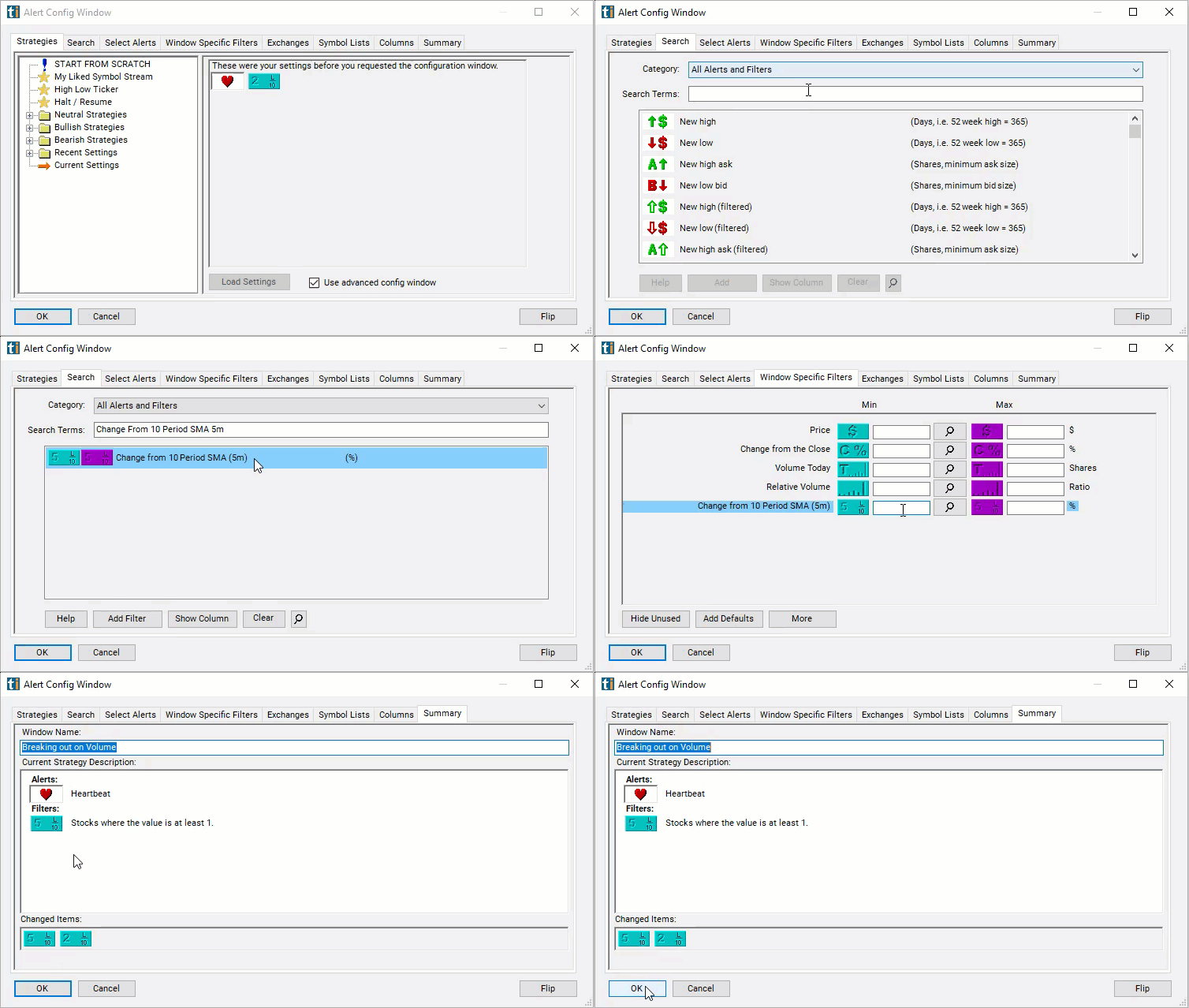
Configuring the "Change From 10 Period SMA 5m Filter" is a straightforward process within the Window Specific Filters Tab in the Configuration Window of your Alert or Top List (Screener) window.
Here's how to set up the filter in your configuration window:
- To screen for stocks currently trading above their 10-period SMA on a 5-minute chart, set the minimum value parameter to 1.
- To focus on stocks currently below their 10-period SMA on a 5-minute chart, set the maximum value to -1.
Using the Change From 10 Period SMA 5m Filter
Leveraging the "Change From 10 Period SMA 5m Filter" facilitates various trading strategies, especially for those looking to exploit short to medium-term timeframes. Here are some strategies:
- Momentum Trading: A notable positive change can act as an entry trigger for long positions, capitalizing on upward price momentum. On the flip side, a pronounced negative change may offer a cue for short-selling opportunities.
- Reversion to Mean Strategies: When the stock price markedly strays from the 10-period SMA, it might hint at an impending price correction towards the SMA, presenting chances for counter-trend trading.
- Scalping: The filter's adeptness at capturing short-term movements makes it ideal for scalping strategies, where traders aim to profit from minor price changes through quick trades.
- Dynamic Stop Loss and Take Profit: Utilize the 10-period SMA to dynamically adjust stop loss and take profit orders, adapting to the stock's current trend and volatility.
Filters to combine with Change From 10 Period SMA (5 min)
Categories
FAQ
Which stocks are above their 10-period moving average on the 5-minute chart?
Add the Change From 10 Period SMA (5 min) filter (5SmaLa10) to a Trade Ideas Streaming Alerts or Top List (Screener) window. To screen for stocks currently trading above their 10-period SMA on a 5-minute chart, set the minimum value parameter to 1. To focus on stocks currently below their 10-period SMA on a 5-minute chart, set the maximum value to -1.
What is the Change From 10 Period SMA (5 min) filter?
The Change From 10 Period SMA (5 min) filter compares the last print to the 10-period simple moving average on a 5-minute chart, in percent. Positive means above the average.
How do I scan for stocks above an intraday moving average?
Use the Change From 10 Period SMA (5 min) filter (5SmaLa10) in Trade Ideas Streaming Alerts and Top Lists to find stocks trading above or below the 10-period moving average on the 5-minute chart. The Change From 10 Period SMA (5 min) filter compares the last print to the 10-period simple moving average on a 5-minute chart, in percent.